


Problem with logging into the browser after frequently turning on the computer.

When I frequently turn off my computer using the system unit's power button, meaning a quick shutdown, after several such shutdowns, when I launch the browser, I'm prompted to log in again. Bookmarks that weren't synced disappear. And I'm also logged out of all the websites I was logged into, forcing me to log in again. Cachyos Linux.
Всички отговори (5)

You could try to Repair Your Current Profile Database. Since this has already happened multiple times, your current profile might have lingering corruption. In Firefox, you could: - Click the three horizontal lines (menu) in the top right. - Go to Help > More Troubleshooting Information. - Scroll down to the Place Database section and click the Verify Integrity button.
This will scan, reindex, and repair your local storage files. Hope that helps!
Thanks. I checked the integrity. How pressing a single button could fix anything is unclear. I tested it for four days, and it seemed to stop logging out of the browser. But one problem persisted. When I launched a game from Steam, I minimized it, launched Firefox, and then went to YouTube. When I started watching any video, the screen immediately went blank, a message appeared on the monitor saying the device would go into standby mode in 5 seconds, and the fans in the system unit started screaming at full volume. I tested it in Chrome browsers, and this problem didn't occur.
When I frequently turn off my computer using the system unit's power button,
Do you mean the GUI power or the physical button.
What Linux are you using ?
I'm referring to the button on the system unit.
Cachyos
But there's another problem, and it's only in Mozilla. I play games at 3440p on Ultra, and everything works fine until I launch the browser with the game minimized. I'll open a couple of pages or a YouTube video in the browser, and the screen goes dark, and the system unit fans start blaring. That's how I learned about browser shutdowns: when the screen goes dark, the system unit goes crazy, so I have to turn off the PC using the button on the unit. But this issue only occurs with the game and YouTube minimized in Mozilla. I checked in Google Chrome, and everything works, even with the game minimized and watching a walkthrough on YouTube, but nothing turned off or went dark. Maybe Mozilla can't adjust to the 100 FPS I'm playing with the game minimized.
Hello,
Try Firefox Troubleshoot Mode to see if the problem goes away. Firefox Troubleshoot Mode (previously known as Firefox Safe Mode) is a special diagnostic mode that temporarily turns off hardware acceleration, disables add-ons (extensions and themes) and resets some settings. See the Use Troubleshoot Mode in Firefox article for details.
If Firefox is open, you can restart in Firefox Troubleshoot Mode from the Help menu:
- Click the menu button
 , click Help, select Troubleshoot Mode and click Restart in the "Restart Firefox in Troubleshoot Mode?" dialog that opens.
If Firefox is not running, you can start Firefox in Troubleshoot Mode as follows:
- Quit Firefox, go to your Terminal and run firefox -safe-mode
(you may need to specify the Firefox installation path e.g. /usr/lib/firefox)
When the Firefox Troubleshoot Mode window appears, select "Open".
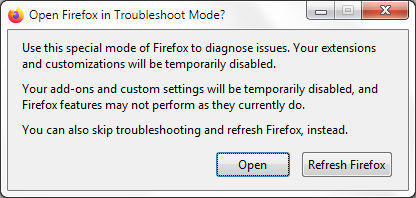
If the issue is not present in Firefox Troubleshoot Mode, your problem is probably caused by an extension, theme or hardware acceleration. Please follow the steps in the Troubleshoot extensions, themes and hardware acceleration issues to solve common Firefox problems article to find the cause.
To exit Firefox Troubleshoot Mode, just close Firefox and wait a few seconds before opening Firefox for normal use again. (If you can't exit Firefox Troubleshoot Mode, please see Firefox is stuck in Troubleshoot Mode).
When you figure out what's causing your issues, please let us know. It might help others with the same problem.
Променено на от Denys