


Windows 10 reached EOS (end of support) on October 14, 2025. If you are on Windows 10, see this article.

Търсене в помощните статии

Избягвайте измамите при поддръжката. Никога няма да ви помолим да се обадите или изпратите SMS на телефонен номер или да споделите лична информация. Моля, докладвайте подозрителна активност на "Докладване за злоупотреба".

Научете повече
Open

Credit card data is not showing under the autofill section of settings

blachanc

I have card data saved for a number of cards in Firefox, and I am looking to clean that data up. However, when I go to Settings>Passwords and autofill>Payment methods>Manage payment methods no cards are showing up as saved. I also know that this is not Lastpass causing issues, as this card data is not saved in Lastpass. I have attached screenshots of both the manage payments page and the card data showing up for autofill selection on a webpage add payment method screen.
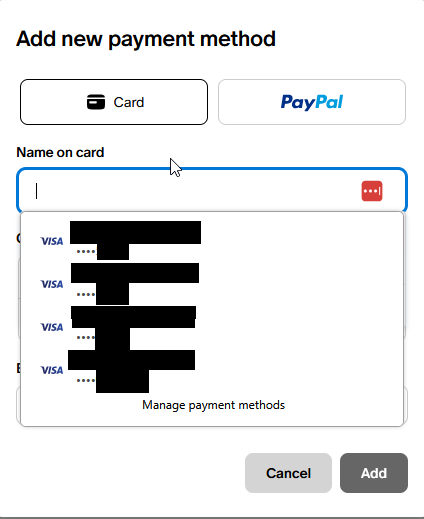
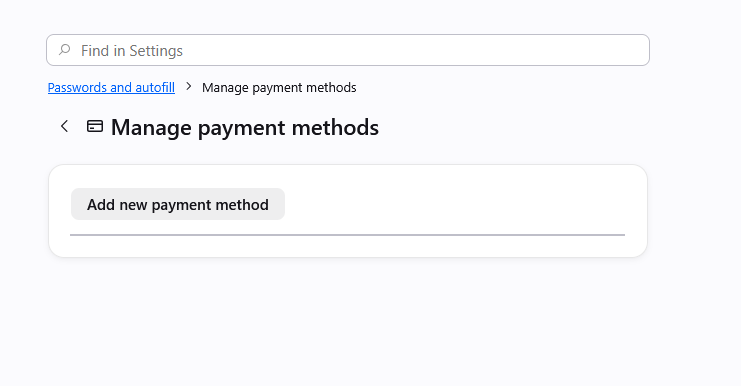
I have card data saved for a number of cards in Firefox, and I am looking to clean that data up. However, when I go to '''Settings>Passwords and autofill>Payment methods>Manage payment methods''' no cards are showing up as saved. I also know that this is not Lastpass causing issues, as this card data is not saved in Lastpass. I have attached screenshots of both the manage payments page and the card data showing up for autofill selection on a webpage add payment method screen.
Прикачени екранни снимки

Всички отговори (2)

Yes, at the moment there's a bug in case there were some older entries that had no expiration set, which then halts showing any cards:

There are some workarounds in previous thread support.mozilla.org/questions/1588553 if it's pressing, but a fix should ship hopefully within a few weeks.

This is fixed in v152.0.5: firefox.com/firefox/152.0.5/releasenotes

Задаване на въпрос

You must log in to your account to reply to posts. Please start a new question, if you do not have an account yet.