


Thunderbird font color selection

Mac sequoia 15.7.2 Thunderbird 147.0
Older updates had same results.
Many of the "solutions" I have read are out of date, so they are irrelevant. So I'm here.
When I compose an email, when I select "bold" the fonts become bold. Same with other selections. however, when I select a color for fonts, when I type a character, the selection and character change to black again. Help?
Всички отговори (4)
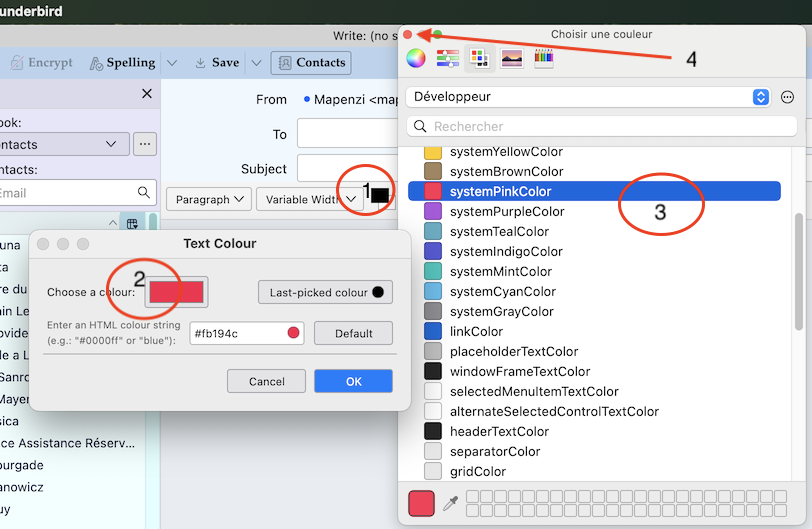
Open compose window and in the formatting bar click on the (normally) black rectangle "Choose colour for text" (1) This opens the "Text colour" box. In this box click on the (normally) black rectangle "Choose a colour" (2) This will open a new window offering the choice between a certain number of text colours (3) Choose your text colour - it will immediately be displayed in the rectangle in the left box - then close the colour choice window with a click on the small red dot in the upper left corner before clicking on OK (4) Most people click OK immediately which doesn't save the colour choice...
Works here running macOS Monterey and TB 147
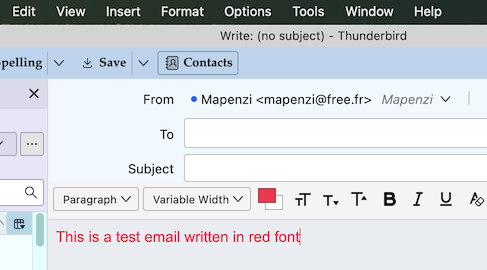
Променено на от Mapenzi
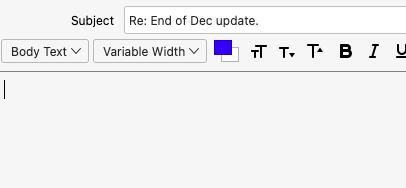
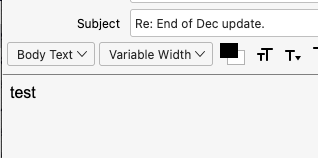
I followed that perfectly, including when to click okay. It went as expected. The composition window showed the new blue selection, (see attached) until I typed "test" when it went back to black. (as soon as I typed the "t") If I backspace or delete "test" characters, the indication box is blue again, as in attachment 1, until I type another character.
Also, If I select the now black text, and try to change its color with the color box, it doesn't do it.
It will change the text to bold, or larger or any other, just not the color.
Also, I never had trouble before using Sequoia. It might be interesting to update to Sequoia or Tahoe and see if you develop a problem!
Anyone else out there using a newer MacOS?
Променено на от r44chopper
Okay, this seems to be a bug. My iMac is in perfect shape but too old to install Sequoia (programmed obsolescence)