


Firefox does not start

Hi, after clicking FF icon, I got nothing. Profile manager (firefox.exe -P) does not start. In event viewer there is log: Name of the application causing the error: firefox.exe, version: 147.0.0.11, timestamp: 0x695c3722 Name of the module causing the error: unknown, version: 0.0.0.0, timestamp: 0x00000000 Exception code: 0xc0000005 Fault offset: 0x00007ffc561c6160 Faulting process ID: 0x4A54 Startup time of the application causing the error: 0x1DC85EE68CB3BAD Faulting application path: C:\Program Files\Mozilla Firefox\firefox.exe Faulting module path: unknown Report Id: e599c553-d77c-4b73-a863-1ccaa8d3bd4c Faulting full package name: Faulting relative application ID for package:
Last time deleting profile was helpfull, today nothing helps... Reinstall - the same... Any ideas?
Избрано решение
So the problem was solved, but fortunately I had a copy of my profile. I uninstalled FF, removed the folders from AppData, reinstalled FF, and then copied the contents of the profile backup to the newly created profile.
Прочетете този отговор в контекста 👍 0Всички отговори (3)
We're sorry to hear that your Firefox seems to be crashing when you open it. Please perform the following steps to give us a crash report ID that helps us find out more about the cause of the crash.
- On the keyboard, press [Windows]
 + [R]. This should bring up a Run box that contains a text field.
- In that text field, type %APPDATA% and press Enter. An explorer window should open.
- From that explorer window, double-click on the Mozilla folder, then double-click on Firefox and then on Crash reports. Double-click on submitted.
- Now, you should see a list of files that contain reports. Go to View > Arrange Icons by > Modified to get the most recent files at the top of the window.
- Open the most recent 5 files with a text editor and copy the IDs.
- Paste each ID with bp- into the reply window on the forums.
Thanks in advance!
You can find more information and troubleshooting steps in the Troubleshoot Firefox crashes (closing or quitting unexpectedly) article.
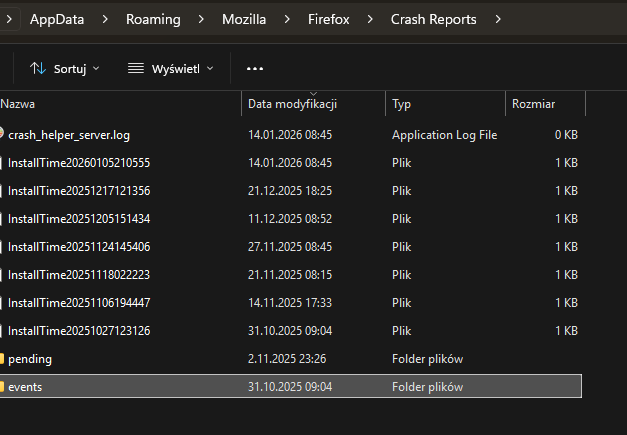
Thanks for response, but I don't have "submitted" folder, and no files from today. Pending and events are empty...
Избрано решение
So the problem was solved, but fortunately I had a copy of my profile. I uninstalled FF, removed the folders from AppData, reinstalled FF, and then copied the contents of the profile backup to the newly created profile.