


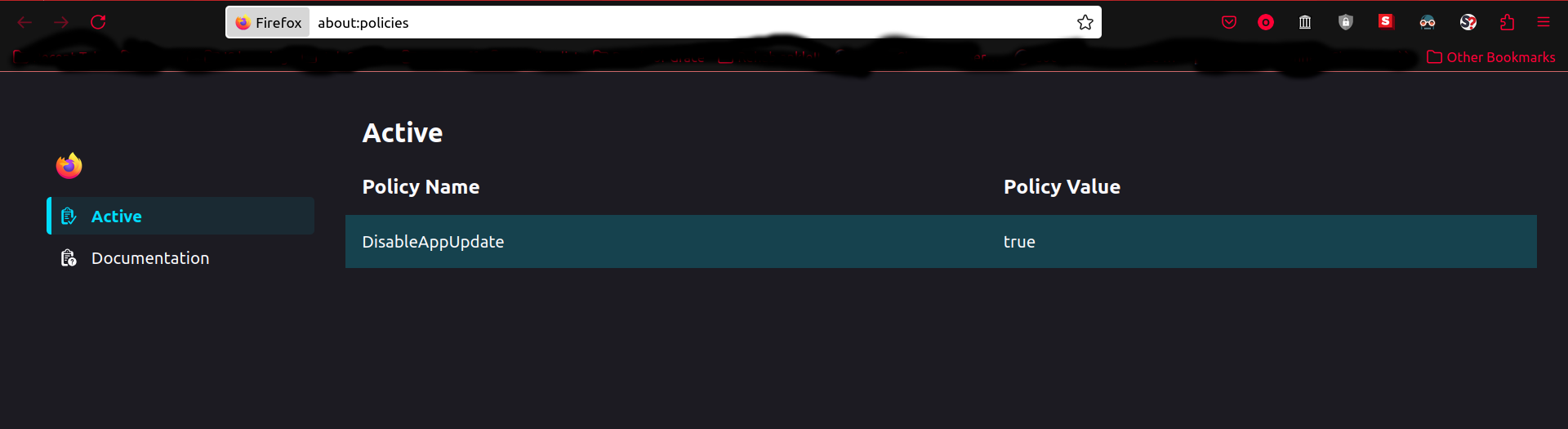
App Update "disabled by my organization" but I'm not using an enterprise network. DisableAppUpdate is set to true for some reason (not by me)

Hi, I said most of it in the title. Somehow, my Firefox DisableAppUpdate policy got set to 'true' & when I try to change it Firefox says sorry "this is managed by your organization". But I'm not currently signed in to an enterprise network. This is on private wi-fi. Can you all fix this? I need to be able to manage policies like this *for my personal browser*, less is not okay. Thank you for your help.

Всички отговори (1)
I see you are using a Linux build of Firefox.
If you are using a package build of Firefox from your distro then that could be the reason as Mint for example does this with their Mint package builds of Firefox as the Firefox updates are from Mint in this case.
The Linux (along with macOS and Windows) version of Firefox from say https://www.mozilla.org/firefox/all/desktop-release/ does not do this as they get internal Firefox updates from Mozilla.