


Windows 10 reached EOS (end of support) on October 14, 2025. If you are on Windows 10, see this article.

Търсене в помощните статии

Избягвайте измамите при поддръжката. Никога няма да ви помолим да се обадите или изпратите SMS на телефонен номер или да споделите лична информация. Моля, докладвайте подозрителна активност на "Докладване за злоупотреба".

Научете повече

Emails are automatically marked as read when received

  • 2 отговора
  • 1 има този проблем
  • 118 изгледи
  • Последен отговор от artonus1
  • Разрешен

Hi Recently I have spotted a problem that every email that comes to my mailbox is automatically marked as read without opening or previewing it. The Preview panel is closed. I have tried changing the passwords to the mailbox to eliminate the possibility of other email clients marking it as read. Clicking the "Properties" on the mail folder and pressing the "Repair Folder" (marked on the attached screen) button does solve the problem and received emails are correctly marked as "Unread". But the problem continues with every new message received. The program works correctly in the troubleshooting mode. What can be a possible cause of this issue?
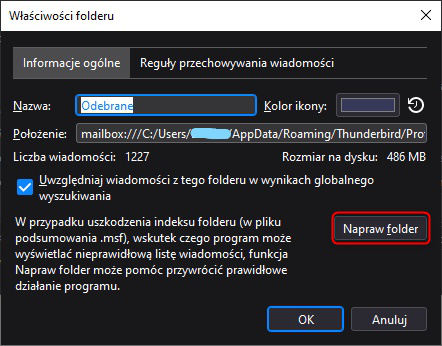
Hi Recently I have spotted a problem that every email that comes to my mailbox is automatically marked as read without opening or previewing it. The Preview panel is closed. I have tried changing the passwords to the mailbox to eliminate the possibility of other email clients marking it as read. Clicking the "Properties" on the mail folder and pressing the "Repair Folder" (marked on the attached screen) button does solve the problem and received emails are correctly marked as "Unread". But the problem continues with every new message received. The program works correctly in the troubleshooting mode. What can be a possible cause of this issue?
Прикачени екранни снимки

Всички отговори (2)

Избрано решение

Yes, that's it! Haven't even thought that bitdefender could install this extension by itself.. Thank you!