


Cannot disable taskbar jumplist on Windows Embedded 7

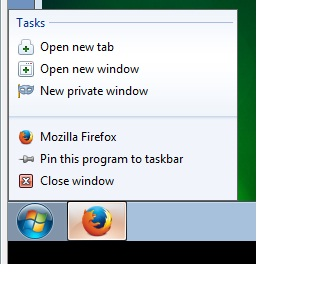
This is a thin client where I don't want the user to open ANY new tabs. The user's taskbar FF jumplist still shows the "Tasks", including new tab/window, even if I disable all the browser.taskbar settings via about:config. Still exists if I forcibly set "lockPref" settings in mozilla.cfg. I've read existing forum threads, and even installed rkiosk, but I cannot prevent this jumplist. Any help appreciated.
Всички отговори (3)
Should've probably indicated version - 41.0.2. Same results when I tried older 39.0. Found what may be a (maddening) workaround, via two add-ons Tab Killer and Disable Private Browsing.
What pref(s) did you lock to false?
- browser.taskbar.lists.enabled
- browser.taskbar.lists.tasks.enabled
You can also check the source code:
Exactly those, among others. This seems to be related to (the undocumented?) browser.taskbar.lastgroupid, and settings possibly persisting across re-installs, even if the appdata/mozilla folders are removed. This link suggests manual regkey cleanup after uninstall: https://support.mozilla.org/en-US/questions/1034650