Windows 10 reached EOS (end of support) on October 14, 2025. If you are on Windows 10, see this article.

Търсене в помощните статии

Избягвайте измамите при поддръжката. Никога няма да ви помолим да се обадите или изпратите SMS на телефонен номер или да споделите лична информация. Моля, докладвайте подозрителна активност на "Докладване за злоупотреба".

Научете повече
Архивирани

Some emails go directly to Junk despite the fact I placed a Filter.

Gnospen replied
Avisia

I want to make sure I get the emails from my friends, but they keep going to junk. I placed a filter with each friend's email addresses to send them to a special inbox folder labeled 'Friends'. They are in my Address Book, and I made sure they are spelled correctly in the filter.

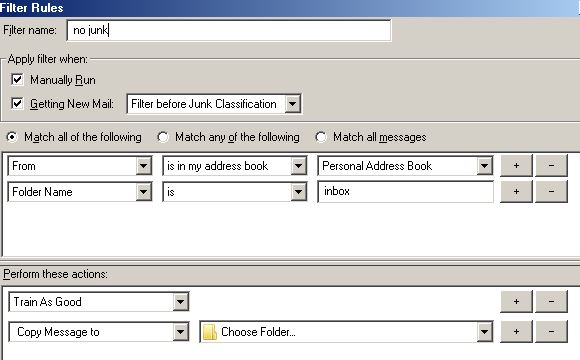
I made sure to click 'Getting New Mail: Run Filter Before Junk Classification' I made sure it says 'Match any of the following' At the bottom I placed both 'Set Junk Status to Not Junk' And 'Move Message to Friends on ***@sbcglobal.net'

It still sends it to the Junk folder. It does this with multiple emails

I want to make sure I get the emails from my friends, but they keep going to junk. I placed a filter with each friend's email addresses to send them to a special inbox folder labeled 'Friends'. They are in my Address Book, and I made sure they are spelled correctly in the filter. I made sure to click 'Getting New Mail: Run Filter Before Junk Classification' I made sure it says 'Match any of the following' At the bottom I placed both 'Set Junk Status to Not Junk' And 'Move Message to Friends on ***@sbcglobal.net' It still sends it to the Junk folder. It does this with multiple emails

Променено на от Avisia

Всички отговори (1)

The folder you send it to, is probably also checked for junk If its on the same account. You need to add folder is Inbox

I use an addon FiltaQuilla