


Thunderbird - modal stays open

Thunderbird 152.0.1 Mac
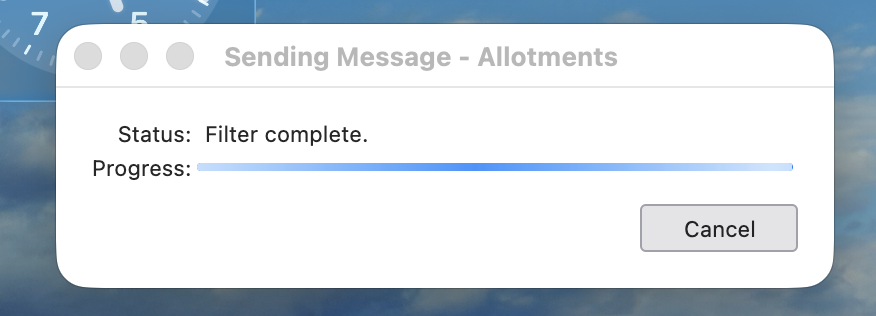
After sending on one of 4 accounts in Thunderbird (Sky Mail), the "Filter Complete" modal will not shut down.
Cancel will override.
All Replies (3)
Hello there David.redmayne.
Repair folder Here is how you can try to fix the folders in that problematic account. First, go to the problematic Sky Mail account and locate the folders that are not working correctly, specifically the Inbox and the Sent folder. Right-click on the folder name, select Properties, click Repair Folder, and then click OK .
Filters Check "Filter After Sending" Settings. Change "Filter Run Time" (For IMAP/Sky Mail Sync Issues)
Trouble shoot mode Try to isolate the issue in Troubleshoot Mode. Restart Thunderbird in Troubleshoot Mode, and then send a test email to yourself using your Sky email address.
Use https://support.mozilla.org/en-US/kb/troubleshoot-mode-thunderbird
Modified by Googlethunderbird.
After sending on one of 4 accounts in Thunderbird (Sky Mail), the "Filter Complete" modal will not shut down.
Your issue seems to be bug 2050589 https://bugzilla.mozilla.org/show_bug.cgi?id=2050589 "Sending Message" stuck on "Filter complete.", but send is successful
Hello there
You seem to have a bug in your Thunderbird email software. The first thing to do is run a full antivirus scan and try to quarantine the infected email. And try to find a way to clean it: start Thunderbird in Troubleshoot Mode, compact folders, and delete bad or damaged add-ons or extensions
If the Thunderbird software is infected or behaving strangely, you may need to reset or reinstall the entire program.
Because Thunderbird stores your emails in a local profile folder rather than within the application itself, the issue could stem from a corrupted email file, a bad extension, or infected files.
You can try to clean the software or > replace it >with a fresh installation of the thunderbird software.
Use https://download.mozilla.org/?product=thunderbird-150.0.2-SSL&os=win&lang=en-US
https://support.mozilla.org/en-US/kb/new-thunderbird-desktop
https://support.mozilla.org/en-US/kb/troubleshoot-mode-thunderbird
Tip
An accidental bug can get into the profile map and cause problems.
Modified by Googlethunderbird.