Hide the "go offline" button

My father is old and doesn't easily find his way around user interfaces and accidentally clicks on stuff without noticing. The "Go offline" button in Thunderbird is especially insidious in this regard. It is completely useless for most people, and it sits there in a corner, hard to even notice. After clicking it by accident and having gone offline it is hard to find even for someone who is not old and unfamiliar with computers. There must be an option hide it. But I can't find it. Can anyone help me find it?
Additional info: My father uses an older version of Thunderbird that came with Ubuntu 14.04. Not sure which version number that is, but it's old. He refuses to upgrade, because he can't get used to new user interfaces. Back then the user interface for Thunderbird was generally better anyway than it is now. But that worthless "Go offline" button is still there even in the newest version. UX designers responsible for the continuous enshittifcation of all user interfaces everywhere should all be euthanized IMO.
All Replies (4)
Disregard this. The next answer is better.
You can hide it but it's a Custom CSS job.
It's difficult to tell you exactly how without knowing the version of Thunderbird involved.
Open the config editor and find:—
toolkit.legacyUserProfileCustomizations.stylesheets
If its value is false, double-click the word false and it will change to true.
In your Dad's Home directory will be a directory called .thunderbird — you'll probably have to press Ctrl-H to make it show in his file browser. In that will be a folder with a load of random letters and numbers in it's name; there may be more than one and if so choose the newest.
In that directory make directory called chrome, all lower case. Now get into that and create a text file called userChrome.css, again all lower-case apart from the C in the middle. That's the file that will hold the instructions to Thunderbird.
Paste this into userChrome.css:—
#offline-status { display: none !important; }
Restart Thunderbird to see if it's worked.
To find out what version he's actually on press Alt-H and click About Thunderbird and that will say. If the above doesn't work and you tell me that version I'll install it and find out exactly how to do it.
I absolutely share your feelings on the constant mending things that aren't broken. If there comes a point when your Dad has to 'Upgrade' it may be worth his looking at Seamonkey as that has been spared the vagaries of fashion.
Modified by Joe Freeman
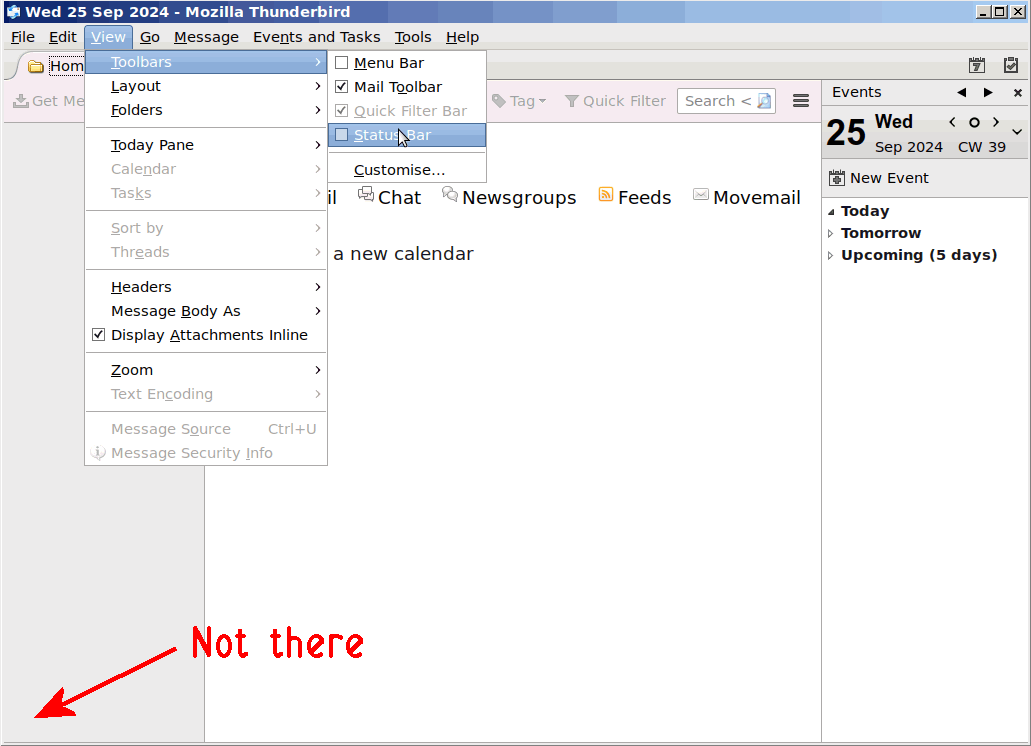
I'm puzzled. Are you referring to the button in lower left of screen? If so, just click view>toolbars and UNtick the status bar.
And, IMO do not upgrade his Thunderbird. Newer versions have more menus, some of which are hidden, and it may be completely unnecessary. If it works for him, let it alone. If you do upgrade, I would go no further than version 102 for him.
If the Menu Bar isn't visible and you can't see "View" as David suggests above press Alt-V instead.