


Access GMAIL with Thunderbird

Hope I'm in the right place
Gmail will not recognize my email account when trying to set up with Thunderbird
I've configured GMAIL IAW instructions - when the gmail log in screen pops, gmail does not recognize email account
I have other gmail accounts working fine, I've compared all thunderbird account settings, all identical
I CAN log in to gmail directly, so the account is valid.
The online help I've found did not resolve this issue.
Appreciate any suggestions.
Thanks
Seçilmiş Həll
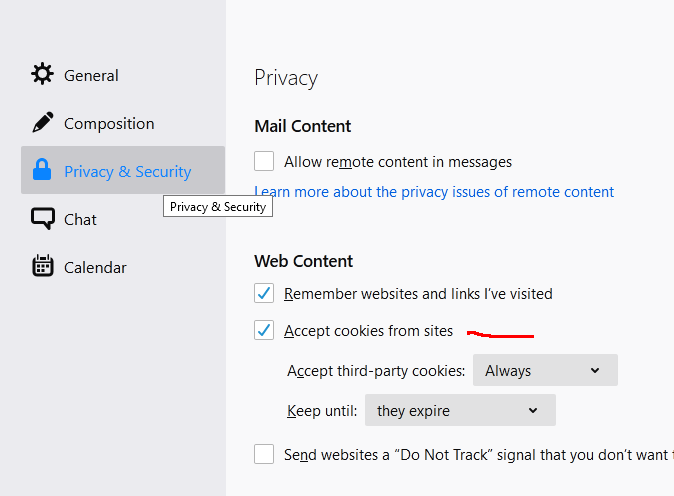
The cookies setting is shown in the attached picture. Check your server settings, as the incoming IMAP server is imap.gmail.com, not imap.google.com.
All Replies (4)
Check that cookies are accepted in Options/Privacy & Security for the OAuth authentication to complete. Check that POP or IMAP are enabled for the account on gmail.com.
Hi sfhowes -
Thank you for your reply. I appreciate your help I do not find a cookies setting in option/privacy IMAP is enabled on google account
When I attempt to get messages, a "one account, all of google" page loads, email address appears - click next, email or phone block goes blank, re-enter email, same result....
Thunderbird error message pop up: "Aauthentication failure while connecting to server imap.google.com"
All other gmail accounts are functioning fine, with identical settings.....
Appreciate any additional suggestions.
Thanks
Seçilmiş Həll
The cookies setting is shown in the attached picture. Check your server settings, as the incoming IMAP server is imap.gmail.com, not imap.google.com.
Thank You !!!! Problem was cookies setting.....