firefox take a screenshot template?
Is there a way to edit the template to show just the subject title and the date? Or at least show those items first?


Is there a way to edit the template to show just the subject title and the date? Or at least show those items first?
Hi. I'm still new to Firefox and don't really know the settings very well. I recently switched over to using it and realized that when I use most drop down boxes the back… (read more)
Hi. I'm still new to Firefox and don't really know the settings very well. I recently switched over to using it and realized that when I use most drop down boxes the background of the drop down menu is black, but the text is white and the selection box (when you hover over the item) is also white. Making whatever I'm hovering over very hard to see. I'm wondering if I have a strange setting turned on or not?
Settings wise I have Firefox set to dark mode, not the auto. But when I use the auto it still happens. Trying it in safe mode it still happens. Iv tried to research this a little myself. And read something about the proton setting and turning that from true to false. But this also did not work.
Is there any way to fix this? I just need the text to be a different color or the selection box (when you hover over it) to be a different color.
Attached are two screenshots of what I'm seeing
After every update, Firefox starts to a blank screen and will not start loading the webpage url put in for over twenty minutes to a half hour. During this time other brow… (read more)
After every update, Firefox starts to a blank screen and will not start loading the webpage url put in for over twenty minutes to a half hour. During this time other browsers on my Win 10 PC load immediately so it is not a network issue. It is Firefox. When I see that an update is pending I hesitate to do the update because I know I will lose the use of Firefox until it is ready to respond. It just hangs with "loading X.com" showing at the bottom left of the blank screen. I have been using Firefox for a long time and in the past year or longer it has become very unreliable. There are also instances where without an update it will do this and the only way I can get it to work is to clear the cache and the history through settings. What is going on with Firefox! (And lately there is an update every couple fo days!
latest versions of firefox (now at 140.0.1) keeps opening onto my 2nd monitor which is off - how to stop it doing it. Tried making new profile which works for awhile, but… (read more)
latest versions of firefox (now at 140.0.1) keeps opening onto my 2nd monitor which is off - how to stop it doing it. Tried making new profile which works for awhile, but sooner or later they all bump it to the 2nd monitor and it never comes back - tried moving to primary and closing it there, but next time back on #2. Open 2nd window while first is on primary, and that goes to 2nd monitor...
playing video on YouTube is always choppy
Ok so I usually choose these option to remember history and from time to time delete Browsing & download history and Temporary cached files and pages. https://asset… (read more)
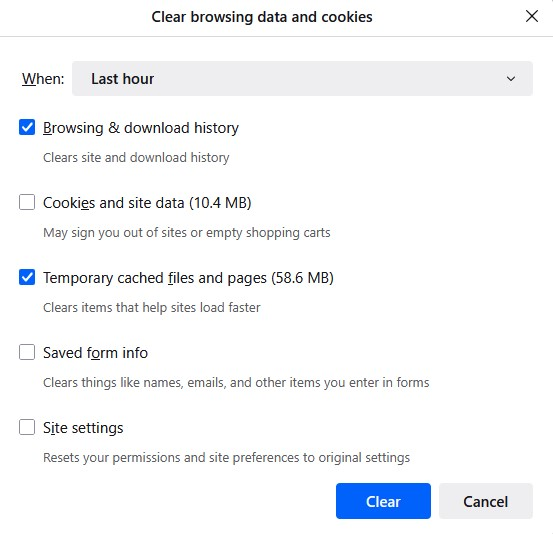
Ok so I usually choose these option to remember history and from time to time delete Browsing & download history and Temporary cached files and pages.
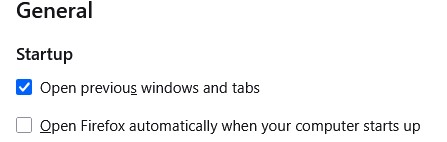
Note: I have "Open previous window and tabs" ticked in general settings which also has a restore previous session option in the history menu. This brings back previous session with tabs etc as is when I close FF. https://assets-prod.sumo.prod.webservices.mozgcp.net/media/uploads/images/2025-06-28-08-45-51-cf2daf.png
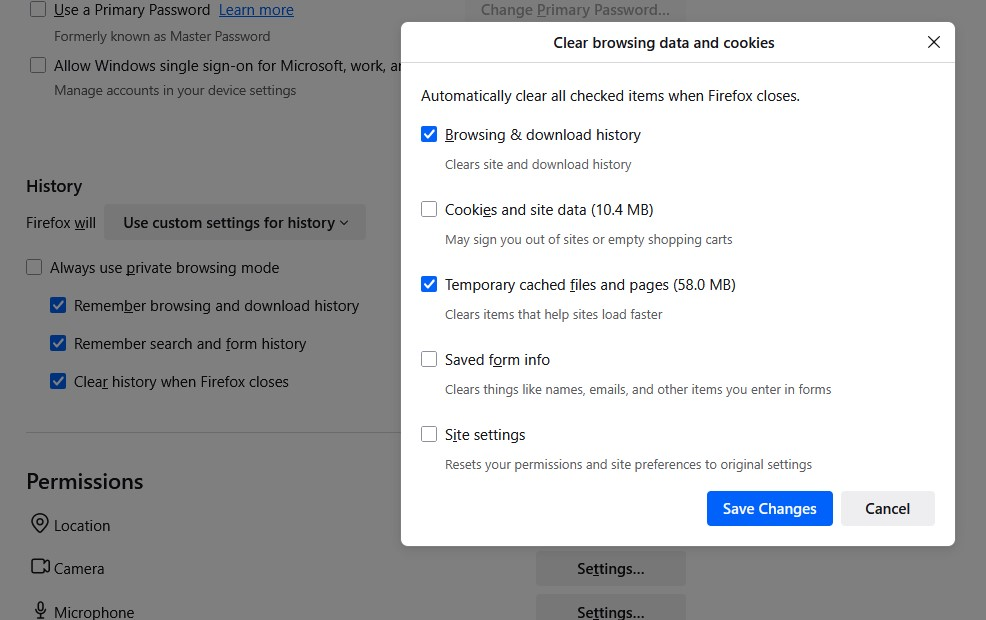
I thought I could automate this on exit but don't think its working right. So I change the option to "use custom settings for history" and tick all three options:
Remember browsing and download history Remember search and form history Clear history when Firefox closes For "Clear history when Firefox closes" I ticked Browsing & download history and Temporary cached files and pages. https://assets-prod.sumo.prod.webservices.mozgcp.net/media/uploads/images/2025-06-28-08-45-43-b10213.png
The issue is the restore session option is missing and FF opens with all previous tabs gone. I am frankly not even sure what else is missing such as cookies, site data etc. Is this meant to work like so?
Hello. I use Firefox on an computer with Ubuntu, (installed as snap) and have noticed that since the update to version 140 (specifically, version 140.0 canonical-002-1.0… (read more)
Hello.
I use Firefox on an computer with Ubuntu, (installed as snap) and have noticed that since the update to version 140 (specifically, version 140.0 canonical-002-1.0), closing a tab causes a noticeable delay : that is, upon any action that would close a tab (clicking on the cross, pressing CTRL+w, or middle clicking), there is a delay of about 200 to 300 ms before the tab is actually closed.
However, during this delay, the window still responds to inputs, leading to rather annoying situations. For example, during regular usage, I usually open a great number of tabs. When I am done with browsing, I close them, by repeatedly clicking the cross button on the tabs. It used to be that the tab under the cursor would immediately close, then the next tab would slide under the cursor, and I would click again to close that one, etc.
But now, when clicking the cross button, the tab is not closed, and when I click again after a small delay (because of muscle memory), the tab is still there. This cause the two single clicks to be treated as a single double-click, which for some reason puts the window in full-screen mode (but only with the snap version; I'm not sure what's going on here).
When using CTRL+w when closing tabs, the delay is still there, but the inputs are correctly handled. If I press CTRL+w three times at the usual rate, I can see the three key presses, then nothing happens for a few instants, then the three tabs close at the same time (i.e. the delay is from input to tab close, not from tab close to other tab close).
This behaviour is completely absent on Firefox (also version 140) on my windows computer.
This delay does not appear when creating tabs, and it does not occur either when closing the window or when closing the last tab in the window (leading to an amusing situation where shutting down Firefox is actually faster then closing a tab). These operation keep going at their previous speed, immeasurably fast to the human eye.
Navigation does not appear to be meaningfully slower than before the update, and the CPU/memory usage is very reasonable.
Curiously, this appears to be a fixed delay. Closing an empty tab takes the same time as closing a very busy one. Closing a tab when there are five takes the same time as closing a tab when there are thirty.
This issue makes browsing feel incredibly sluggish.
Is there a solution for this problem ?
Edit 1 : I have tried to run Firefox in troubleshoot mode, but there was no difference in behaviour. Edit 2 : Fixed typo. Edit 3 : Added exact version. I also tried to refresh Firefox, but the issue remained. Edit 4 : The problem is still present in version 140.0.1 canonical-002-1.0. Edit 5 : The problem is still present in version 140.0.2 canonical-002-1.0. Edit 6 : As of version 140.0.4 canonical-002-1.0, the problem seems to have been fixed. Thank you.
Hi all, I'm using Firefox 140.0.4 (64-bit) on Debian Trixie and I'm getting a weird behavior with the auto-complete functionality of the address bar. If I type the first… (read more)
Hi all, I'm using Firefox 140.0.4 (64-bit) on Debian Trixie and I'm getting a weird behavior with the auto-complete functionality of the address bar.
If I type the first character the address gets auto filled (see 20250711_First-character-auto-fill-working.png attachment), then if I type the second character the auto filled result disappears (see 20250711_Second-character-auto-fill-NOT-working.png).
I've tried any search option combination, but results doesn't change. At the moment I'm using for the address bar just "Browsing history" (see 20250711_Address-bar-settings.png).
The correct behavior would be, as in the past, that new characters confirming the address would leave things as they are. Do you have any suggestion on how to restore the original behavior?
Many thanks,
Raoul
What the title says. Firefox just isn't playing any sound whatsoever. Troubleshooting: Volume mixer indicates that Firefox is using my speakers, along with all other… (read more)
What the title says. Firefox just isn't playing any sound whatsoever.
Troubleshooting:
I have Apollo installed on my computer and I've reached out to them before for similar issues, but the dev was insistent that Apollo does not cause sound issues. I'm somewhat sceptical, but they're not being helpful at all so I thought I'd ask here, and disclose usage of Apollo so that all bases are covered.
Thank you for your time.
I am using Firefox on Win 11, recently I have noticed a weird problem, on Ebay for example when a listing uses a drop down selection box for sizes, amounts etc none of th… (read more)
I am using Firefox on Win 11, recently I have noticed a weird problem, on Ebay for example when a listing uses a drop down selection box for sizes, amounts etc none of them work for me, I click on the box and down arrow but nothing. I also went on to the Vodafone site to top up my phone but I was unable to do it as the drop down box to select the amount was empty. I have tried clearing my cache and even reloading Firefox but nothing seems to work, I just tried using Edge as well but its the same, suggesting that its maybe something to do with my settings?
Every time i load a page i have to quickly click on the link. If i don't it will not load. Every website that has a drop down menu wont allow me to click. In order to cli… (read more)
Every time i load a page i have to quickly click on the link. If i don't it will not load. Every website that has a drop down menu wont allow me to click. In order to click anything i have to refresh the page and click the link before it fully loads or else it just wont register. And it wont register across the entire page. Can't open in a different tab, cant do anything.
Doesn't happen with anything other than your browser.
I want to keep using your browser but its becoming incredibly annoying and i often have to jst say "fuck Firefox" copy the link to any other browser and it works perfectly.
In the past, I would create new profiles in Firefox often on my macOS Macbook pro. I want to merge them all together (merge open tabs and their saved info, cookies, bookm… (read more)
In the past, I would create new profiles in Firefox often on my macOS Macbook pro. I want to merge them all together (merge open tabs and their saved info, cookies, bookmarks, passwords, etc.) into the same profile.
I found this tool: https://github.com/james-cube/firefox-session-merger but I'm not sure if it will do everything I want to do.
Is this possible to do without using Firefox Sync?
Just want to login to a mozzilla acount
I reinstalled windows on my pc after syncing all my browser data (bookmarks etc) everything but some bookmarks, i have 4 folders and 2 of them had all that was in there a… (read more)
I reinstalled windows on my pc after syncing all my browser data (bookmarks etc) everything but some bookmarks, i have 4 folders and 2 of them had all that was in there and the other 2 where empty is it possible to get them back somehow?
I am trying to set up an MMDVM Pi-Star DMR Hotspot for Amateur Radio. The address for the device is http://pi-star. What do I need to do to get https-only mode 100% disab… (read more)
I am trying to set up an MMDVM Pi-Star DMR Hotspot for Amateur Radio. The address for the device is http://pi-star. What do I need to do to get https-only mode 100% disabled? The device that I am trying to set up is: Radioddity RHS-H1 MMDVM Hotspot | OLED Screen | Raspberry Pi-Zero W | Support P25/DMR/D-STAR/YSF/NXDN | UHF VHF WiFi Digital Voice Modem | 16G TF Card
I am using Firefox version 140.0.2 on PCLinucOS Debian (Bookworm) Edition.
When I log in to my account at https://my.noip.com/ and display my dashboard there is a constantly displayed banner across the top of the page that says: FireFox prevent… (read more)
When I log in to my account at https://my.noip.com/ and display my dashboard there is a constantly displayed banner across the top of the page that says:
FireFox prevented this page from automatically reloading - Allow
when I click Allow the page just reloads with the same banner
What setting can I change to get rid of this banner?
First got a msg box from Firefox that my W10 PC had crashed overnite - and I could report it. My PC was back up & looked normal - but when I accessed Firefox the PC … (read more)
First got a msg box from Firefox that my W10 PC had crashed overnite - and I could report it. My PC was back up & looked normal - but when I accessed Firefox the PC crashed - then I got the above error & blue screen and could do nothing on the PC! I restarted again - as long as I DO NOT START FIREFOX - my PC is fine. Help pls! For what it's worth, I happened to open a lot of tabs in Firefox yesterday. Drivers are up-to-date. Vicki
Unsecure connection refused by Firefox(?) How might I fix this?
Just switched from PC to Mac and miss the Page Up, Page Down, Home and End buttons. Wondering if there's a Firefox addon or extension to add these functions to a Macbook.… (read more)
Just switched from PC to Mac and miss the Page Up, Page Down, Home and End buttons. Wondering if there's a Firefox addon or extension to add these functions to a Macbook. I've searched but not found anything. I know I can't be alone in wishing for this!
(I am aware of using "Fn" and the arrow keys on a Mac to do page up and page down, but they are opposite sides of the keyboard and require both hands to scroll by page.)