


can't get sync to work on my mobile

I cannot find the menu item on my mobile device to sync my Firefox account. When I select "menu" it doesn't have that as an option; it only shows me other topics I have used Firefox to search.
所有回复 (7)
Hi martyfinley1,
do you use Android or iOS? After clicking on the menu (3 dots), there should be an option to "Sign in".
For more information, please also check: How to set up Firefox Sync in Firefox for Android
Thank you. I use iOS. When I go to Firefox it doesn't have a menu icon. I have tried to go to Mozilla but there are no 3dots or menu.
Hey martyfinley1,
Can you share what's your homepage look like on your end?
For reference, here's an article about Firefox Sync on iOS > Sync bookmarks, logins and browsing history on Firefox for iOS.
I took a screen shot but can't figure out how to post it here, on my laptop. When I select the 3 horizontal lines (which I think is "menu") it doesn't offer me anything other than whether the answer helped. I'm sorry I am so clueless.
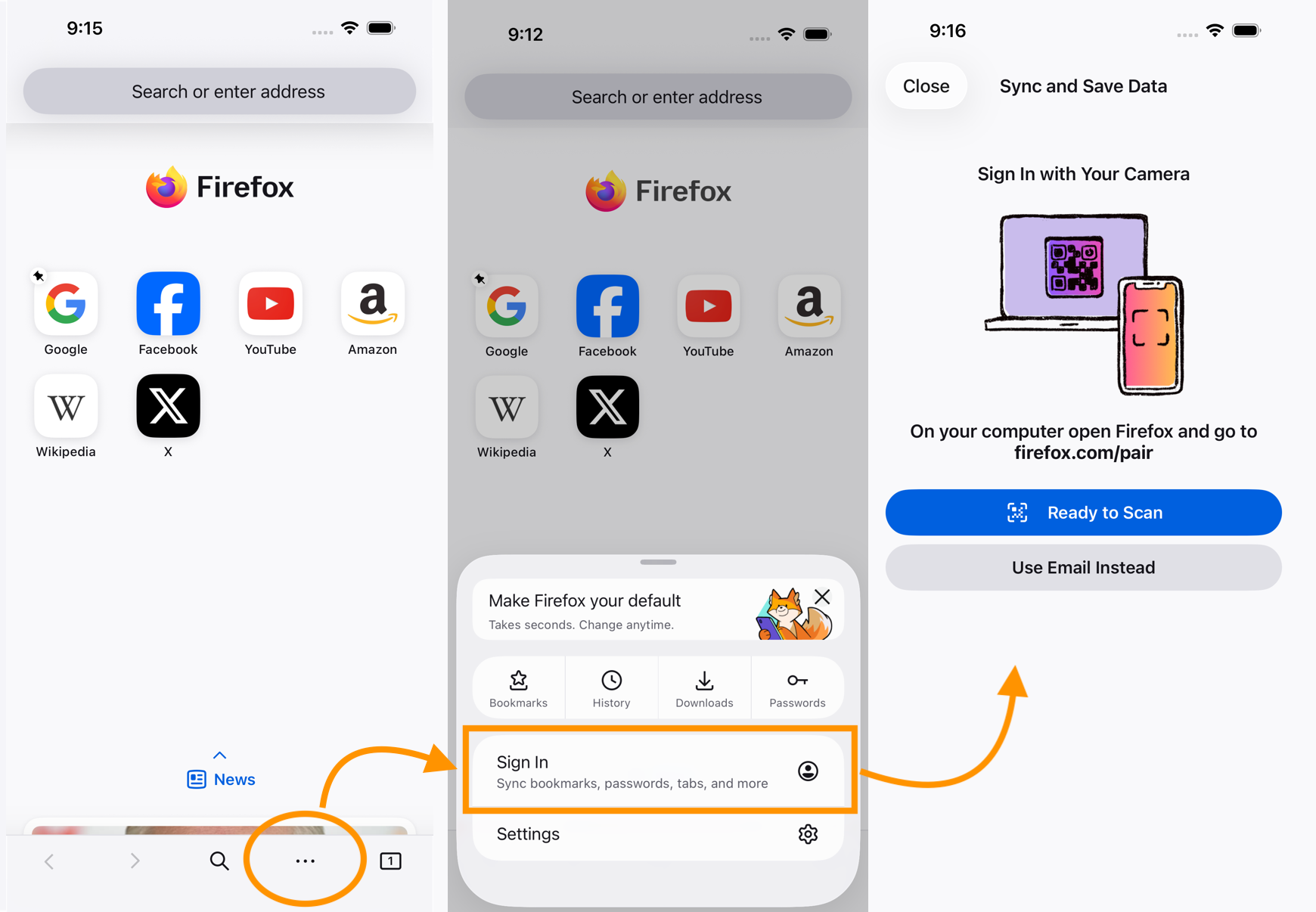
Hi
If you are already signed in, that menu item may display as your email address or user name.