


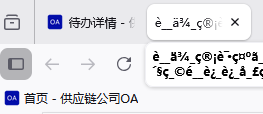
The file names of the downloaded files in Firefox are automatically garbled

Whether the file is opened internally or directly downloaded to the desktop, the file name will be automatically changed to garbled text。This led to me manually correcting the file name to be correct every time I downloaded, and my installation of the "Download File Name Encoding" plugin was also ineffective.

所有回复 (3)
More info please... Where are getting the file from? Can we replicate your steps? Are you at home or at work? What security software besides MS Defender are you running? Windows home or pro? Does it happen with Firefox in Troubleshoot Mode? https://support.mozilla.org/en-US/kb/diagnose-firefox-issues-using-troubleshoot-mode#search
由jonzn4SUSE于修改
The file was downloaded from our own company's website OA. I also tried downloading the public files on the government's official website and found that I could change the file name as well. When working in a company, there is no security software available except for the company's built-in atrust. My computer is Windows 11 Pro. This situation occurs in Firefox when it is in troubleshooting mode.
Work.... Are you having the same issues with the public files? Provide a link. What language? Looks like a language issue.
由jonzn4SUSE于修改