


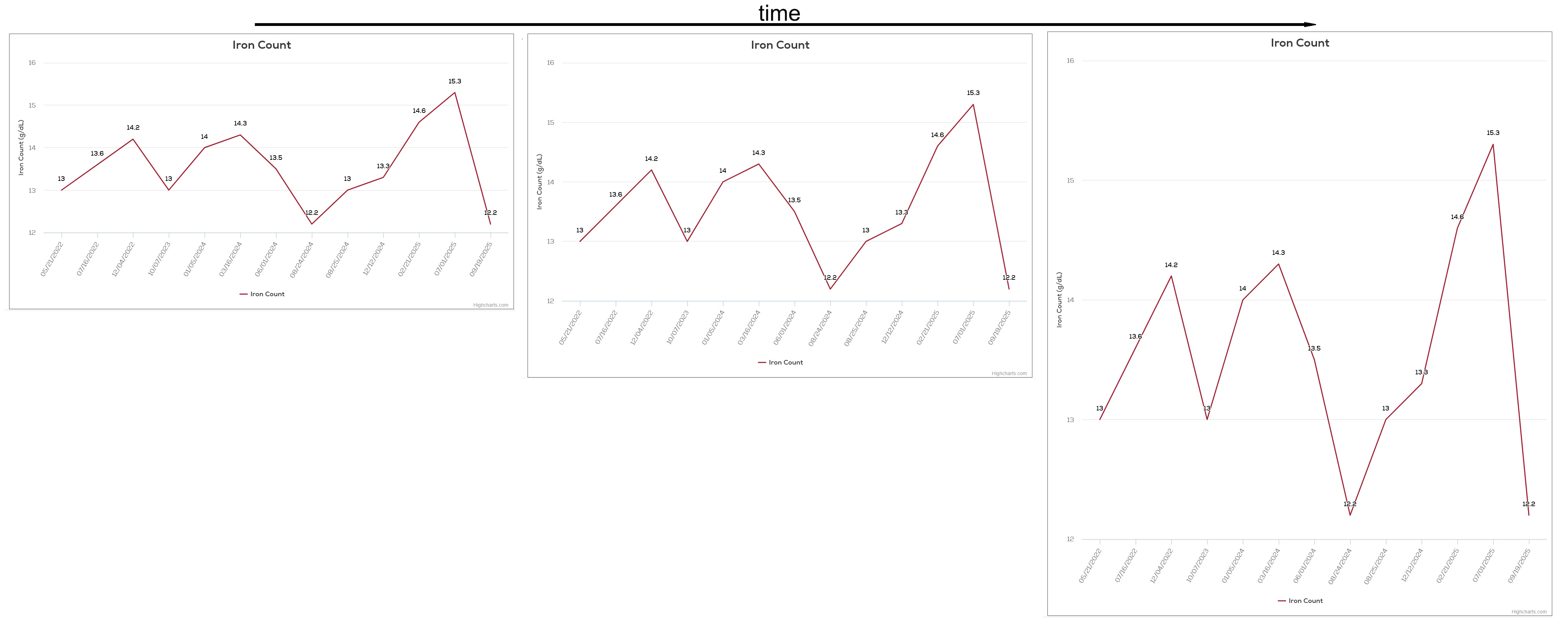
unstable graph rendering

On Firefox, the line graphs slowly stretch downward at
https://www.oneblood.org/donor-portal/health-summary/iron-count.html
as if the image height is being incremented. (Chrome & Edge display stably.)
所有回复 (3)

You can file compatibility issues
- via the 'Report broken site' option (https://support.mozilla.org/en-US/kb/report-breakage-due-blocking) (Send technical and interaction data to Mozilla must be enabled)
- on webcompat.com (https://webcompat.com/issues/new), esp. if you want to include a screenshot)
Hi,
To supplement, the issue seems to require an account, and, what's more, some user data, to reproduce itself. Please be ready that the WebCompat team will ask you to send them your credentials via email in order to perform testing. If you submit a WebCompat report, we would appreciate if you post a link to it here.
What you can also do is:
- Go to https://profiler.firefox.com/
- Click Enable Firefox Profiler Menu Button.
- Select Graphics in the Settings drop-down menu.
- Whenever you're ready, click the Profiler icon in your toolbar to start recording.
- Load the page you reported, and click the Profiler icon to stop recording.
- Click Submit local profile and post the link here (or in the WebCompat issue).
@ed, @Denys, Thanks! Credentialing seemed a hurdle, but I didn't know how to handle it. I'll try the Profiler steps outlined.