


After Update to 138.0 (32bit) my sidebar including bookmarks is disappeared. Even when activated again it is gone at the next start or tab.

After Update to 138.0 my sideabar (bookmarks) is away. I can reactivate the sidebar on the left side as wished. But when I open a new Firefos Window or Tab the sidebar ist away again. What have they done, mozilla ?? How can I get mey bookmarks ALWAYS shown on left side of any Window or tab ?
所有回复 (2)

Hi there! So sorry to hear about the trouble. The Mozilla Team is looking into a possible issue with Bookmark Sidebars after the last update. You can follow along or add your own comment here: https://bugzilla.mozilla.org/show_bug.cgi?id=1963549
I hope this helps!

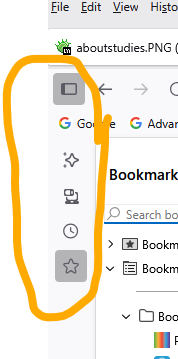
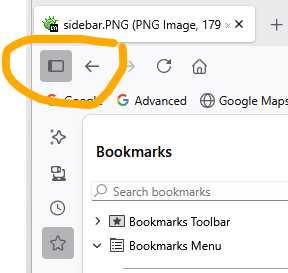
Mine kept disappearing as well. But then I learned that this was part of the latest UI update. This is a horrible update because if you always want your sidebar to show up, all that extra stuff has to show up as well. See first image. The second problem is that the Hide Sidebar button is too close to the Back button. I keep clicking on the Hide Sidebar button when I really want the Back button.
Is there a way to hide these controls? I don't have a lot of screen real estate.
Please see: https://support.mozilla.org/en-US/questions/1510369
由Bryce于修改