


Firefox mistakes file extensions (.docx, .zip) for CSV files!

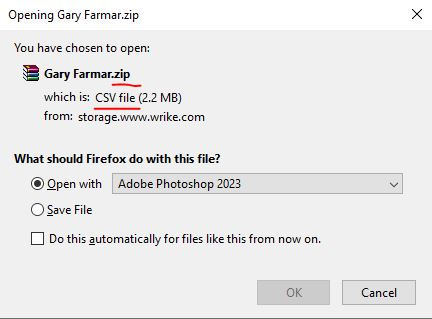
Whenever I try to download many different file types *.zip .docs, etc. - Firefox says they are CSV files - when they clearly are not. How to fix this?

由Roguepixel于修改
所有回复 (5)

选择的解决方案
Interesting... I see you're getting files from https://www.wrike.com/. What if you try the same steps from google drive, onedrive, or any other site that you can download similar files. Let me go try a few site.
由jonzn4SUSE于修改
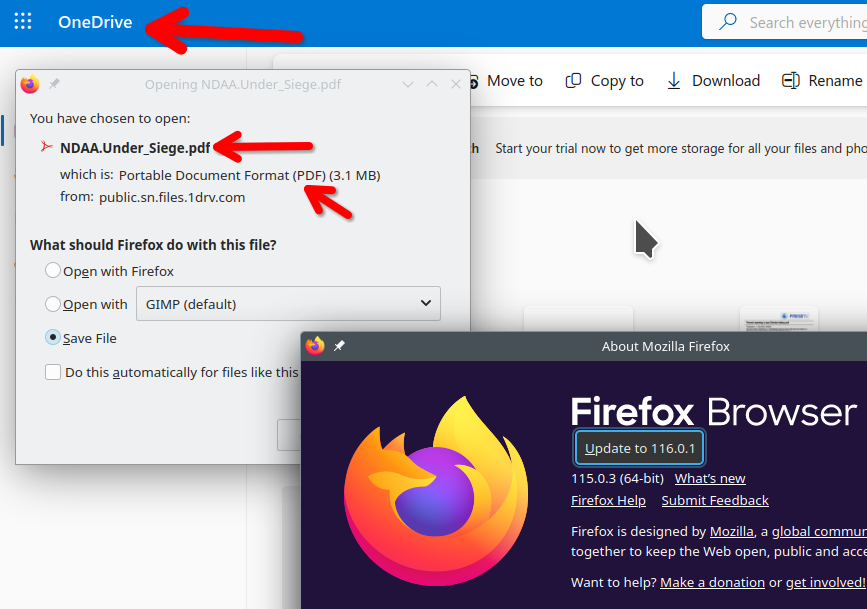
I'm not seeing this issue from onedrive. see screenshot Did you try Firefox in Safe Mode? https://support.mozilla.org/en-US/kb/diagnose-firefox-issues-using-troubleshoot-mode#search104

I created an account on that site to try and replicate your issue, but the navigation was not fun. ;-/
I think you are on to something... I tried a docx from Google drive... it recognized it properly... I tried a pptx and zip file form another site... worked fine. Must be an issue with wrike.com (my large University client makes us use it as their project management system) Thanks for helping me out... I'll submit a ticket to their help system.
You can look on the Add-ons website at this extension.
由cor-el于修改