话题已存档。
如果需要帮助请提出新问题。

Solved
已存档
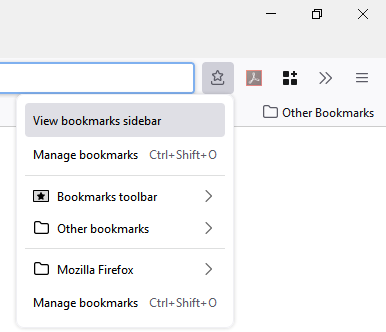
I just got a new computer & the old option "show bookmarks sidebar" is GONE How do I get it back? I want the sidebar always

How do I get back the option under "Bookmarks" "show bookmarks SIDEBAR" (NOT "toolbar!)
How do I get back the option under "Bookmarks" "show bookmarks SIDEBAR" (NOT "toolbar!)
所有回复 (2)
选择的解决方案
You can toggle the Bookmarks Sidebar via the "Ctrl+B" keyboard shortcut. You can toggle the Bookmarks Toolbar via the "Ctrl+Shift+B" keyboard shortcut. The keyboard shortcut to Open the Library is "Ctrl+Shift+O".
You can find a toolbar button for the sidebar in the Customize palette.
There is one other option -- there is an optional bookmarks menu button for the toolbar ( ). You can add it using the Customize panel (Customize Firefox controls, buttons and toolbars). It's on that menu.