


Firefox auto update no longer works

Firefox auto update has stopped working for me. Neither of the settings, see attached screenshot do anything, all I get is a popup saying a new version of firefox is available with a link to https://www.mozilla.org/en-GB/firefox/ I recently did a clean install of Win 10 pro x64 and this problem may have started then. I have another PC on the same network where auto download of updates are still working. Hopefully someone can point me to a way to get this working again.
Joe
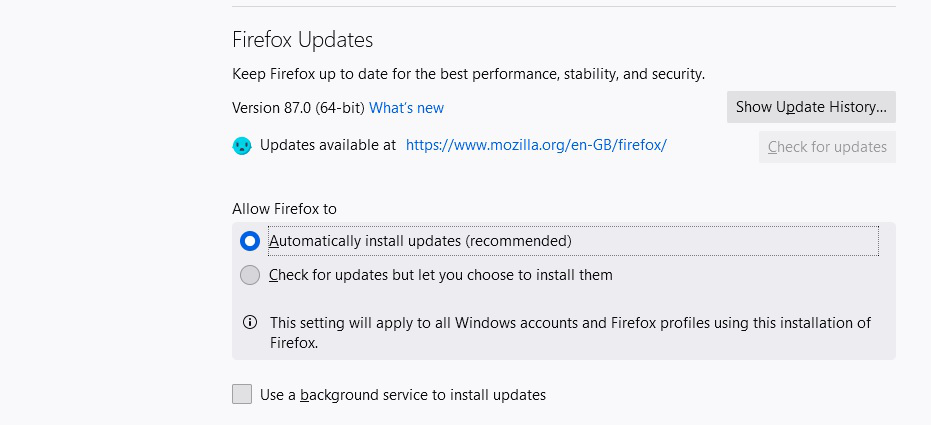
选择的解决方案
Well to answer my own question: It seems Firefox cannot download and install updates from a Windows non- admin account. When I login to an admin account and run Firefox the update proceeds automatically. Not sure this was the case in the past, maybe someone here can confirm or not?
所有回复 (3)

Hi. Joecrow2
follow this steps to see if you have Automatically install updates and if not you can enable and it will auto update.
- click the Firefox button at the top left corner of the window.
- From the displayed menu, go to the Options > Options option.
- On the opened Options box, click to select the Advanced icon from the displayed icon bar.
- Once on the Advanced interface, click the Update tab.
- Under the Firefox updates section, click to select the Automatically install updates (recommended, improved security) radio button.
- Once done, click OK button to save the changes.
- Restart Mozilla Firefox to allow the changes to take effect.
If it is enabled then open Firefox in safe mode and see which extension is not letting Firefox auto update see this article on how to open Firefox in safe mode https://support.mozilla.org/en-US/kb/troubleshoot-firefox-issues-using-safe-mode#w_how-to-start-firefox-in-safe-mode
I do not have a Firefox button at the top left of the window, I select options via the 3 horizontal lines icon in the top right of the window. As per the screen shot I attached in the OP auto update is enabled.
Quote:-"If it is enabled then open Firefox in safe mode and see which extension is not letting Firefox auto updatee"
No problem going into safe mode but how do I tell if an extension is not letting Firefox update? It did not update automatically while in safe mode!
由Keith Roper于修改
选择的解决方案
Well to answer my own question: It seems Firefox cannot download and install updates from a Windows non- admin account. When I login to an admin account and run Firefox the update proceeds automatically. Not sure this was the case in the past, maybe someone here can confirm or not?