


using latest version of thunderbird
when ever i try to get an extension for Thunderbird it does not install to thunderbird it say browse and goes to Firefox and will not install says it is not compaible or just can not install. How do i add more extension or add ons to Thunderbird
所有回复 (2)

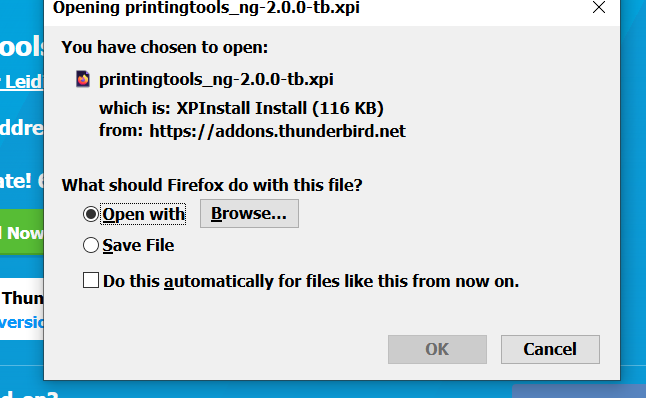
The image you posted offers the option to 'Save file' Select 'Save file' option and click on 'OK'
File 'printingtools_ng-2.0.0-tb.xpi' will get downloaded to your default location on computer. Mine gets downloaded to the 'Downloads' folder in my User Account.
Then in Thunderbird: Menu app icon > Select 'Addons' Click on gear wheel icon and select 'Install addon from file' locate and select the file you downloaded 'printingtools_ng-2.0.0-tb.xpi' click on 'Open' You may need to restart Thunderbird at the prompt.