


"Check spelling as I type" spell checker/autocorrect not working

I've had Firefox installed for months, but this weekend the spell checker/auto correct (red squiggly lines under the words I spell wrong), has stopped working. I haven't installed any new plugins/add ons or changed anything in Firefox.
I've even completely re-installed Firefox this morning in the hope to solve the problem - no luck.
I'm on Mac OSX High Sierra (10.13.6).
The tick box to check my spelling as I type is checked.
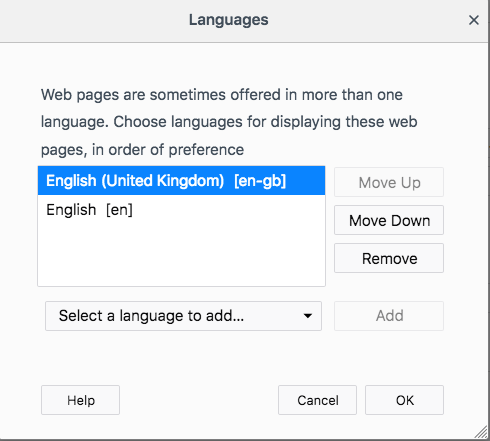
Screenshot shows I have my correct language selected.
I'm all out of ideas - please help :D
由linziloop于修改
所有回复 (5)

Type about:config<enter> in the address bar. If a warning screen comes up, press the I Accept the Risk button. At the top of the screen is a search bar.
Type: layout.spellcheckDefault Its values are; 0 Spell Checker Off 1 Check Only Multi-Line Input Boxes. 2 Check Multi And Single Line Input Boxes.
Also, check the spellchecker.dictionary entry.
https://support.mozilla.org/en-US/kb/how-do-i-use-firefox-spell-checker
FredMcD said
Type about:config<enter> in the address bar. If a warning screen comes up, press the I Accept the Risk button. At the top of the screen is a search bar. Type: layout.spellcheckDefault Its values are; 0 Spell Checker Off 1 Check Only Multi-Line Input Boxes. 2 Check Multi And Single Line Input Boxes. Also, check the spellchecker.dictionary entry. https://support.mozilla.org/en-US/kb/how-do-i-use-firefox-spell-checker
If everything is set up correctly, what value should I be seeing? 1, or 2? I did this this morning, and the value said "1"
Your screenshot shows the setting for the request header that is send to the server. This has nothing to do with the spelling checker.
Do you have a dictionary installed and selected?
You can see which dictionary is selected if you right-click in a text area and open the Languages sub menu. At least one dictionary should be installed and have a check mark to indicate that it is selected.
- open the "Add Dictionaries" link to install a dictionary if you do not have one.
The spelling checker is enabled if [X] "Check Spelling" in the right-click context menu has a checkmark.
You can enable or disable spell checking globally:
- Options/Preferences -> General: Browsing: "Check my spelling as I type"
You can look here for dictionaries:
Note that you need a dictionary and not a language pack (string translations for the user interface).
You can check the layout.spellcheckDefault pref on the about:config page. You can reset the layout.spellcheckDefault pref via the right-click context menu.
cor-el said
Your screenshot shows the setting for the request header that is send to the server. This has nothing to do with the spelling checker. Do you have a dictionary installed and selected? You can see which dictionary is selected if you right-click in a text area and open the Languages sub menu. At least one dictionary should be installed and have a check mark to indicate that it is selected.The spelling checker is enabled if [X] "Check Spelling" in the right-click context menu has a checkmark. You can enable or disable spell checking globally:
- open the "Add Dictionaries" link to install a dictionary if you do not have one.
You can look here for dictionaries: Note that you need a dictionary and not a language pack (string translations for the user interface). You can check the layout.spellcheckDefault pref on the about:config page. You can reset the layout.spellcheckDefault pref via the right-click context menu.
- Options/Preferences -> General: Browsing: "Check my spelling as I type"
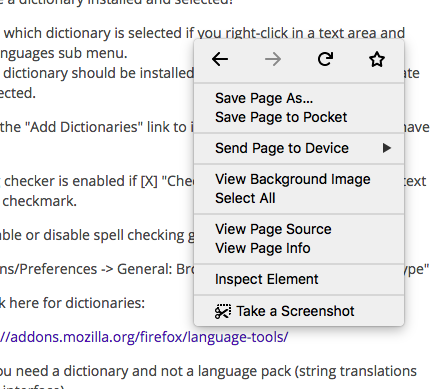
When I right click in a text area, I don't get a 'languages' option (see attached screenshot)
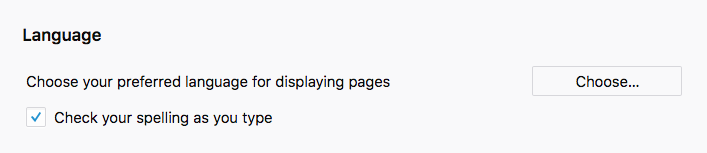
I have 'check spelling as I type" selected (see second attached screenshot)
I guess I need to check if I have a dictionary installed (although I don't see why it would have been working a couple of weeksa ago and not now), but how do I do that?
You need to right-click in the text area like "Post a reply" used on this forum and check the Languages sub menu like posted above.