


Firefox saving only password without the user name

Firefox saving only password without the user name only on one (at least for now) website: https://eu.4game.com/lineage2
I was trying to edit saved password manually and typed login - unfortunately Firefox not filling up the "login" field.
Any ideas?
所有回复 (8)
Please Refresh but do this 1st:
- https://support.mozilla.org/en-US/kb/export-firefox-bookmarks-to-backup-or-transfer
- https://support.mozilla.org/en-US/kb/back-and-restore-information-firefox-profiles
then
TEST....... If no issues then Extensions which need to be added back in 1 at a time and tested ..... Or it is your Profile : Make a new one and test ...:
If is your Profile :
- https://support.mozilla.org/en-US/kb/recovering-important-data-from-an-old-profile
- http://kb.mozillazine.org/Transferring_data_to_a_new_profile_-_Firefox
Note: Any customization will revert back to default, you will also need to reinstall Extensions.
Please let us know if this solved your issue or if need further assistance.

Are you using any password add-ons? Is the problem just with that site? What about others?
Start Firefox in Safe Mode {web link} by holding down the <Shift> (Mac=Options) key, and then starting Firefox.
A small dialog should appear. Click Start In Safe Mode (not Refresh). Is the problem still there?
@Pkshadow - tested, and still same issue
@FredMcD - no pass add-ons and other sites works normal. Safe mode tested and no results.
Website on Chrome was working with no problems.
Many site issues can be caused by corrupt cookies or cache.
- Clear the Cache and
- Remove Cookies
Warning ! ! This will log you out of sites you're logged in to. You may also lose any settings for that website.
Type about:preferences<enter> in the address bar.
- Cookies; Select Privacy. Under History, select
Firefox will Use Custom Settings. Press the button on the right side called Show Cookies. Use the search bar to look for the site. Note; There may be more than one entry. Remove All of them.
- Cache; Select Advanced > Network.
[v57+] Select Privacy. Across from Cached Web Content, Press Clear Now.
If there is still a problem, https://support.mozilla.org/en-US/kb/troubleshoot-firefox-issues-using-safe-mode Start Firefox in Safe Mode A small dialog should appear. Click Start In Safe Mode (not Refresh). While you are in safe mode;
Try disabling graphics hardware acceleration in Firefox. Since this feature was added to Firefox it has gradually improved but there are still a few glitches.
You will need to restart Firefox for this to take effect so save all work first (e.g., mail you are composing, online documents you're editing, etc.,) and then perform these steps:
In Firefox 54 and below:
- Click the menu button
 and select Options (Windows) or Preferences (Mac, Linux).
- Select the Advanced panel and the General tab.
- Uncheck Use hardware acceleration when available.
- Close Firefox completely and then restart Firefox to see if the problem persists.
In Firefox 55 and above:
- Click the menu button and select Options (Windows) or Preferences (Mac, Linux).
- Select the General panel.
- Under Performance, uncheck Use recommended performance settings. Additional settings will be displayed.
- Uncheck Use hardware acceleration when available.
- Close Firefox completely and then restart Firefox to see if the problem persists.
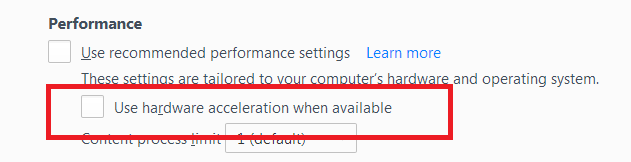
Did this fix your problems? Please report back to us!
If the problem is resolved, you should check for updates for your graphics driver by following the steps mentioned in these Knowledge base articles:
Then restart.
If I check the login form in the Inspector then is looks rather complicated with extra placeholder input fields present that may confuse the Password Manager.

@FredMcD - all checked, and no results
@cor-el - there is a solution for that?
Many thanks!
You can try a form filling add-on.
Honestly I was hope that developers will check and fix this with next update :)