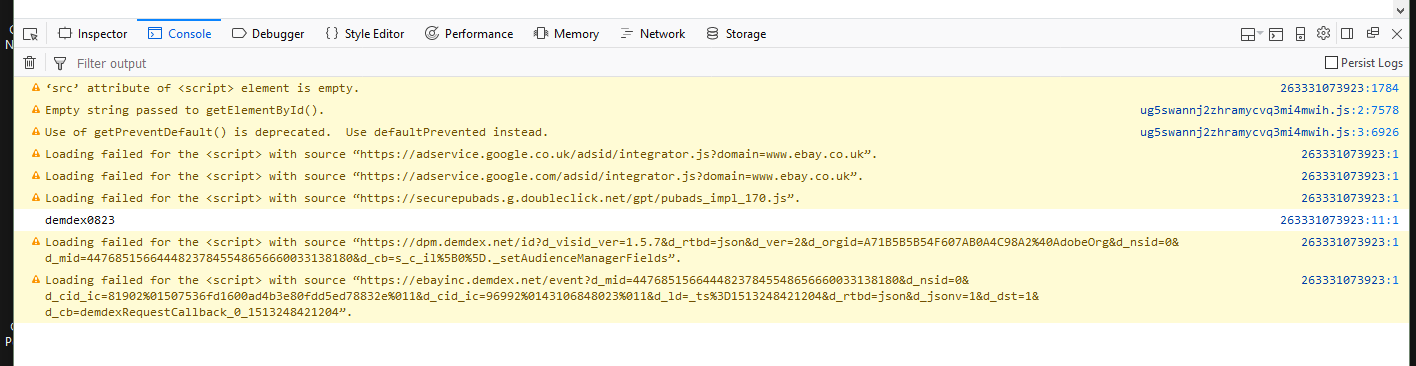
Ebay - part of too many pages is missing
The middle part of pages is often missing - where the description of the item should be. Large blank space. I'm not running things like adblock which i see could be causing problems. I've tried removing all cookies and clearing cache.
I'll have to use a different browser.
Win 10, 57.0.2 (64-bit
- Shockwave Flash 27.0 r0
选择的解决方案
Can you attach a screenshot?
- https://support.mozilla.org/en-US/kb/how-do-i-create-screenshot-my-problem
- use a compressed image type like PNG or JPG to save the screenshot
You can check the Web Console (Tools -> Web Developer) for messages about blocked content and about the presence of mixed or unsafe content.
You can try these steps in case of issues with web pages:
You can reload web page(s) and bypass the cache to refresh possibly outdated or corrupted files.
- hold down the Shift key and left-click the Reload button
- press "Ctrl + F5" or press "Ctrl + Shift + R" (Windows,Linux)
- press "Command + Shift + R" (Mac)
Clear the cache and remove the cookies from websites that cause problems via the "3-bar" Firefox menu button (Options/Preferences).
"Clear the cache:
- Options/Preferences -> Privacy & Security -> Cached Web Content: "Clear Now"
"Remove the cookies" from websites that cause problems.
- Options/Preferences -> Privacy & Security -> "Use custom settings for history" -> Cookies: "Show Cookies"
Start Firefox in Safe Mode to check if one of the extensions ("3-bar" menu button or Tools -> Add-ons -> Extensions) or if hardware acceleration is causing the problem.
- switch to the DEFAULT theme: "3-bar" menu button or Tools -> Add-ons -> Appearance
- do NOT click the "Refresh Firefox" button on the Safe Mode start window
所有回复 (6)

The culprit seems to be some kind of new sandboxing in 57 which prevents fonts from loading.
Open a new tab and type about:config in the address field (press enter, accept risks, etc., etc.)
- Type “sandbox” in the search box
- Change the setting security.sandbox.content.level to 2
- Restart Firefox
If that doesn’t work you could try changing it to 1.
由Mkll于修改
Thanks tried 2 then 1
No difference.
Should I have re-cleared cookies maybe?
Perhaps you can try that.
Went round again.
Same so far.
Will report I clear it somehow
选择的解决方案
Can you attach a screenshot?
- https://support.mozilla.org/en-US/kb/how-do-i-create-screenshot-my-problem
- use a compressed image type like PNG or JPG to save the screenshot
You can check the Web Console (Tools -> Web Developer) for messages about blocked content and about the presence of mixed or unsafe content.
You can try these steps in case of issues with web pages:
You can reload web page(s) and bypass the cache to refresh possibly outdated or corrupted files.
- hold down the Shift key and left-click the Reload button
- press "Ctrl + F5" or press "Ctrl + Shift + R" (Windows,Linux)
- press "Command + Shift + R" (Mac)
Clear the cache and remove the cookies from websites that cause problems via the "3-bar" Firefox menu button (Options/Preferences).
"Clear the cache:
- Options/Preferences -> Privacy & Security -> Cached Web Content: "Clear Now"
"Remove the cookies" from websites that cause problems.
- Options/Preferences -> Privacy & Security -> "Use custom settings for history" -> Cookies: "Show Cookies"
Start Firefox in Safe Mode to check if one of the extensions ("3-bar" menu button or Tools -> Add-ons -> Extensions) or if hardware acceleration is causing the problem.
- switch to the DEFAULT theme: "3-bar" menu button or Tools -> Add-ons -> Appearance
- do NOT click the "Refresh Firefox" button on the Safe Mode start window
Thanks Looks like it was Privacy Badger which was blocking vi.vipr.ebaydesc.com Enabled it with cookies blocked (for that) and the page displays.
The web console showed: