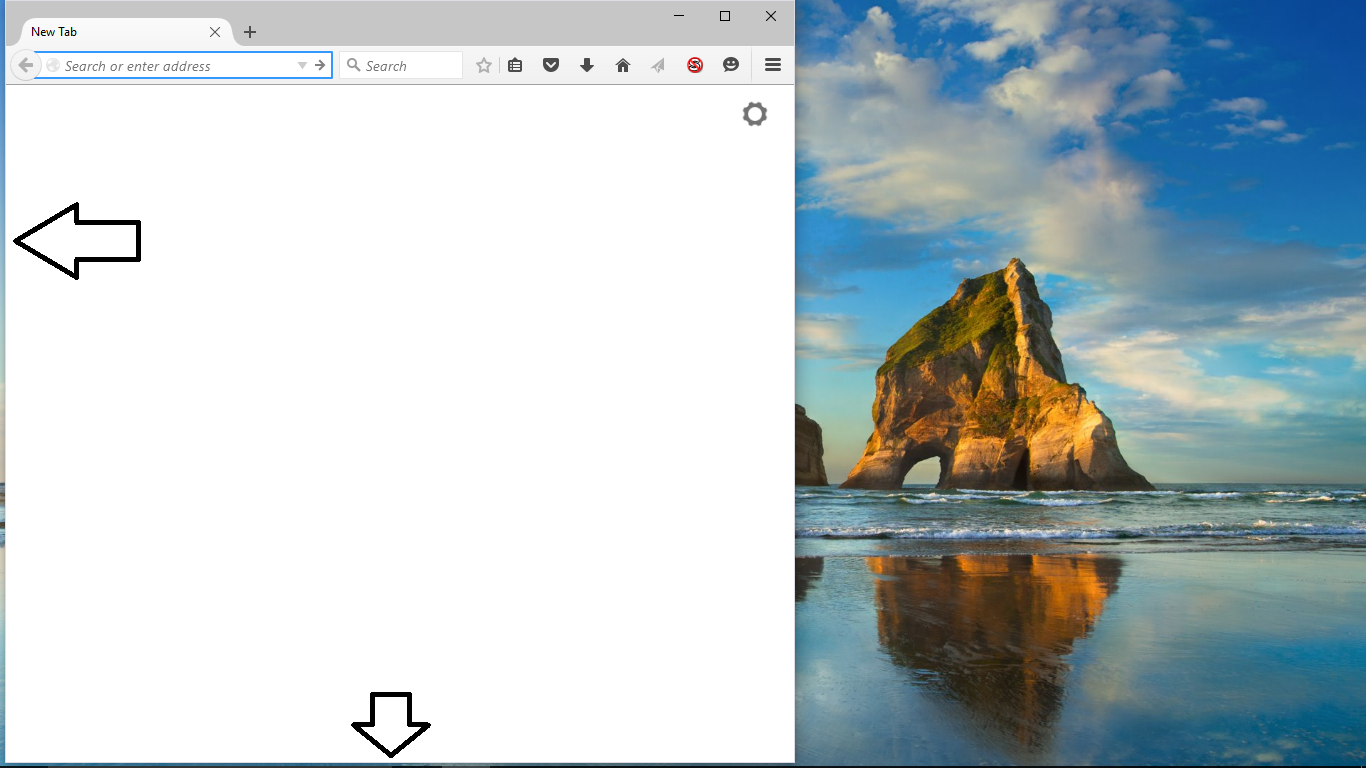
Firefox window not starting up where I placed it before

Before upgrading to Windows 10, I had Firefox set up so that it takes up 60% of the screen on the left while Chrome takes up the other 40% on the right. This set up is convenient for me, but since upgrading to Windows 10, Chrome hasn't changed and when I drag it to where ever, it will open up in that spot when I start it up. But not Firefox. The window is always be slightly off from the left edge and the vertical height is a bit small for the screen. Below is a screenshot of what I mean. I don't want to resize the window every time I want it open and I'm not going to be on fullscreen mode the entire time. I don't know how to fix it.
I updated Firefox to 40.0.3 and it hasn't fixed the issue. If anyone has a solution to this let me know. This sort of thing drives me a bit insane.
所有回复 (2)

Hello,
In order to better assist you with your issue please provide us with a screenshot. If you need help to create a screenshot, please see How do I create a screenshot of my problem?
Once you've done this, attach the saved screenshot file to your forum post by clicking the Browse... button below the Post your reply box. This will help us to visualize the problem.
Thank you!
You may have a corrupt xulstore.json file. https://support.mozilla.org/en-US/kb/changes-toolbars-and-window-sizes-are-not-saved
That's weird, I thought I uploaded a screenshot... This should help describe what I said.