


Icons for bookmarked Start Menu programs fail to appear

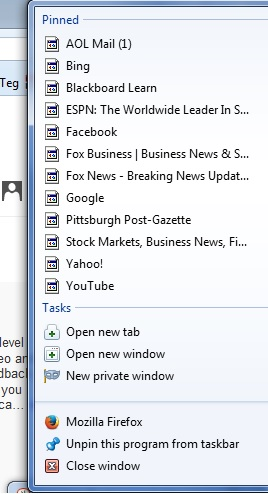
When I right-click on the Firefox icon located on my toolbar, a list of my bookmarked site appears. Beside the description of each bookmarked site, all of the icons accompanying the site description default to a "blank" or generic icon. For instance, the icons for CNN, Google, Bing, ESPN, etc. fail to appear. This is not a big problem, but it is annoying as the icons provide a quick way to identify favorite sites. No forum or online search that I have tried to date has rectified this issue which has been going on for over 2 years.
I have tried reinstalling Firefox or refreshing it, but nothing has worked. Please assist.
Thank you,
Michael P. Friters
Email: MikeFriters@aol.com
所有回复 (3)
I always get the Firefox webpage icon. Maybe your icon cache is corrupt?
Since your screenshot looks like Seven, here's a post with instructions on how to rebuild the Windows icon cache: http://www.sevenforums.com/tutorials/49819-icon-cache-rebuild.html.
Do (new) internet shortcuts you create in the OS have the correct icon? If not, then definitely icon cache corruption.
Thanks for the suggestion. Unfortunately, that didn't fix my problem.
So no other icon problems in your OS then, just the Firefox jump list pinned bookmarks? New internet shortcuts look OK?
If this is the case, it might be that the Windows jump list for Firefox is broken; the problem persisting even though Firefox is reinstalled might very well indicate this. You can see a list of IDs for jump lists here: http://forensicartifacts.com/2011/09/jump-list-appids/ - if and when a program is not listed, you'll just have to check the files in Notepad to find the right one (or delete-restore one by one until you find yours; the path to the files is listed at that URL as well).
Empty jump lists can be fixed by deleting the file, so maybe that would work here as well? Sometimes toggling the setting is enough: Taskbar Properties > Start menu tab > Store and display recently opened items in the Start menu and the taskbar checkbox. This will affect ALL jump lists, however, whereas file deletion only affects the one program getting its file deleted.
Deletion is low-risk, the files are automatically generated by the OS.
Other than that, I can only think of Firefox favicons being the issue, but the jump list shouldn't use them (again, it's a feature of Windows, and only uses the default shortcut icon). You can tweak favicons as per this answer: https://support.mozilla.org/en-US/questions/901490. You can also toggle the setting in Firefox to restore missing favicons: http://dottech.org/158086/how-to-remove-favicons-from-firefox-guide/.
由Phoxuponyou于修改