


Create custom DNS providers list to "DNS over HTTPS" "Choose provider" menu
Create custom DNS providers list to "DNS over HTTPS" "Choose provider" menu (Settings > Privacy & Security - DNS over HTTPS) This can be applied to any Mozilla based browser.
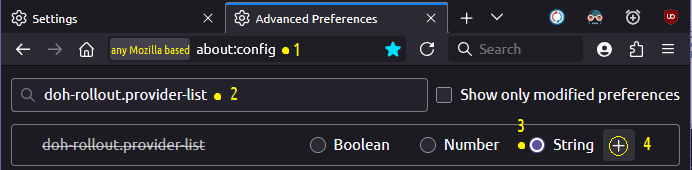
1. Write about:config in url-bar and press [Enter].
2. In the "Search preference name" box Find the "doh-rollout.provider-list" value.
2.a. Create it if not exist by choosing: "String" value and press "+" (add). 2.b. On the right side of the value, Write the '*one string code'. - (if a code already exist, select all code [Ctrl+A] & copy [Ctrl+C] and paste [Ctrl+V] in a notepad and Save it so to keep backup with the previous setting.)
The '*one string code': [ { "UIName": "Cloudflare: Mozilla uri: (https://mozilla.cloudflare-dns.com/dns-query)",
"uri": "https://mozilla.cloudflare-dns.com/dns-query" },
{ "UIName": "Cloudflare: No Filtering uri: (https://cloudflare-dns.com/dns-query)",
"uri": "https://cloudflare-dns.com/dns-query" },
{ "UIName": "Quad9: No Malicious blocking uri: (https://dns10.quad9.net/dns-query)",
"uri": "https://dns10.quad9.net/dns-query" },
{ "UIName": "LibreDNS: No Filtering uri: (https://doh.libredns.gr/dns-query)",
"uri": "https://doh.libredns.gr/dns-query" },
{ "UIName": "Wikimedia: No Filtering uri: (https://wikimedia-dns.org/dns-query)",
"uri": "https://wikimedia-dns.org/dns-query" },
{ "UIName": "DNS4All: No Filtering uri: (https://doh.dns4all.eu/dns-query)",
"uri": "https://doh.dns4all.eu/dns-query" },
{ "UIName": "Mullvad: No Filtering uri: (https://dns.mullvad.net/dns-query)",
"uri": "https://dns.mullvad.net/dns-query" },
{ "UIName": "OpenDNS: No Filtering uri: (https://doh.opendns.com/dns-query)",
"uri": "https://doh.opendns.com/dns-query" },
{ "UIName": "--------------------------------------------------------------------------------",
"": "" },
{ "UIName": "Cloudflare: * Malware blocking uri: (https://security.cloudflare-dns.com/dns-query)",
"uri": "https://security.cloudflare-dns.com/dns-query" },
{ "UIName": "Cloudflare: * Malware & Adult content blocking uri: (https://family.cloudflare-dns.com/dns-query)",
"uri": "https://family.cloudflare-dns.com/dns-query" },
{ "UIName": "Quad9: * Malware blocking uri: (https://dns.quad9.net/dns-query)",
"uri": "https://dns.quad9.net/dns-query" },
{ "UIName": "LibreDNS: * Adblocking uri: (https://doh.libredns.gr/noads)",
"uri": "https://doh.libredns.gr/noads" },
{ "UIName": "AdGuard: * Ad-Blocking uri: (https://dns.adguard.com/dns-query)",
"uri": "https://dns.adguard.com/dns-query" }
]
You can modify the code based on your preferences to change the "Choose provider" menu list.
All Replies (3)

Open
about:config
Confirm the alert if it appears.
In the search, paste
doh-rollout.provider-list
If there is no parameter, select String and press +. Insert this value in one line
[{"UIName":"Cloudflare: Mozilla","uri":"https://mozilla.cloudflare-dns.com/dns-query"},{"UIName":"Cloudflare: No Filtering","uri":"https://cloudflare-dns.com/dns-query"},{"UIName":"Quad9: No Malicious blocking","uri":"https://dns10.quad9.net/dns-query"},{"UIName":"LibreDNS: No Filtering","uri":"https://doh.libredns.gr/dns-query"},{"UIName":"Wikimedia: No Filtering","uri":"https://wikimedia-dns.org/dns-query"},{"UIName":"DNS4All: No Filtering","uri":"https://doh.dns4all.eu/dns-query"},{"UIName":"Mullvad: No Filtering","uri":"https://dns.mullvad.net/dns-query"},{"UIName":"OpenDNS: No Filtering","uri":"https://doh.opendns.com/dns-query"},{"UIName":"──────────────","uri":""},{"UIName":"Cloudflare: Malware blocking","uri":"https://security.cloudflare-dns.com/dns-query"},{"UIName":"Cloudflare: Malware + Adult blocking","uri":"https://family.cloudflare-dns.com/dns-query"},{"UIName":"Quad9: Malware blocking","uri":"https://dns.quad9.net/dns-query"},{"UIName":"LibreDNS: Adblocking","uri":"https://doh.libredns.gr/noads"},{"UIName":"AdGuard: Ad-Blocking","uri":"https://dns.adguard.com/dns-query"}]
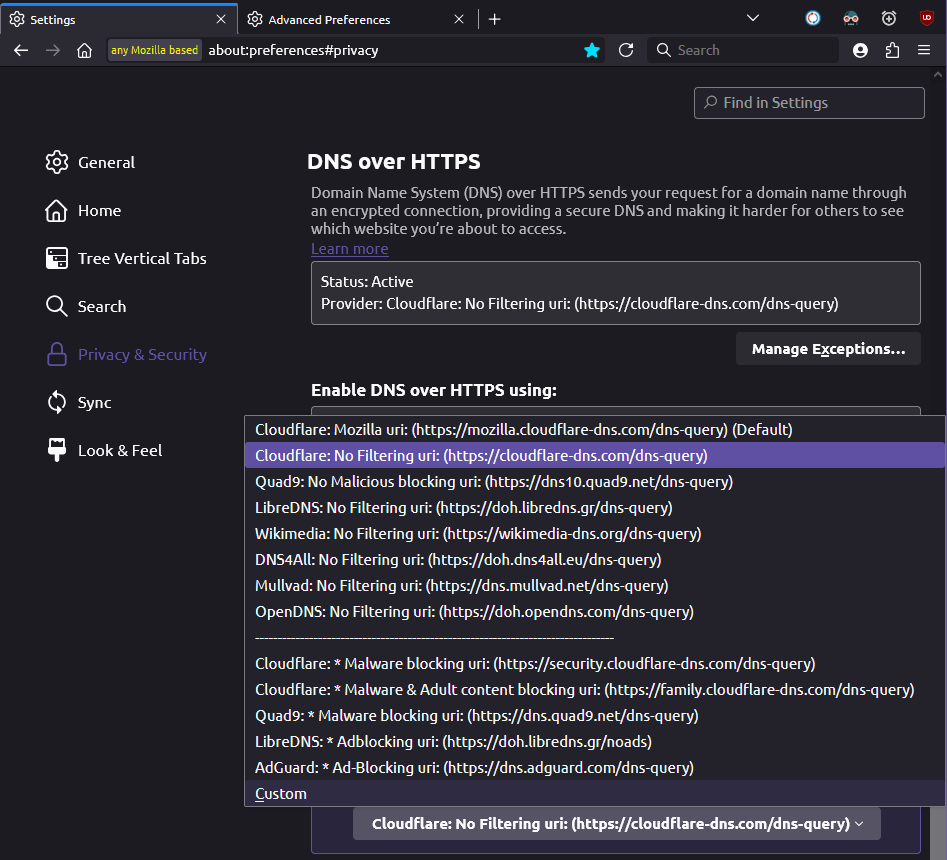
After that, press the /Enter checkmark, then open: Settings - Privacy and Security - DNS over HTTPS and check the provider selection drop-down menu.
Purely in theory, it should help )
Ti ṣàtúnṣe nípa 111222333
Another Add Choose provider list example
DNS Included:
- Default Mozilla Cloudflare DNS
- Default Cloudflare DNS
- Cloudflare (Security): Block malware filtered DNS
- Cloudflare (Family): Block Malware & Adult content filtered DNS
More about here: https://developers.cloudflare.com/1.1.1.1/setup/
One string code: [ { "UIName": "Cloudflare: Mozilla uri: (https://mozilla.cloudflare-dns.com/dns-query)", "uri": "https://mozilla.cloudflare-dns.com/dns-query" }, { "UIName": "Cloudflare: Unfiltered uri: (https://cloudflare-dns.com/dns-query) (IPv4: 1.1.1.1 & 1.0.0.1)", "uri": "https://cloudflare-dns.com/dns-query" }, { "UIName": "Cloudflare: Block malware uri: (https://security.cloudflare-dns.com/dns-query) (IPv4: 1.1.1.2 & 1.0.0.2)", "uri": "https://security.cloudflare-dns.com/dns-query" }, { "UIName": "Cloudflare: * Malware & Adult content blocking uri: (https://family.cloudflare-dns.com/dns-query) (IPv4: 1.1.1.3 & 1.0.0.3)", "uri": "https://family.cloudflare-dns.com/dns-query" } ]
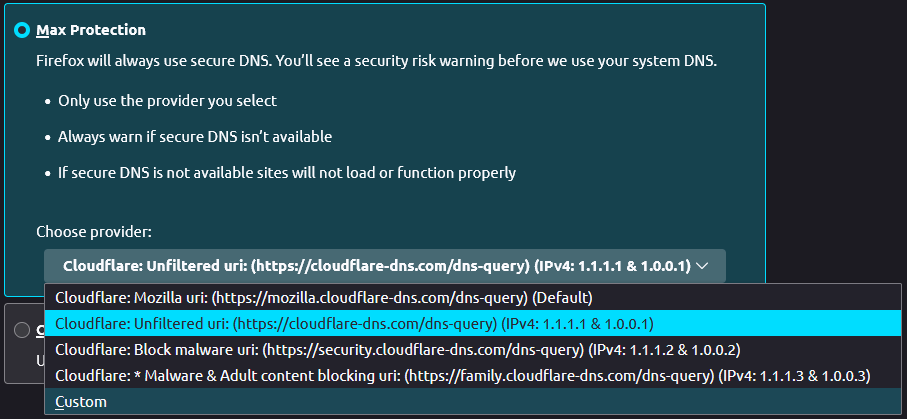
The image below shows how it's look like
This is a production site. Not a place to point your tools to play with.