


failed Thunderbird profile import from Postbox -- NS_ERROR_FILE_NO_DEVICE_SPACE

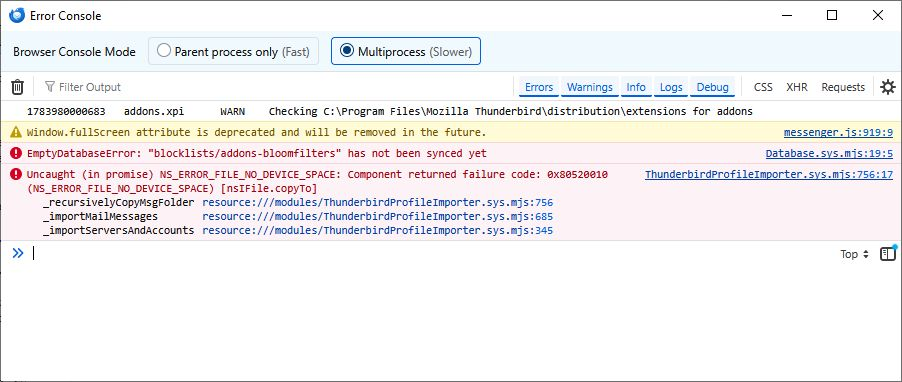
With a new Thunderbird installation on Windows 10 Pro, I attempted to import my profile data from a Postbox on another machine. The process failed, citing two errors (see attached screen shot), EmptyDatabase Error: "blocklists/addons-bloomfilters" has not been synced yet Uncaught NS_ERROR_FILE_NO_DEVICE_SPACE: Component returned failure code: 0X805200010
The profile being imported is pretty large -- around 20Gb, so I wonder whether I have surpassed some capacity limit. I was doing this via the Import Tool on the Tools menu.
Porting my legacy mail folders is crucial. Any help would be greatly appreciated.
Ọ̀nà àbáyọ Tí a Yàn
delete all of the MSF files with Thunderbird closed. They are quite probably not quite the same as Thunderbird's version. They are not really required and will be regenerated when the mbox files included in the profile are reindexed when you select that folder.
A failure to display mail after a deletion of the msf files is more likely a problem with the underlying mbox files (which the failure to display content may be highlighting) so a failure might actually be progress. David's process assumes all mail is stored locally, in mbox files usually), as postbox is mostly the same as Thunderbird you might not have been storing mail locally so there is nothing local to display.

All Replies (6)
Try this: First, remove all addons as some may not work. Or at least disable them
- start postbox
- click help>troubleshootinginformation
- scroll to 'profile folder' and click 'open folder'
- exit postbox - you should now be in the profile folder. You can verify that by looking to see if abook.sqlite is there.
- copy profile content to external media
- install thunderbird , downloaded from thunderbird.net
- start thunderbird
- click help>troubleshootinginformation
- scroll to 'profile folder' and click 'open folder'
- exit thunderbird
- delete everthing there
- now, paste contents of exported profile
- if there is a compatibility.ini file, delete it
- restart thunderbird
Thanks, David That worked.
On my first attempt, I put my entire profile directory from my old machine, including its root, in the Profiles directory, rather than putting all its contents in the folder that was opened by the troubleshooting tool. Also, I failed to delete the compatibility.ini file.
All good now.
You are quite welcome. :)
Well, I spoke too soon. I can't get any of my imported messages to display their content. The headers look fine in the Inbox and other folders display, but trying to open them, either by a click or using the menu to open in another open, produces no display, either in the message display frame or in the new tab. If there is a newly received message in the display area, trying to open an legacy message leaves the new message still displayed. Also, if I try the print option from the legacy message header, the print preview window shows the (still present) newly received message. So it seems the content of the legacy message is not being sent to the display, regardless of whether it exists or whether it has been reduced to null content.
Any ideas about that?
Ọ̀nà àbáyọ Tí a Yàn
delete all of the MSF files with Thunderbird closed. They are quite probably not quite the same as Thunderbird's version. They are not really required and will be regenerated when the mbox files included in the profile are reindexed when you select that folder.
A failure to display mail after a deletion of the msf files is more likely a problem with the underlying mbox files (which the failure to display content may be highlighting) so a failure might actually be progress. David's process assumes all mail is stored locally, in mbox files usually), as postbox is mostly the same as Thunderbird you might not have been storing mail locally so there is nothing local to display.
OK! That worked. I'm seeing my content now. Attachments are there, too.
BTW, I knew I was storing content locally. Had been careful to set it up that way, so I was able to browse email history when off-line on my old machine. I've set Thunderbird to do the same.
Thanks again, very much.