


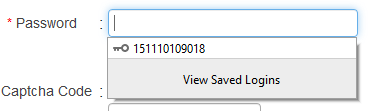
When I go to any page or website for registration It is showing the view saved log in. How can i fix it?

When I go to any page or website for registration It is showing the view saved log in. How can i fix it?
When I go to any page or website for registration It is showing the view saved log in. How can i fix it?
All Replies (1)
Hello Sai_Patel,
This is what you are talking about :
https://matthew.noorenberghe.com/blog/2019/05/password-manager-improvements-firefox-67
To disable this new feature that came with the update to Firefox version 67.0 :
Type in the address bar about:config and press Enter (promise to be carefil, if asked)
Type in the search bar and look for the preference :
signon.showAutoCompleteFooter
And set its value to false
Then close and restart Firefox.
You won't see it again .....