


How to stop Thunderbird from constantly trying to check email

I'm using Thunderbird 153.5.Oesr (64-bit) on a Linux machine (Zorin OS).
Most of my email addresses use POP, but with a new email address, I decided to use IMAP. When I'm disconnected from the internet, that particular email address keeps checking for new emails and saying it can't connect. I don't WANT it to connect. A message pops up every few seconds or so and is very annoying. I need to unplug my ethernet cable/adaptor periodically, since it seems to overheat, so keeping it connected to the internet continually won't work.
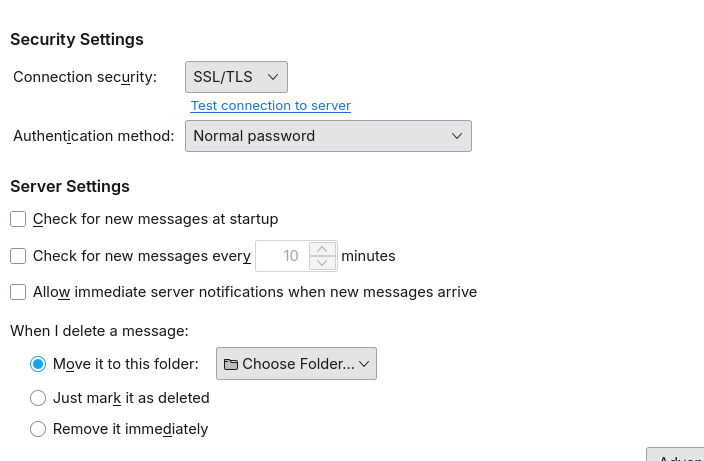
I have un-selected the boxes in Server Settings to check for messages. See the images below.
Any ideas? Thanks!

All Replies (4)
This article may help: https://kb.mozillazine.org/IMAP:_advanced_account_configuration IMAP checks mail periodically by default.
Hi David,
Well, I read the article, but didn't really understand it. I guess there's no way to stop TB from checking for email every 10 seconds or so, and giving me that error message (which blocks part of the tool bar for files I'm working with).
Maybe I'll see if I can switch back to POP for that email address. The other email addresses that are POP don't have this issue.
I found a question from 2019 about this, which seems to say you can't just switch from IMAP to POP. There are a lot of instructions about how to copy emails to a new account. I also found this: https://support.mozilla.org/en-US/kb/faq-changing-imap-pop
So, if you have any other tips on how to keep my emails, I'd appreciate it. Luckily, I haven't had this email address for too long, so it doesn't have thousands of emails in it!
Thanks, DD
I noticed that the error message you posted was for a POP account being refused access Maybe thunerbird doesn't know you're offline. Try clicking File>offline . I think that may stop your problem. If thunderbird knows you're offline, it shouldn't be attempting to connect. Let me know how that goes.

You can usually fix this by going to Thunderbird’s **Settings → General → Network & Disk Space** and checking the connection settings. Under **Account Settings → Server Settings**, disable “Check for new messages at startup” and “Check for new messages every X minutes.” If you want to stop automatic checks completely, make sure both options are unchecked for each affected email account.