


Blocked by Cloudflare from installing extensions

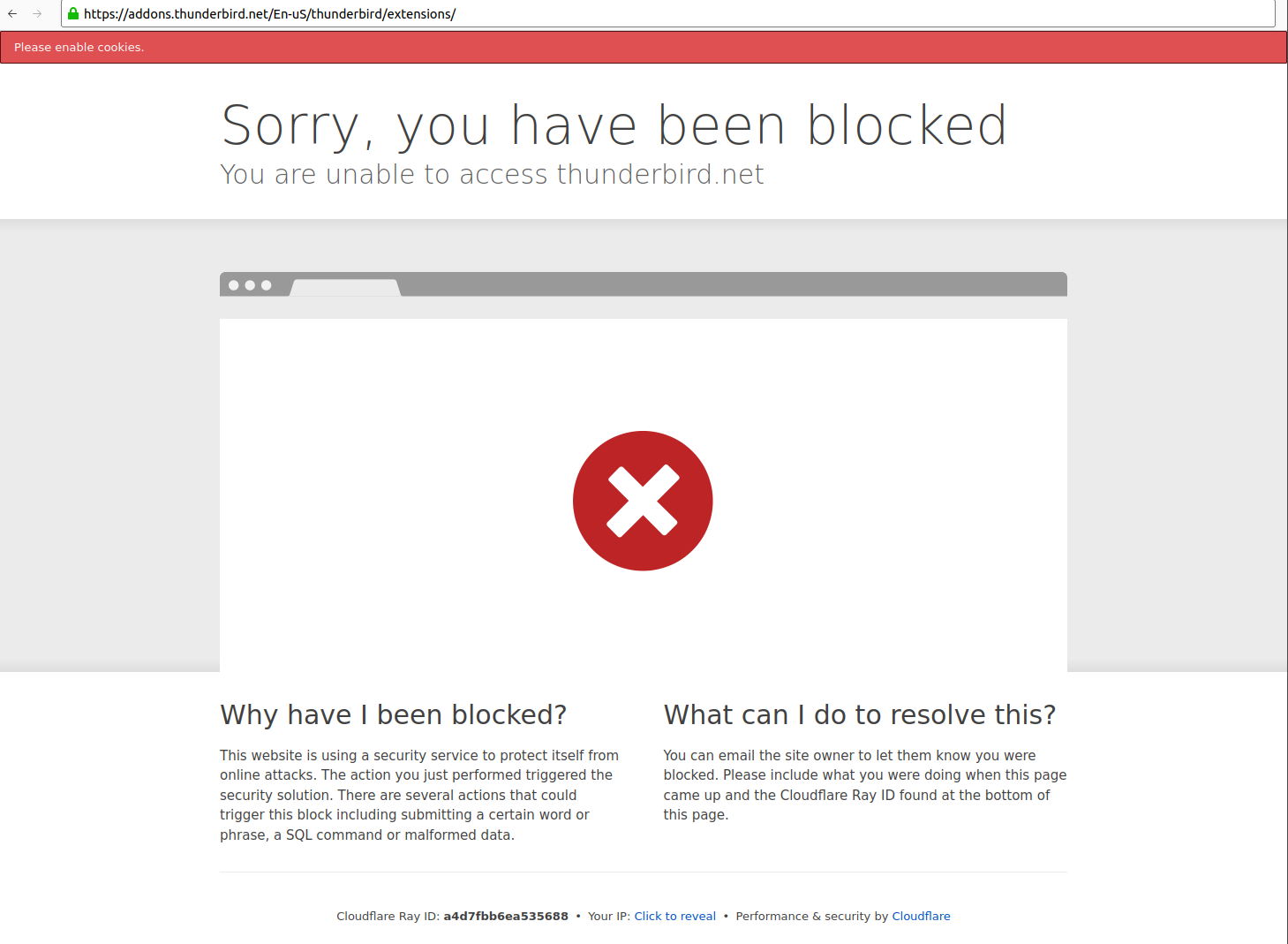
When I click "extensions" under Tools > Add-ons and Themes, I get the following message:
Sorry, you have been blocked You are unable to access thunderbird.net
I.e. going from https://addons.thunderbird.net/en-US/thunderbird/search/ to https://addons.thunderbird.net/En-uS/thunderbird/extensions/
This happens in Thunderbird, Firefox and Vivaldi, both from my job or my home network (using NordVPN). Funnily search still works, so I suspect the link itself might be broken. Cloudflare tells me to contact the site owner, but they have made themselves incommunicado and refer me to community support who obviously aren't able to fix the problem!
(It is also disconcerting that Cloudflare asks me to enable cookies in Thunderbird, which is a huge privacy issue. However I get the same error in browsers with cookies enabled, so that is not the real issue here.)
All Replies (3)

If it happens with several unrelated applications, it's obviously not a Thunderbird-specific problem. As a test, I just disabled cookies and removed all cookies from Thunderbird and I had no problem connecting to either of those URLs you mention above. The links are not broken. There's something else peculiar about your setup.
- Does this still happen when you restart Thunderbird in Troubleshoot Mode (see <Help | Troubleshoot Mode>.)
- Does this happen when you disable your VPN?
- What other antivirus or network security software do you run, if any, and does it work better if you temporarily disable them?
Sorry if I wasn't making myself clear – I'm not asking for technical assistance, I'm trying to report a bug in the Thunderbird infrastructure, and this was the only available option under "contact us". So I'm hoping somebody responsible for coding the thunderbird.net site will eventually be reading this.
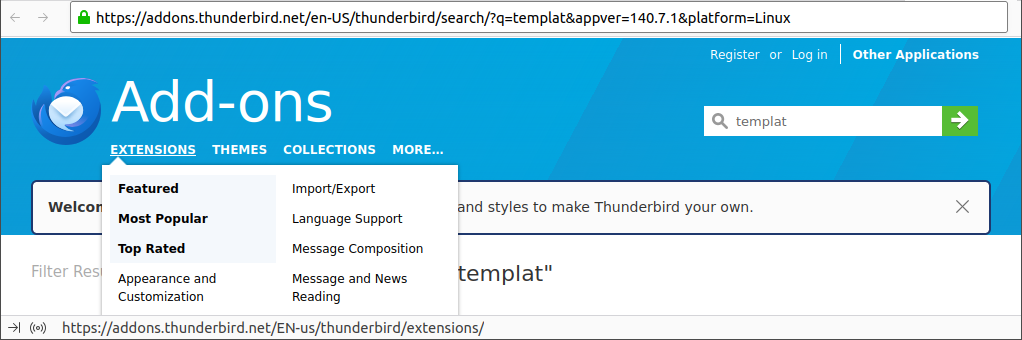
After verifying the problem is present under both Android, iOS and several Linux browsers, I checked with my colleagues at work who could confirm that not only were they blocked too, but someone spotted the error causing the blocking. If you look closely at the screendump below, you will see that the page itself is using the "en-US" locale, but the link under "Extensions" is using "EN-us" which is invalid and triggers the blocking. Same thing happened yesterday but then the link locale was "En-uS", and today on my iPhone it links to "En-gb". When you edit the URL (which can only be done in browsers, not in Thunderbird) to the correct ISO codes (ll-CC) the blocking disappears. So there must be some form of case-mangling in the addons website code which causes invalid links to appear inside Thunderbird.
> I just disabled cookies and removed all cookies from Thunderbird and I had no problem connecting to either of those URLs you mention above
Well, obviously it must have worked for *someone* or the error would have been discovered ages ago. The problem seems to be a combination of malformed URLs together with overly aggressive anti-bot Cloudflare rules which both must occur to trigger the block (probably penalizing non-American users). This is not limited to Thunderbird though – recently I reported that Lenovo Support blocked all browsers on Linux platforms, which was fixed within a week.
This forum is really for support of Thunderbird itself. The best place to report web site issues would be to follow the "Contribute to this site" link at the bottom of the main thunderbird.net page.
I reported the issue for you there. If you want to follow it or comment, it's found here:
https://github.com/thunderbird/thunderbird-website/issues/1345