


How do I enter my Greenby password in to Thunderbird

I am unable to access my mails on Greenby with Thunderbird and I suspect the password is incorrect. I can read my mails on the Greenby server and know the necessary password but cannot work out how to enter this into Thunderbird! As I am no expert, a simple guide would be most appreciated! Thanks in advance. Roy
All Replies (9)

Stored passwords can be found at <Settings | Privacy & Security | Passwords | Saved Passwords>. Here you can view, edit, or delete your passwords. Keep in mind that if this account uses OAuth2, what's stored here is not your actual password, but a unique token placed by the server, and editing it will be ineffective. If this is the case, let us know and we can guide you through the re-authentication process.
Unfortunately that leads me to a blank page! See attached. I have a second account (my wife's!) @tiscali.co.uk using Thunderbird as well with no problems! I'm confused!
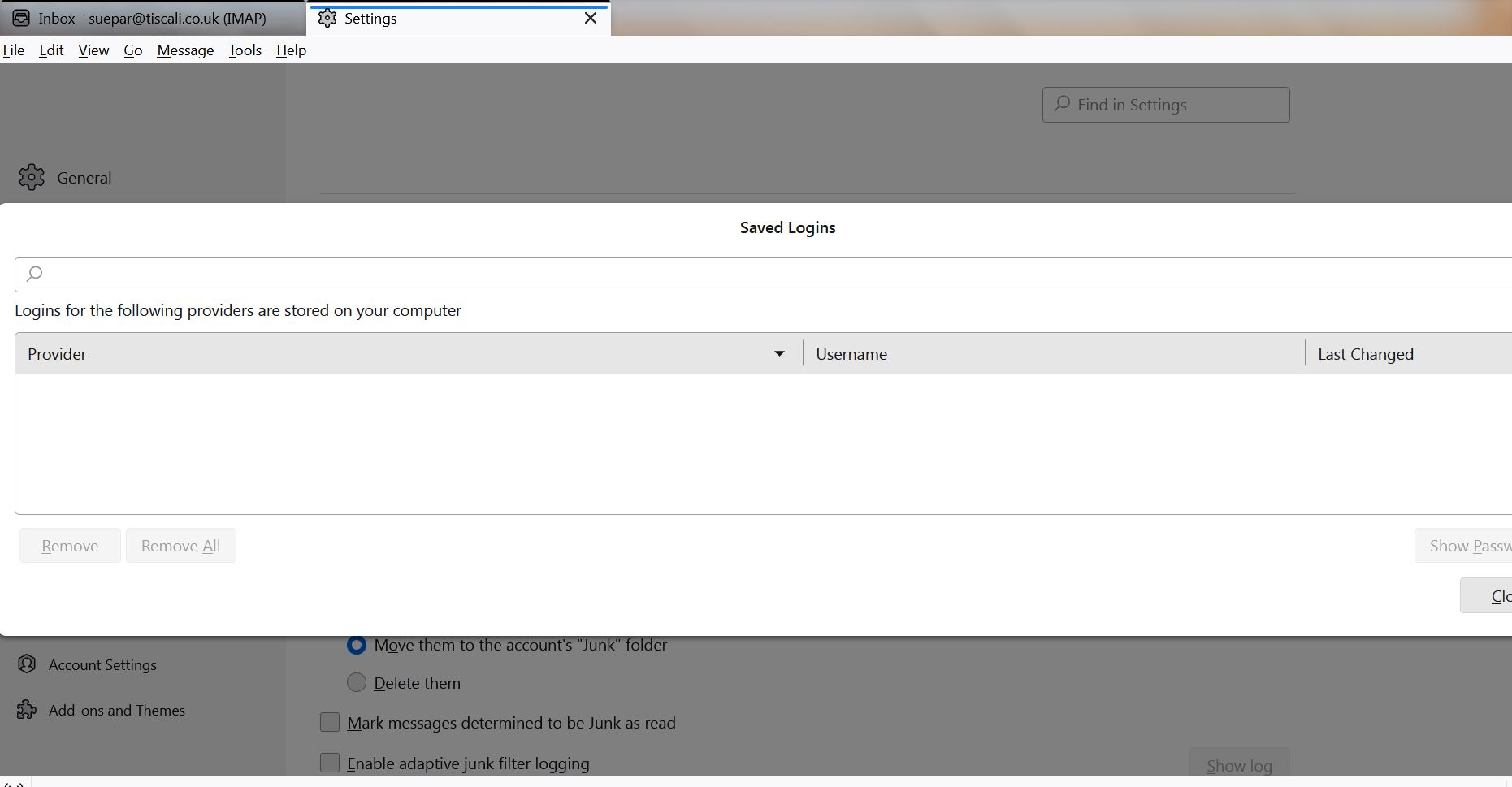
Help! I am still unable to sort my password out and cannot get at my e-mails with Thunderbird! Any suggestions would be welcome.
That is very curious. If Thunderbird is also set up for your wife's account, you should see her passwords listed there, too. Is it possible that you have typed a few Space characters into the password window's Search bar?
Have you confirmed that you're using the correct server settings? I found their settings guide:
https://greenby.com/support/knowledgebase/article/29
Normally you're prompted to enter your password when you first set up the account, and asked if you want to save the password or not. To force Thunderbird to re-request your credentials I would suggest deleting all passwords for that account in Stored Passwords (assuming there are any,) AND deleting all cookies for that account (see <Settings | Privacy & Security | Web Content | Show Cookies>. Also, make sure "Accept cookies from sites" is enabled.
If this doesn't work, it may be worthwhile to create a new Profile for testing purposes. But we'll come back to that after you try the above.
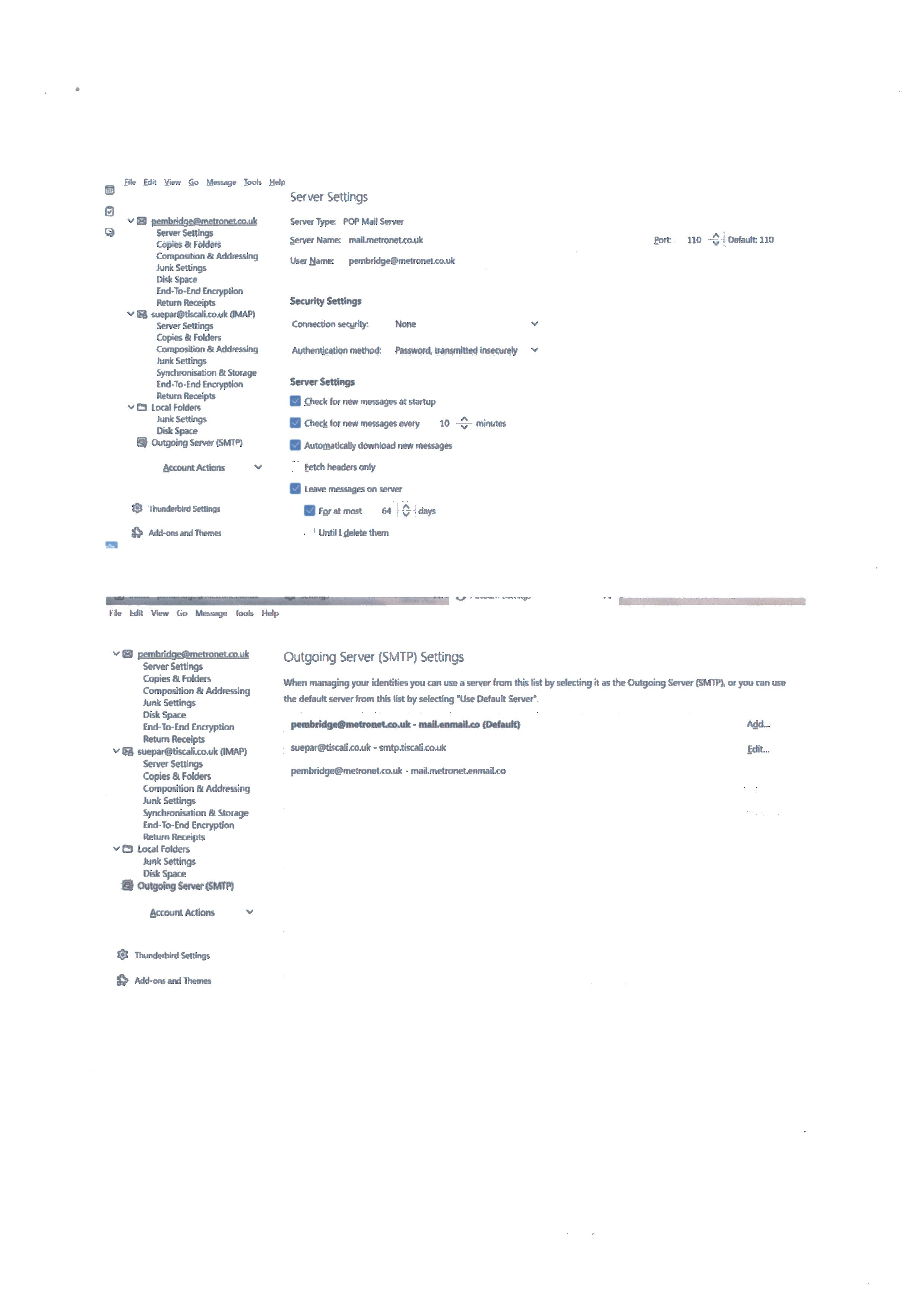
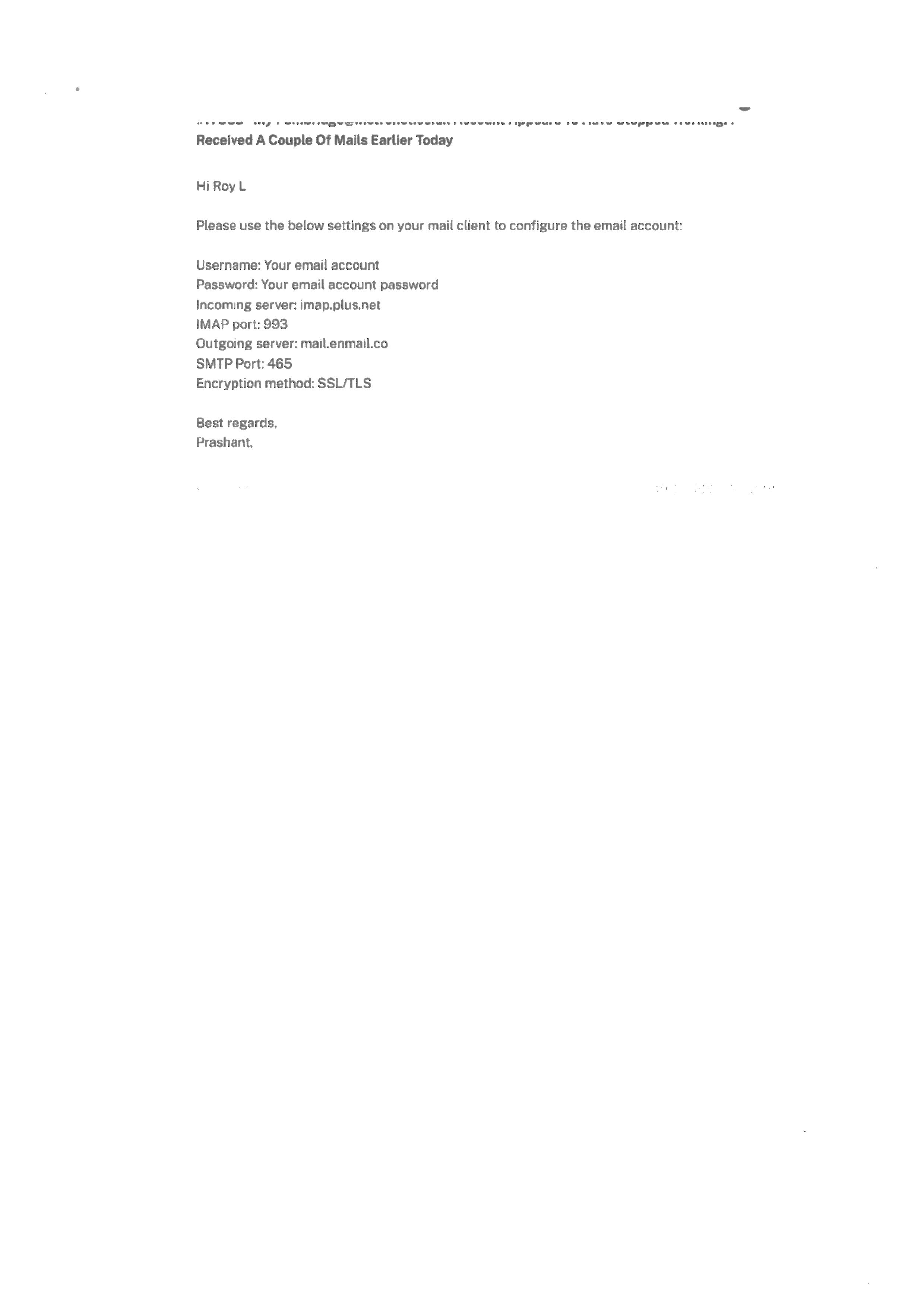
Lin. Sorry about late reply - I've been ill so no progress. I've got no further and have been struggling by reading the Greenby server direct. It must be the slowest site I've seen since the old dial-up days! I've attached a screenshot showing my current server settings and Greenby's recommended settings from earlier. If you could cast your eye over this and see if anything stands out? I still have the feeling it is a password problem that perhaps I'm not understanding. I know and can use the Greenby password successfully but not the Mozilla one?
Am I understanding the situation correctly, that you are migrating your email from metronet to greenby? Have you read through their FAQ page?
https://www.plus.net/help/email-account-changes/
Was that an email sent to you by their tech support? If so, I guess we have to take that as gospel, or at least the most likely settings. This is all very confusing - I find a bunch of supposedly correct, but conflicting settings on the Internet. However, your settings as you show in your screen shot are not at all like their recommendations.
You show as your current incoming settings:
Incoming Server Type: POP3 Incoming Server Name: mail.metronet.co.uk Port: 110 User Name: (your metronet email address) Connection Security: none Authentication method: Normal password
The email from "Prashant" wants you to use:
Incoming Server Type: IMAP Incoming Server Name: imap.plus.net Port: 993 User Name: <usually your email address> Connection Security: SSL/TLS Authentication method: Normal password
You don't show your complete current outgoing (SMTP) settings, but you do appear to have correct server name, mail.enmail.co .
If you would like to try these out, I urge you to create a brand new account in Thunderbird so as not to risk losing any of your current email. You should also make a backup copy of your Thunderbird Profile in case something goes wrong.
I don't like to pass the buck, but we can help you set up Thunderbird, but you must provide the correct server settings. Usually that information is easily available from the provider, but Greenby doesn't make it easy to find.
https://greenby.com/support/knowledgebase/faqs
New email accounts in Thunderbird are created from Accounts Settings. If your newly-created test account functions correctly, we can work to transfer your saved email from the old account to the new.
This whole thing is kind of a nightmare and I blame Greenby, Plusnet, and Metronet.
Many thanks Lyn. The background is that my original metronet e-mail address was carried over to Plusnet when I joined them for broadband and phone some time ago. They recently decided to get out of broadband and transferred all accounts to Greenby saying "there is no need to change any settings etc.", that would all be handled by Greenby!! And for a couple of months all was fine Then I found my account was blocked, apparently for "unusual activity". I reset my password as requested and the account was re-instated but after a couple of weeks I couldn't connect again. I have tried using previous Thunderbird passwords etc. without success - and lost track of previous settings! I know the Greenby password which works OK to give me access to the account on the Greenby server (albeit painfully slowly!). Hence my suspicion about passwords! I've been thinking about my understanding of Thunderbird and passwords. One thought - when I enter a password in Thunderbird to get messages from Greenby's server, I used to enter the same password as the Greenby account as they coincidentally happened to be the same! Not a good idea perhaps, but ... Which is why my original Question was about managing passwords in Thunderbird!. How do I get to the Thunderbird password to check it or change it? I can't seem to find any way to do this! I can adjust the Greenby settings to what they now recommend but until I can "correct" my Thunderbird password I'm a bit stuck! Many thanks for your understanding! Roy
When I say above "I reset my password as requested ..." I refer to the Greenby password!
The only password that's unique to Thunderbird is an optional one that you could use to password-protect your Saved Passwords. It's unrelated to the password that you would use to log into your provider's web mail. When you first try to fetch or send email, Thunderbird will ask you for your provider's password - the same one you would use to get into web mail. Thunderbird just passes that on to the provider. IOW, for your purposes, there is no "Thunderbird password", only your provider's password, which will be stored in Saved Passwords.
Since you can log into Greenby's web mail with your known password, I think the problem in Thunderbird is incorrect server settings, which Greenby is vague about.
I suggest that you create a new profile for testing purposes and use the settings that your contact at Greenby gave you, which will also give you a fresh password vault, in case the old one, which you say is blank, is corrupt.
Here's an article describing how to create a new profile:
https://support.mozilla.org/en-US/kb/profile-manager-create-and-remove-thunderbird-profiles