


Delay moving messages to and from 4 certain mailboxes (win10, v152)
It's very odd. Normally moving an email, say from the Inbox to the relevant year's archive, takes "no time at all".
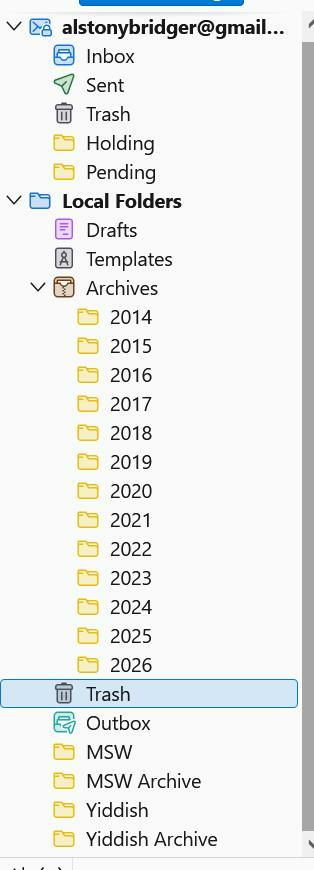
Which is true for all the mailboxes shown on the attached screenshot, EXCEPT for the four at the bottom. Moving even one message from Inbox to Yiddish can take ten seconds or longer (with the dreaded "Not Responding" occasionally). Moving something in the opposite direction is also screwy, only from those four.
I had thought that it was because they're rather large. This first started when there were just Yiddish and MSW, and I split off most of the earlier years into the archives shown. To no avail.
It's only an annoyance, but I'm puzzled about how such a thing could happen.
Also very slow tagging or untagging a message just in those mailboxes.
Wayne Mery moo ko soppali ci
All Replies (16)
Just as a test I added a new mailbox aaaa which appeared between Outbox and MSW. Moving messages into and out of aaaa works as it ought to. So what's special about the four slow ones?
It might be that aaaa is very small, but MSW and Yiddish aren't nearly as large as the yearly archive files, where message transfer works quickly.
Does the problem reproduce when you run with Help > Troubleshooting Mode? (do not enable any of the checkboxes when prompted during the start)
Still took about 8-10 seconds to move a message from Inbox to Yiddish. Avoided the Not Responding hiccup, but not different.
I had "repaired" those mailboxes in response to an earlier suggestion.
Thanks for trying.
What is your version number? How many messages in each of these folders?
152.0 (64-bit) with W10.
2025 951 messages 2026 665 MSW 98 MSW Archive 2066 Yiddish 304 Yiddish Archive 5934
Thanks for the numbers. Those are not large folders.
Please do the key and menu sequence alt > file > offline > work offline > download now.
Now move one message timed with a clock. How many seconds?
- If it is not slow, repeat and test a few more messages.
To get back to normal mode alt > file > offline > you should see that "work offline" has a check mark > click on "work offline" Move one message timed with a clock. How many seconds?
Ok, offline: Moving one: 10.67 (undoing the move took as long) Still slow, but a few more tests: 3 moved together in 12.38 (deleting the three took 7.54) Tagging two messages in MSW took 8 seconds. But when I repeated tagging right away, it was fast.
Back on line: 10.52 moving one to Yiddish, 10.72 to undo the move
No joy, I'm afraid.
BG
Later, I tried again, moving a message from Trash to Yiddish. The same 10 seconds or so, but when I hit Ctrl-Z to undo the move, the message "header" appeared in the Trash list, though the body took its time. FWIW.
AlBridger moo ko soppali ci
We're into a process of elimination and collecting information.
Does the same problem happen for the two test messages I emailed you? Where are your folders stored - on a network disk, or local disk?
Simple test message moved to Yiddish: 10.76 seconds Undo move:10.34 HTML test message to MSW: 7.44 And undo: 6.39
HTML moved to Y: 10.6 Simple moved to MSW: 6.7
Deleting HTML message from Y also took about 10 seconds.
Both are terrible, but MSW is ~30% "faster" -- ???
Thanks for that test, and apologies for the back and forth, but the cause may be something we haven't seen before.
- Where are your folders stored - on a network disk, or local disk?
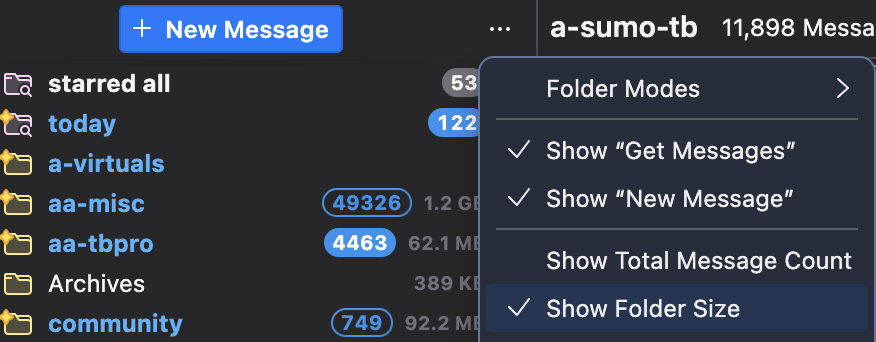
- What are the affected folder sizes in bytes? You will find this by clicking on the three dots in the top right of the folder pane and selecting "Show Folder Size" (see screen shot)
- Start Windows in safe mode with networking enabled - https://support.microsoft.com/en-us/help/12376/windows-10-start-your-pc-in-safe-mode. Still In Windows safe mode, start Thunderbird in Troubleshoot Mode - https://support.mozilla.org/en-US/kb/troubleshoot-mode-thunderbird. Does problem change? (you might want to print the Windows safe mode instructions)
Wayne Mery moo ko soppali ci
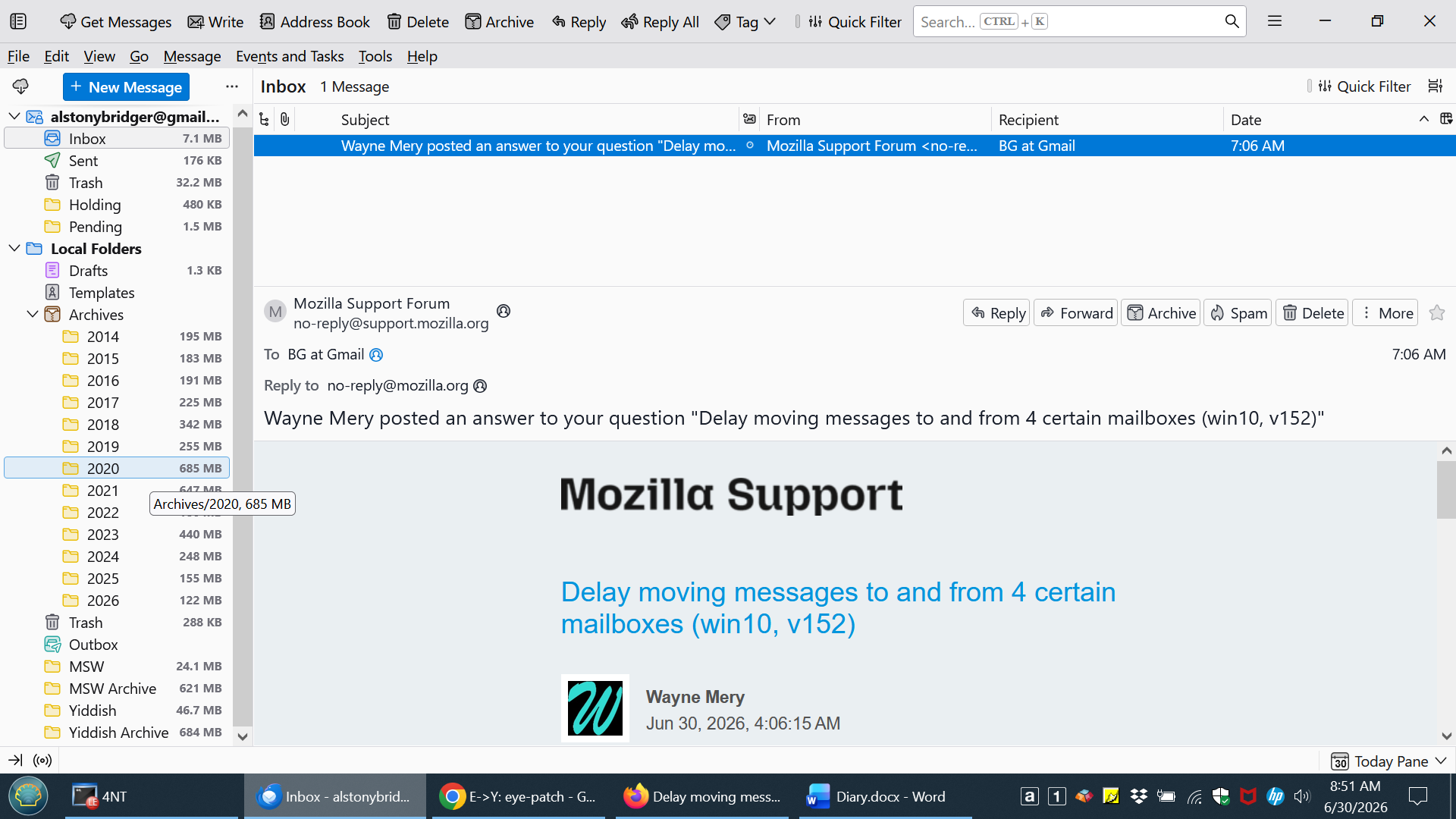
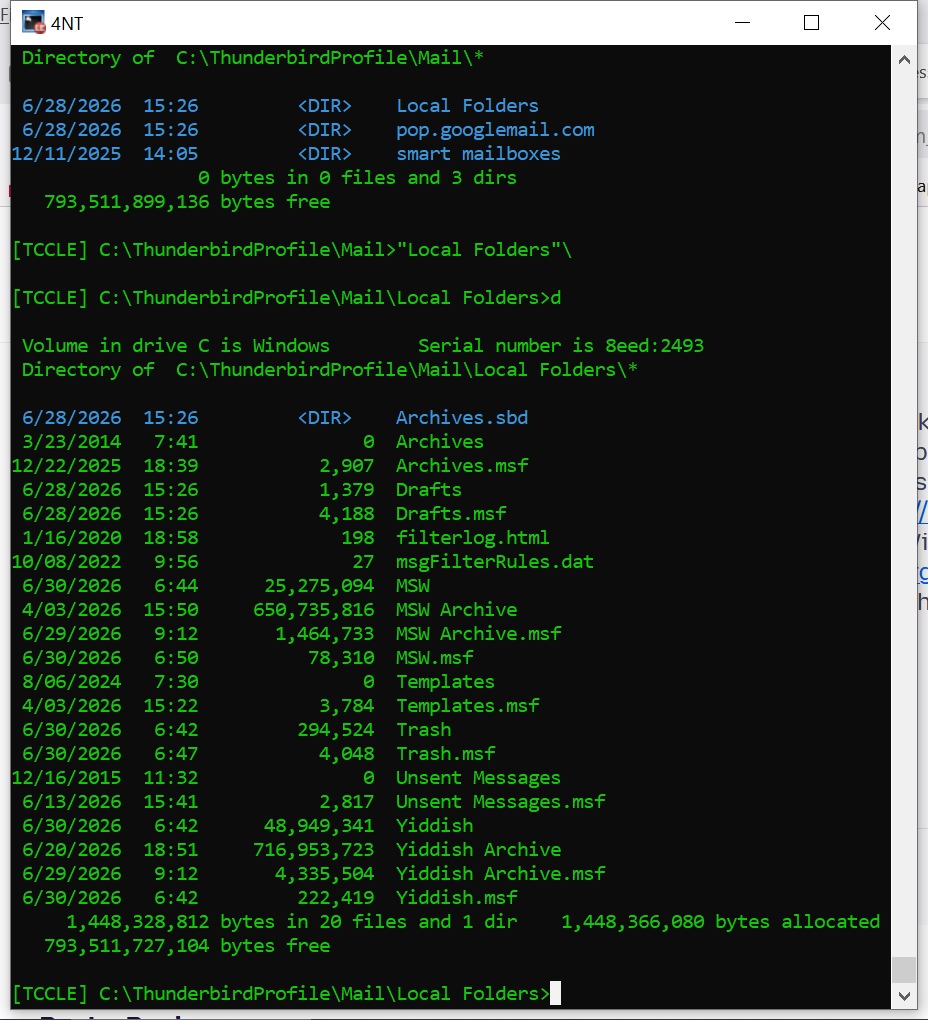
No need to apologize. I was a programmer in a former life. 1) On a local disk, in C:\ThunderbirdProfile. See screenshot. 2)See second screenshot. 3)will have to wait until this afternoon
Thanks.
BG
Hi --
First, fwiw, I started Tbird on my backup pc (also W10). Same problem.
Regarding Safe Mode, will restarting in normal mode after troubleshooting return my system as I've come to know and love it? If it's going to disturb things, I'm a bit hesitant.
AlBridger said
Hi -- First, fwiw, I started Tbird on my backup pc (also W10). Same problem. Regarding Safe Mode, will restarting in normal mode after troubleshooting return my system as I've come to know and love it? If it's going to disturb things, I'm a bit hesitant.
Good question. Safe mode is largely a temporary toggle of what you see in the windows startup program list in Windows task manager. So yes, it should not disturb normal startup - I have never heard of that happening.
I'm back, but I got lost on the way. Rather complicated and I hit what seems to be a stone wall. A Microsoft Key somewhere in a BitLocker. Which I've never heard of.
But I did start Tbird in troubleshoot mode and the problem is still there.
AlBridger moo ko soppali ci
My reading is "Booting a BitLocker-enabled PC into Safe Mode requires your BitLocker Recovery Key. Windows triggers this prompt to protect your data. Before proceeding, locate this 48-digit key in your Microsoft Account, printed document, or Azure Active Directory."
At 48MB the Yiddish folder isn't that big. My primary working theories are: hardware problem (seems unlikely), Windows problem (should be ruled out by Safe Mode), Thunderbird bug related to the type of message.
Can you forward to me an example message that is slow? Right+click on a message and do "Save As", send it as an attachment to wayne at thunderbird.net
I'm totally ignorant re BitLocker and the recovery key. Maybe because this is a refurbished pc set up by the seller?
Since it happens on two machines, I doubt it's hardware. Can't rule out some nasty interaction w/ Windows, but see above.
This has been going on for quite a while, though certainly not forever. I hesitate to guess, but on the order of a few months maybe.
I'll send you a message via your email, though I've been picking random messages from Trash or Inbox for the testing.