Solved
Downloading messages

How do I set up Thunderbird to download all messages from the email server and then delete any messages over 30 days on the server?
How do I set up Thunderbird to download all messages from the email server and then delete any messages over 30 days on the server?
All Replies (1)
Saafara yiñ Tànn
Go to the app button ≡ and click Account Settings.
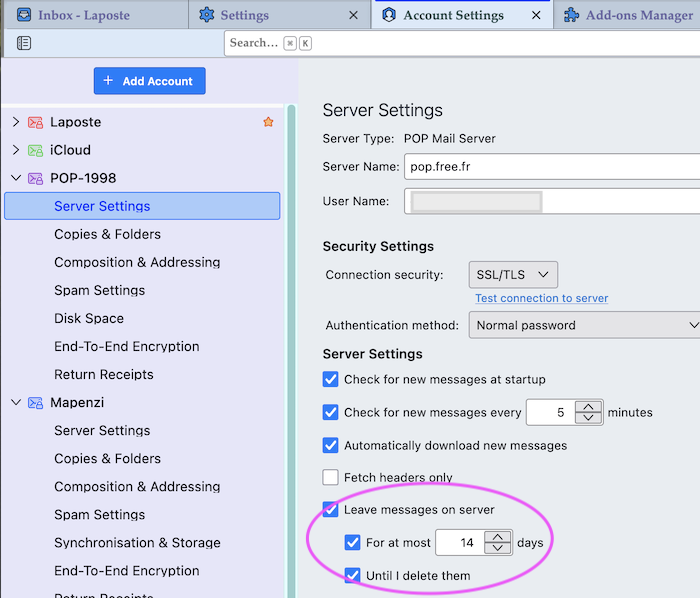
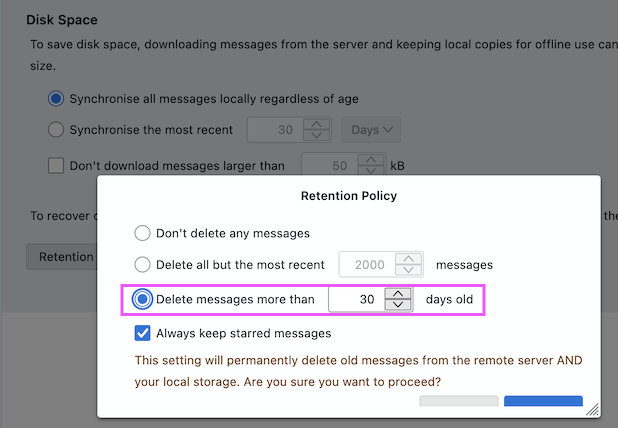
• If the account is set up with the POP protocol: select account name in the left panel click Server Settings > Server Settings > Leave messages on server > For at most: choose 30 days • If the account is set up with the IMAP protocol: select account name in the left panel > Synchronisation & Storage > Disk Space > hit the Retention policy button and in the following popup box activate the radio button ◉ Delete messages more than 30 days old