Using Delete in Menu Bar, I can only delete from Unified Inbox, not individual accounts
Sorry - I feel as though I'm monopolising this forum at the moment!
In my Menu bar, I have Delete, but, using this, I can only delete emails from the Unified list, not individual accounts. I CAN delete from individual accounts if I select the email, right click and select delete. Seems odd
All Replies (4)
OK, I have absolutely NO idea why that happens, but I'll offer some suggestions to try. Maybe one will work.
- restart in troubleshoot mode and see if it works. If so, then it may be an addon that is interfering
- remove the delete button from tool bar, shut thunderbird down and restart and then add the delete button back and see if that works
- reboot the PC.... (probably a useless gesture, but I list it anyway)
Unified folders are not true folders, only virtual. Good luck.
david said
OK, I have absolutely NO idea why that happens, but I'll offer some suggestions to try. Maybe one will work.Unified folders are not true folders, only virtual. Good luck.
- restart in troubleshoot mode and see if it works. If so, then it may be an addon that is interfering
- remove the delete button from tool bar, shut thunderbird down and restart and then add the delete button back and see if that works
- reboot the PC.... (probably a useless gesture, but I list it anyway)
Hi David. Method 1 I went to Troublshhot Mode and had to add Delete to the Menu Bar, but then, when I tried to delete from a single account, it worked the first time, but not after that, The same happened with Method 2. This has been happening for a long time now, so I didn't try reboot
Are you talking about the correct toolbar ?
You cannot customise the 'Menu Bar' toolbar. It has the following items - File, Edit, View, Go, Message ,Events and Tasks, Tools, Help
If you select a Message then you can use 'Edit' > 'Delete Message'
Are you talking about the 'Unified Toolbar' ?
By default it contains the 'Global Search', but you can customise it to add some additional options. 'Delete' is an option you can add to the 'Unified Toolbar'. Please confirm you are talking about the Unified toolbar.
Other methods of deleting:
- Select/open message so you can see it in the Message Pane. Click on the 'Delete' button which is auto available in the Message Header area.
- Right click on email in Message List and click on the Delete/Trash icon top right.
- Enable the column header called 'Delete' - it puts a trash bin icon on each email line - click on it to delete email.
- Select email in Message List - press the keyboard 'del' key
Q: What version of thunderbird are you currently using ?
Q: How many accounts? Are they all imap or all pop or a mix of both ?
I presume you have several mail accounts as you mention using 'Unified Inbox' - so you have enabled:
- 'View' > 'Folders' > 'Unified Folders'
Q: Does the 'Delete' button on 'Unified Toolbar' work correctly if you switch off the 'Unified Folders' option and just use the 'All Folders' option ?
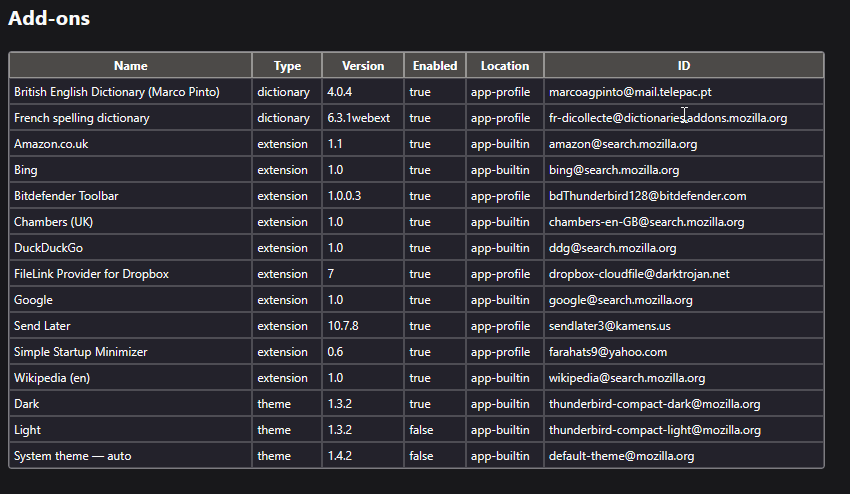
Q: What addon extensions are you using - if any ?
- In Help > Troubleshooting Information
- Scroll all the way down to the 'Add-ons' section
Copy all the contents in that are and paste the data into this forum question OR take a screenshot and upload the image.
I'm needing to know some info because I want to perform some tests and that means I've got to set up my view the same as yours.
Hi Toad-Hall,
I had no idea what the different toolbars are called - Thunderbird is not very user friendly with this. It seems to be this "Unified Toolbar" - see screenshots 1 and 2. I have it set up with Delete and it is this Delete button that is causing the problem I'm not looking for other delete options - I already know I can delete in individual accounts with Rt click-Delete or delete in any account in the Unified list using this Delete button . I'm trying to find out why the Delete button doesn't work on individual accounts.
Thunderbird 146.0.1 (64-bit) The two accounts I'm currently using are both POP
No, the Delete button doesn't work using All Folders
Add Ons - see third screenshot