


Why must Thunderbird have a 'Default' email account?

Example why question is being asked:
Three separate GMX email accounts, each with its own unique password, and NOW Application-specific password for Thunderbird. Aliases are not used or desired. Three different separate accounts that should each have its own outgoing server.
Worked fine until updates to Thunderbird and changes to the GMX server, and Application-specific passwords became a requirement to send and receive email.
Seems like updates to nearly every program and/or app that may be released with the intent to resolve an issue or include a new feature breaks something else. M$ is horrible with updates and labels nearly everything as a critical update so it gets pushed through even when updates are turned off or supposedly permanently disabled by a registry hack; Windows 11 being the absolute worse ever. Why I only have one computer with M$ while all the others are Linux. Problems all the time with M$ while Linux simply continues to work.
Regardless, can setup each GMX account but the default email account name must be used as the user name on the other two GMX accounts on the outgoing server in order to send email. Then the recipient sees the name for the default account rather than the name assigned to the other two accounts, and the Application-specific password for Thunderbird must be changed to that of the default. Then attempting to pull down email for the other two pop accounts comes to a halt, and email messages can only be viewed by going to the online account.
Two separate accounts for yahoo, two for gmail, and one for Charter work fine, each has its own name and outgoing server. Should be the same way for GMX but is not because Thunderbird requires one of the three GMX accounts is set to Default.
Appears by having a Default email account, users are not only restricted by the default account, but email that is sent is done so with he incorrect name, The purpose for three different emails is for email segregation and better management; personal correspondence, business related, and Internet stuff.
Instead of having a 'Default' email account, makes more sense to use a valid email to register Thunderbird after downloading and installing, and then using that email for Support, Boards, assistance, etc. The default email requirement causes too many frustrating unneeded issues that should not occur, along with wasted time, stress and grief. Computers were suppose to make our lives easier and allow us more time for the real world. Biggest lie told since the Bell Labs created the transistor.
Thunderbird 158.0.1 (64-bit) Thunderbird codename Meadow badgeMozilla Thunderbird Flatpak en-USthunderbird-flatpak - 1.0
Computer OS:
 Kernel: 7.0.0-38-generic arch: x86_64 bits: 64 compiler: gcc v: 13.3.0 clocksource: tsc
 Desktop: Cinnamon v: 6.6.9 tk: GTK v: 3.24.41 wm: Muffin v: 6.6.3 vt: 7 dm: LightDM v: 1.30.0
   Distro: Linux Mint 22.3 Zena base: Ubuntu 24.04 noble
تمام جوابات (17)
The default account is only for situation where you click 'new message' and the cursor is not pointing to any specific account That is not your problem. My guess is that those three gmx accounts do not have separate SMTP servers assigned. You can check that by
- clicking to 'account settings'
- highlight a gmx account in left sidebar
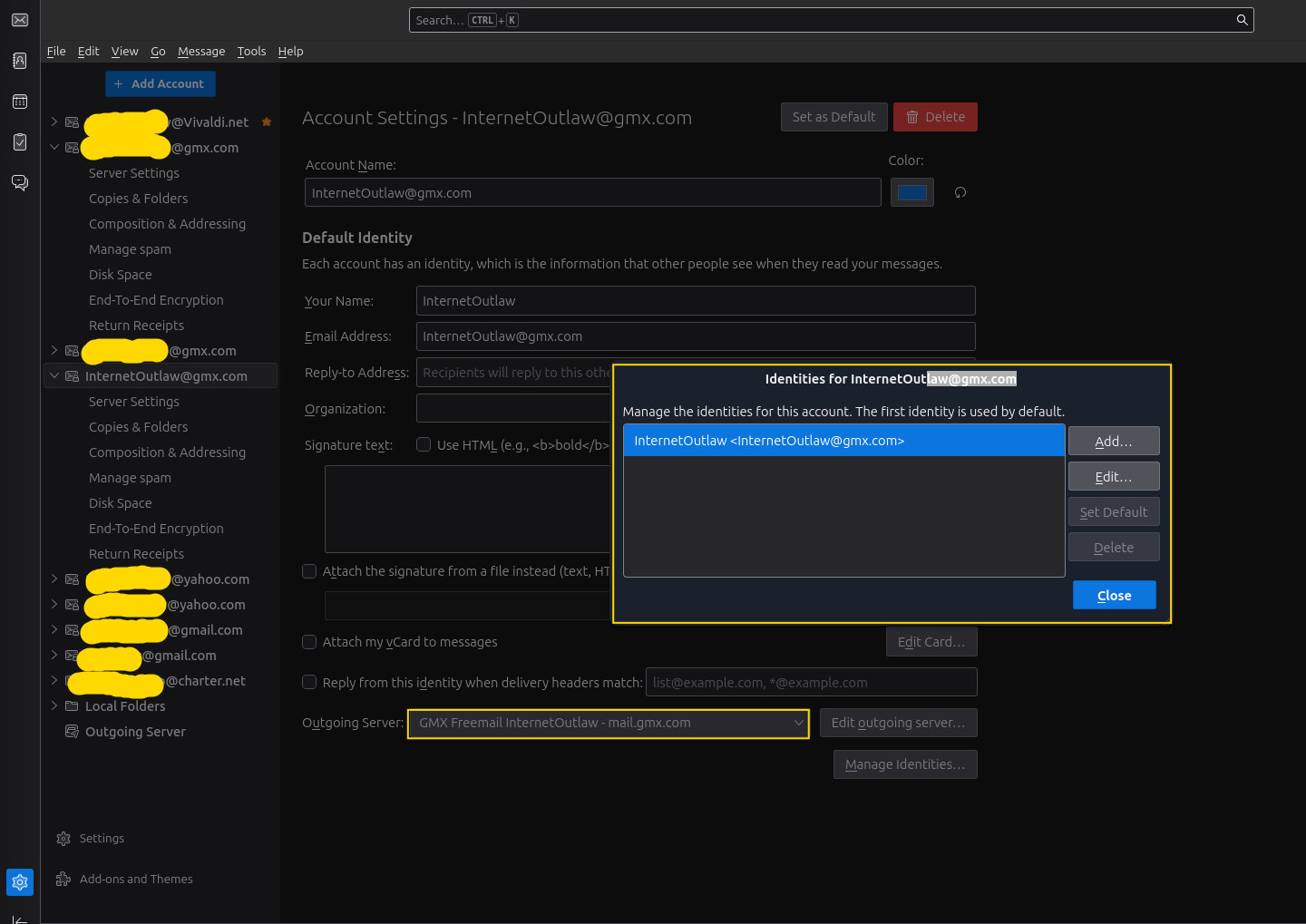
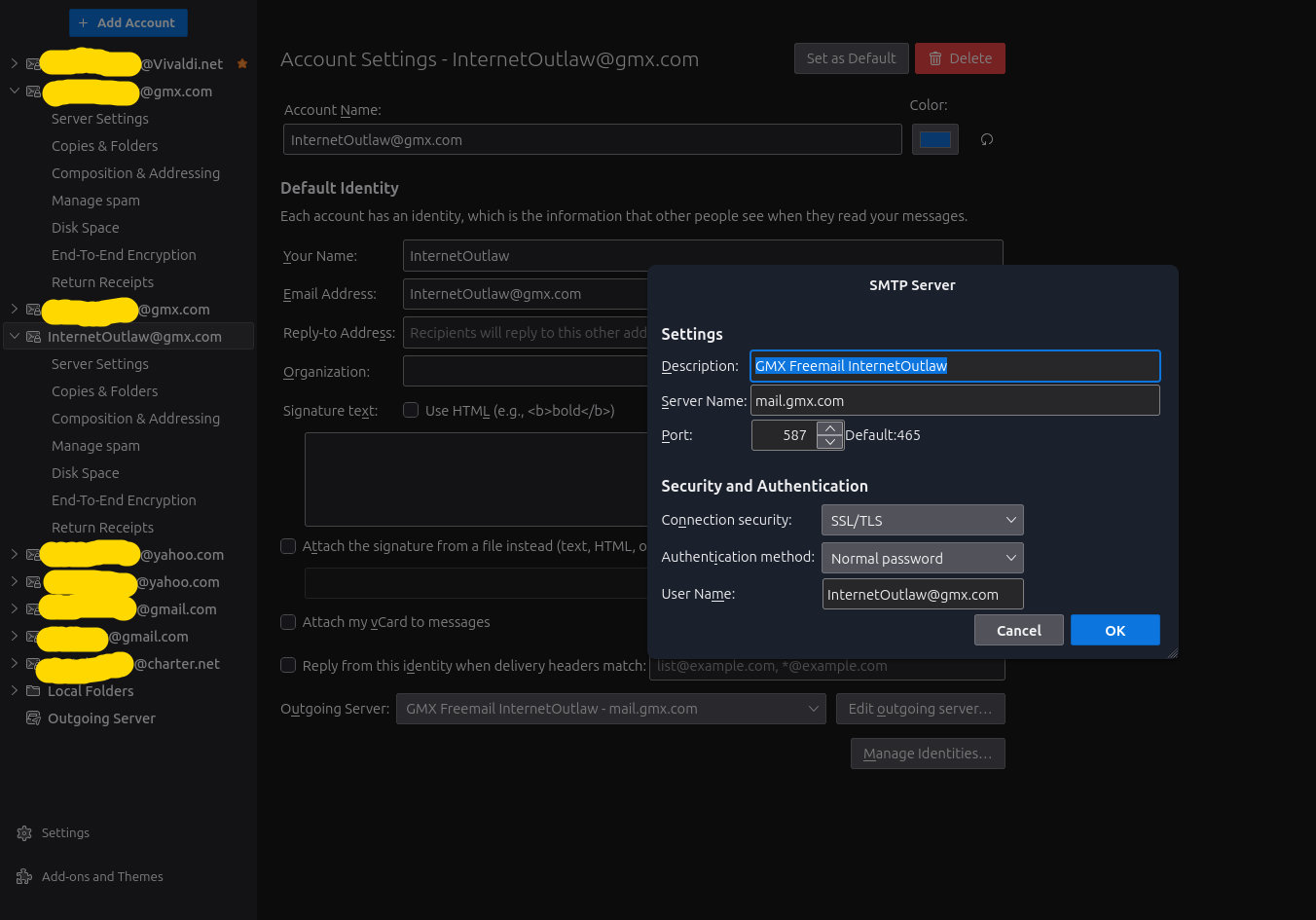
- now, click the button in lower right that says something such as 'Edit SMTP server.' Does the email address match the email address in the 'server settings' pane? If you check all three, I think you will find some discrepancies.
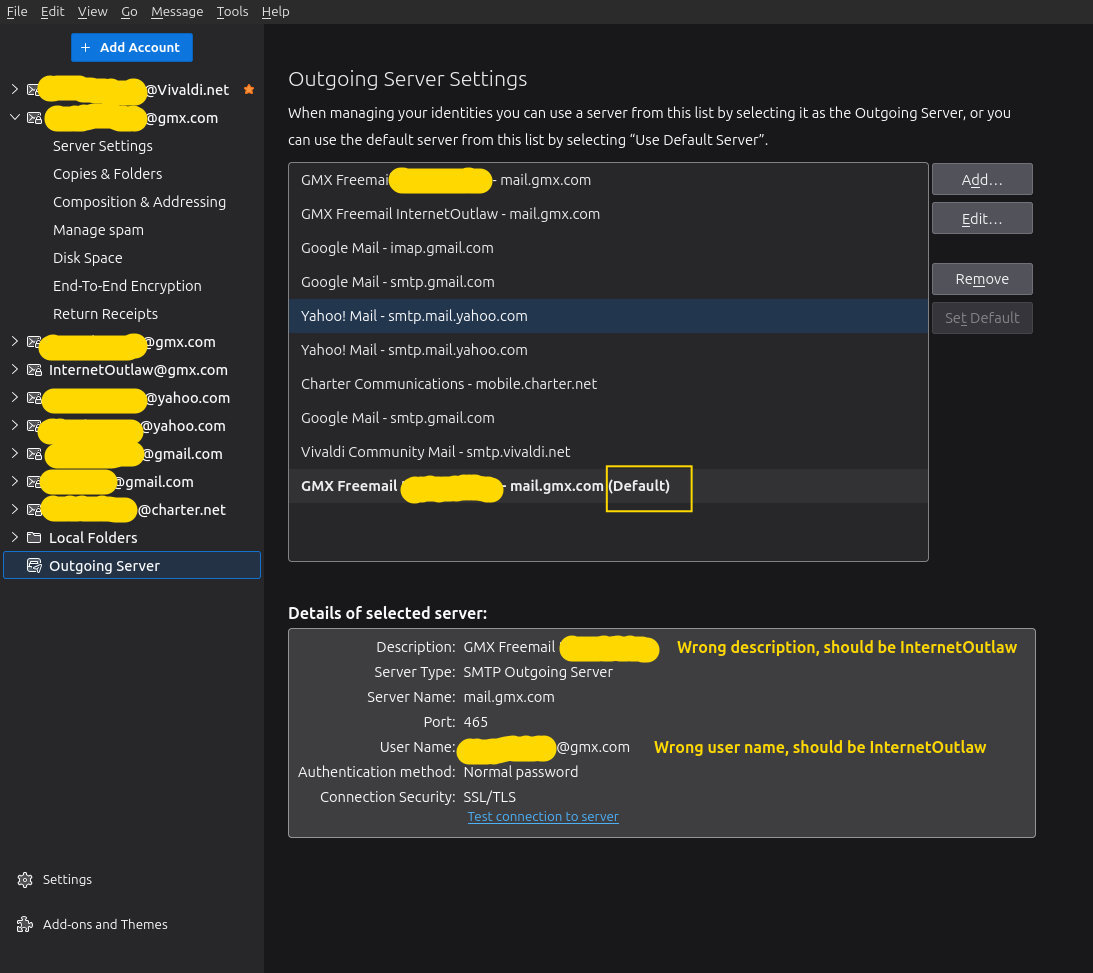
To see the full SMTP setup, while on the 'account setting' pane, click the 'Outgoing server' link near the bottom of left sidebar. That should display an SMTP server for each account. For the three gmx servers, I especially encourage putting a unique identifier in the 'description' field, such as the email address for the account. Once done, if you repeat the firs set of steps in my response, you should see the proper email ad showing on the lower bottom row when the account is highlighted in left side bar. Let me know how it goes.
Thank you very much for replying.
At this time I do not believe the issues I am experiencing using GMX with Thunderbird is a Thunderbird problem. Sounding more like a GMX problem more every day.
FYI, the email addresses matches the email address in the server settings pane.
Each email address also has its unique password since an 'Application-specific password' that must be used with Thunderbird. The normal password for each account can be used to access each account online.
Just going to have to dig even deeper, should I want to retain GMX. The frustration, time, stress and grief trying to use GMX is starting to become not worth it.
As originally stated, each email account worked fine until an update. Since then only one of the email addresses can be used to send email unless the outgoing server for the default email email address is used for either of the other two,. Unfortunately, then the the default ceases to work.
I had to leave isp.com as an email provider when the company was acquired and/or dissolved. The service they offered for a small fee was fantastic! Email, blocking features, small space online, and support.
I chose gmx which offered basically the same which worked absolutely great until the past few months.
Changes noticed with GMX:
1 - Email addresses and domains can no longer be blocked by accessing the online account and creating a filter. Blocking must be done by Thunderbird. 2 - When creating an email message from an online account, the default for attaching an image is from the cloud. The option of selecting a drive on the computer is inconsistent. 3 - The addition of advertisements in the inbox when accessing an email account online is not a good sign. If GMX is experiencing financial difficulties, offer an annual paid version with support. Its that good that people will pay for it, even if its just to return to the original configuration of the servers, and what was previously offered. Should not be that difficult since Germany has an incredible wealth of intelligent tech people available. The AI and general Q&A is not working , nor is it maintained and up-to-date. 4 - The requirement for a 'Application-specific password' which is generated online, and must be entered as the password for both the incoming and outgoing server to retrieve and send email for each gmx account in Thunderbird. Previously, the password for each account worked fine. 5- GMX pushing their app to access and send email which is available from Google and Apple Play Stores. (BTW, quite a few apps by developers for Android are going to stop working January 1, 2026 unless they sell their souls to Google.) Would not be surprised if GMX intends to drop support for email managers such as Thunderbird on computers in the future and focus only on 'smart' phones. 6- The lack of support compared to previously as an automatic email is sent by GMX, when using the form online to report an issue, stating to expect a reply within so many days.
It's really frustrating and time consuming to go-online to retrieve and send email. Therefore, until I find another email provider as good as GMX use to be, I just have to access two of the three accounts online. If an important email message is needed to be downloaded and saved, will just forward it to a yahoo (which i not always consistent) gmail (which I absolutely dislike using), or Charter email address (used by Spectrum) which works fine with Thunderbird.
One of the main reason I chose GMX was because it was not managed by Google which has the monopoly on email in the USA. Google has been allowed to become entirely too big and has too much control. The company should be broken up into multiple companies like what was done with AT&T, TWICE. However, that is not going to happen because the government is involved. Why gmail is actually government mail.
Again thanks for responding. My search for a new email provider to replace GMX begins.
Just as a comment, I have several gmx accounts with no problems. THere may be something in your setup. good luck.
Questions:
1) Is one of your GMX accounts set as Default? Pretty sure that is what is causing my issues.
Even entered my Vivaldi email account, placed it at the top of the list, and set it as default. Works fine. However, there is still a gmx account identified as Default. Cannot edit it or remove it.
May try creating a bogus GMX account and delete the account that is marked as default. Then edit the bogus account to that of account deleted.
2) Are you using Application-specific passwords for each of your accounts or just normal password?
3) When you send email from your gmx accounts, is the same name being displayed on all the accounts by the recipient?
It is your third question that causes me to still believe that you're using the same SMTP server for all three. I encourage you to follow the steps in my first response .
Each gmx account has its own SMTP outgoing server.
For example,
'GMX Freemail InternetOutlaw'
with its identity set as
'InternetOutlaw>InternetOutlaw@gmx.com'
The same applies to the other two accounts. However, the only one from which email can be sent is the one account marked as Default.
As of late last night, I am again able to pull messages down from all three accounts, but to send messages from two of the accounts requires going to gmx online and enting the account.
Why I know something changed as all three accounts worked for years.
Just to check (and to humor me), please do this:
- click 'account settings
- highlight the internetoutlaw account on left side
- do a screenshot of the screen
- now, click the 'edit SMTP server' button in lower right and do a screenshot of that.
Seeing both screenshots will let me then pursue another direction. Thank you.
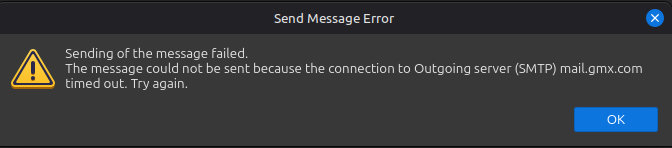
One more thing: when you attempt to send a message from internetlaw, do you get an error message? Please post a screenshot of that as well.
Again, thank you David.
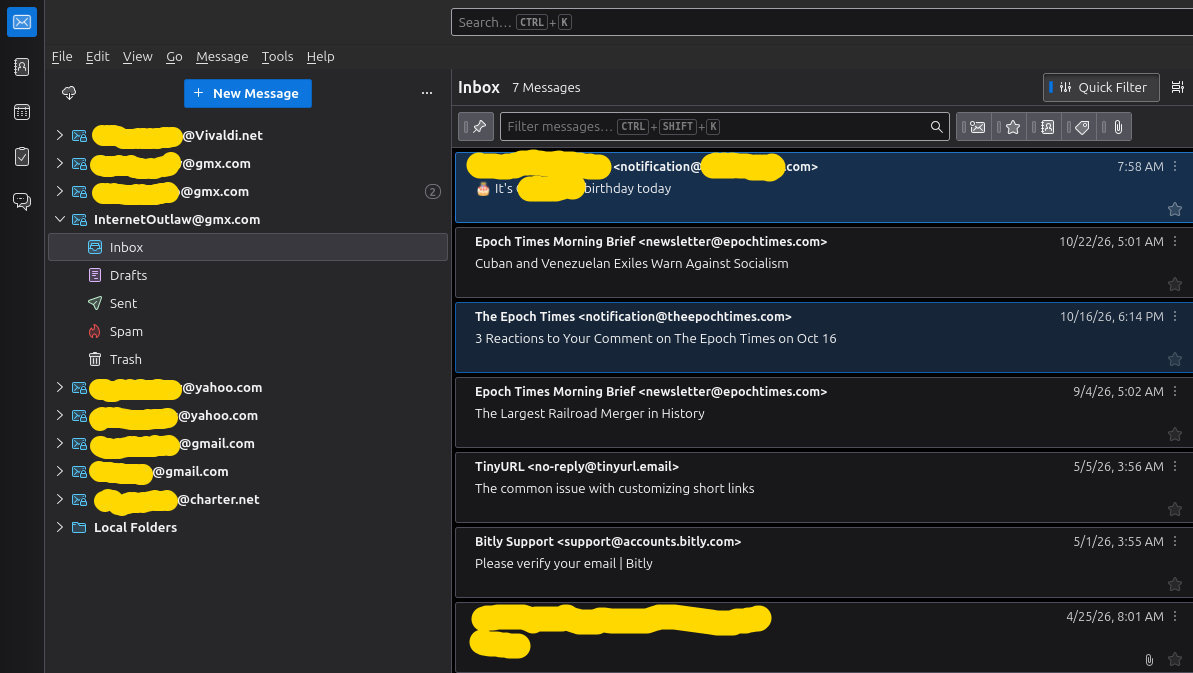
Screenshots as requested.
FYI, since yesterday, instead of 'Sending of message failed', now receiving 'timed out' message' which I consider an improvement.
I strongly suspect the problem is by something almost insignificant, something very simple being overlooked as Thunderbird has been around a long time and always works, and GMX is no back room mail service maintained by hobbyists or enthusiasts. Everything I have ever used made in Germany has always worked.
DesertOutlaw کی جانب سے میں ترمیمکی گئ
I am still puzzled. One of your screenshots (attached) has an SMTP server for internetoutlaw second from top, yet you state the bottom one is incorrect because it doesn't have the outlaw email address. Why should the default one be for the internetoutlaw account also? And, to get default issue out of the discussion, I suggest making one of the other non-gmx accounts the default while you experiment here. You showed info for one account with SMTP setting. Please do also for the others. I appreciate your patience here.
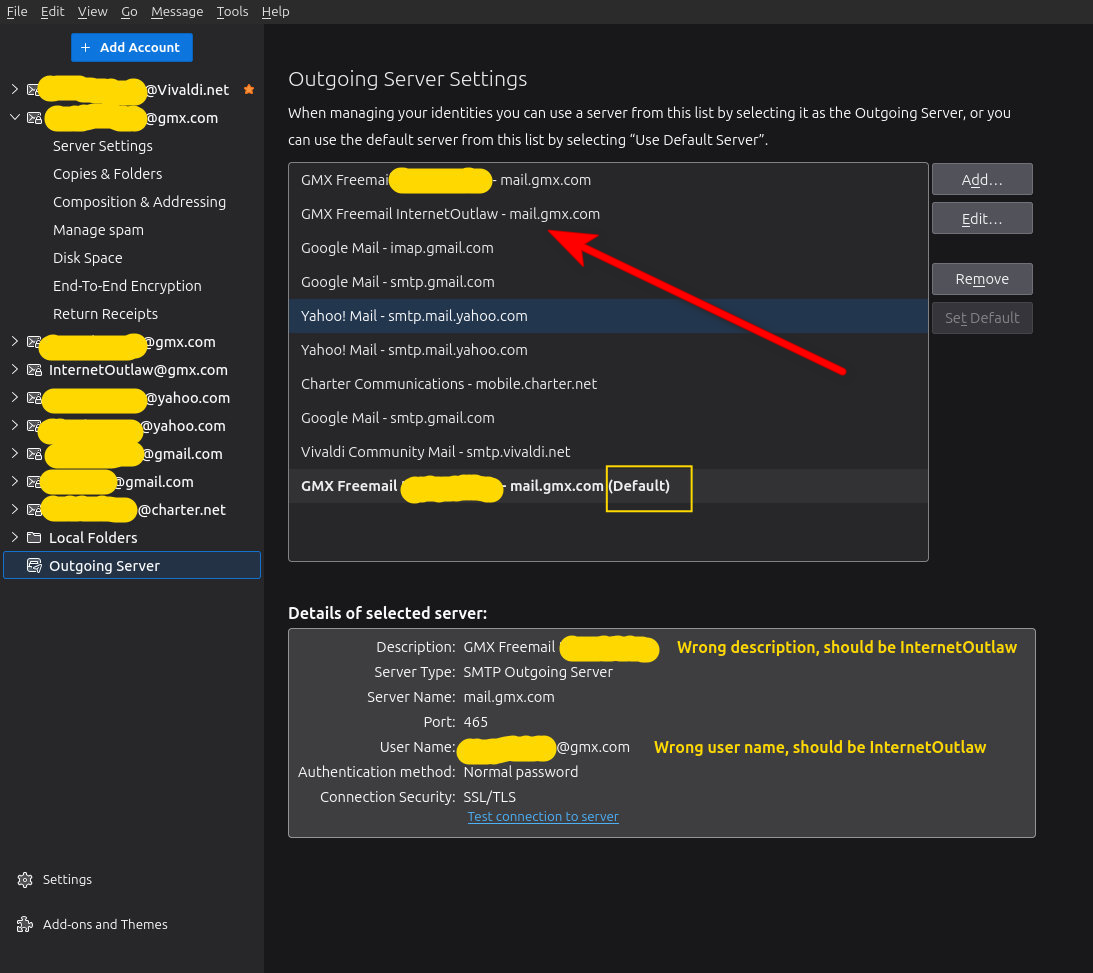
I can appreciate you being puzzled. It certainly has me confused.
I installed and made the Vivaldi email account my default yet the first GMX account remains identified as the default which does not make sense to me. As in the Highlander, "There can be only one".
Going to try moving all the messages to different folders, and delete all three GMX accounts from Thunderbird.
Then go to GMX online, and remove the 'Application-specific password' from each account.
Clean the machine via a trusty proven app and reboot machine.
Return to Thunderbird and add each account with its normal passwords. If an 'Application-specific password' is needed, can always go back online and create an 'ASP' from each account.
Although this issue is occupying your time, I appreciate your patience, insight, and suggestions.
Something is just not right.
Have never had any issues with an email provider in the past with Thunderbird. Why I believe its more a GMX issue.
I still believe its something small being overlooked.
have you trie changing the vivaldi server to default?
Yes. When I installed the Vivaldi email account, I made it my default. However, per Thunderbird I have two default account; the Vivaldi, and a GMX account.
Simply does not make any sense.
Perhaps GMX will get back to some time in 2028 LOL!
Just an experiment, not any sort of solution. Flatpak have been exceedingly troubled with permissions and other issues related to the sandbox it imposes.
Try installing Thunderbird from another source that is not in a sandbox like the Thunderbird.net site and install the tarball offered there just see if your current issue still applies with the different build and runtime environment. Certainly I see none of the issues you mention using GMX, nor do I have issues with the need for an application password, but I am on windows and do not use a VPN.
Hi Matt.
Uninstalled all 3 email accounts,
confirmed all passwords and settings for all three accounts were gone,
removed application-specific passwords from each account online,
uninstalled Thunderbird,
ran system cleaner,
rebooted machine,
reinstalled Thunderbird, (from the Internet)
added third gmx account,
did not recognize server,
performed manual setup,
account created but outgoing server automatically set as Default although Vivaldi email still set as default which I believe is a GMX function as I doubt Thunderbird cares otherwise it would have done the same for yahoo, gmail and Vivaldi.
Could not access or send email.
Uninstalled, cleaned, etc and reinstalled using Thunderbird from Software Manager.
Going to remove account and add all three gmx accounts using new Application-specific password created by each account on line.
BTW, gmx cannot always be reached when using the Vivaldi browser, Its a crapshoot as its not consistently accessible the majority of the time and strictly a GMX issue. Therefore, another browser such as Brave or LibreWolf must be used)
Regardless, hopefully I will be able to pull down messages again and just have to go online to send messages.
Will just have to live with being unable to send messages using GMX with Thinderbird on Linux Mint for the time being. In the meanwhile, will search for another pop3 email provider; email providers NOT managed and/or controlled by Google are becoming difficult to find.
GMX still has not responded other than automatic replies so I doubt they ever will. However, they did have time to change the layout of accounts online along with changing configurations settings, which do not match Thunderbird suggestions.
Also, if an installation is performed by downloading Thunderbird for Linux from the Internet rather than using the Thunderbird within Software Manage, there are even more issues.
Considering this matter closed. GMX is just not compatible with Thunderbird on Linux Mint when using more than one gmx account.
As I stated, GMX use to be a great email provider.
Well, I don't all the ins and outs, but I still think you have configuration issue. I have linux mint and my gmx account works fine. All I can guess (and it's just a guess) is that something may be interfering, Good luck
I believe you are 100% correct David.
Decided to try one last time before calling it quits.
1) After reinstalling Thunderbird from Software Manager in Linux Mint.
entered name of the machine itself for the Default Identity in the 'Your Name:' field rather than the 1st part of the email address which I have done for years.
Then entered the email address in the email field into the Reply-to Address field.
The Outgoing Server name is automatically populated to 'GMX - mail.gmx.com (Default) and TB shows 'Normal' password is used, although I entered a new Application-specific password created by the account online when using the auto setup, which was saved by TB. Pretty easy, I simply used the 1st part of the email address to create a Application-specific password.
Outgoing server port is automatically set to 465 which is correct, NOT 587 as shown of the GMX web site.
Was able pull email down from gmx and send email.
2) Followed the same process for the other two gmx email addresses.
However, a 2nd outgoing server was automatically created for the 2nd email address, and a 3rd outgoing server was automatically created for the 3rd email address. Only the first email GMX address has 'Default' in the outgoing server.
If all three accounts work until Monday morning, will consider the matter resolved.
I would suggest the documentation by GMX be updated for GMX accounts used with Thunderbird on Linux Mint System as it can cause configurations errors, and GMX provides too good a service to have its reputation tarnished.
I am hoping for your success and look forward to an update after Monday. :)