


Windows 10 reached EOS (end of support) on October 14, 2025. If you are on Windows 10, see this article.

تلاش سپورٹ

Avoid support scams. We will never ask you to call or text a phone number or share personal information. Please report suspicious activity using the “Report Abuse” option.

مزید سیکھیں
Open

Folder names duplicated

TC

I had this issue some while back, then an update resolved it. Seems another update has brought it back.

Having just updated, still on ESR, I find that I now have 2 folders named "Spam", but in fact looking at the folder properties 1 is actually still "Junk".

The images explain it well.

As in the past, I'm unable to correctly rename the second Spam folder back to Junk.

It has to be the update that caused it (as previously).

When can I expect another update to resolve it?
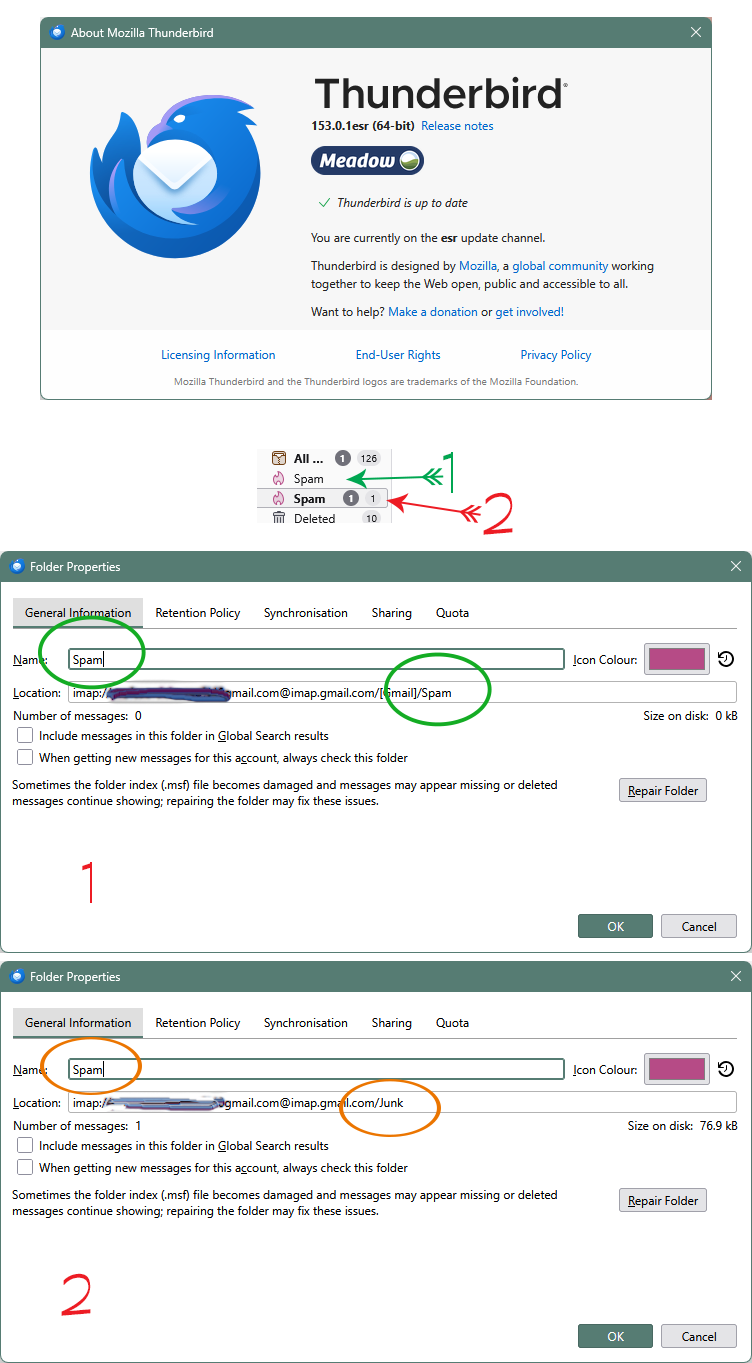
I had this issue some while back, then an update resolved it. Seems another update has brought it back. Having just updated, still on ESR, I find that I now have 2 folders named "Spam", but in fact looking at the folder properties 1 is actually still "Junk". The images explain it well. As in the past, I'm unable to correctly rename the second Spam folder back to Junk. It has to be the update that caused it (as previously). When can I expect another update to resolve it?
منسلک شدہ اسکرین شاٹٹس

تمام جوابات (1)

Today another update was offered. Thinking it may address the problem I'm now on Meadow 153.0.2esr, BUT the problem remains.

I would add here that this problem is apparent on both a desktop PC and a laptop, both having been similarly updated.

The common denominator being the update.

TC کی جانب سے میں ترمیمکی گئ

ایک سوال پوچھیں

You must log in to your account to reply to posts. Please start a new question, if you do not have an account yet.