

اس تھریڈ کو آرکائیوکیا گیا تھا۔
اگر آپ کو مدد کی ضرورت ہو تو براہ مہربانی نیا سوال پوچھیں۔

آرکائیو شدہ
Whatsapp Default App on Firefox

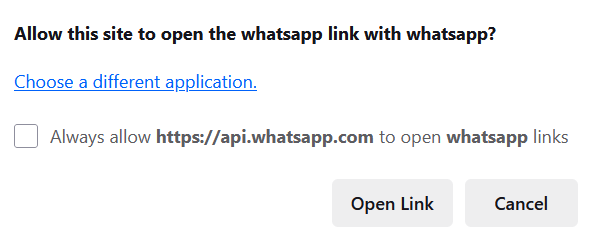
How to stop firefox from prompting me with this pop up (see attachment). I already removed the whatsapp app from firefox, it's still not working as it used to be which is to start whatsapp conversation directly in the web. It's annoying because the app is so easy to install but hard to remove. Firefox should do something about this.
How to stop firefox from prompting me with this pop up (see attachment).
I already removed the whatsapp app from firefox, it's still not working as it used to be which is to start whatsapp conversation directly in the web.
It's annoying because the app is so easy to install but hard to remove. Firefox should do something about this.
تمام جوابات (1)
Hi
You may need to contact the WhatsApp support team about removing their app from your computer.