

اس تھریڈ کو آرکائیوکیا گیا تھا۔
اگر آپ کو مدد کی ضرورت ہو تو براہ مہربانی نیا سوال پوچھیں۔

Solved
آرکائیو شدہ
The wordwrap of a new mail triggers on plugin bar Quicktext

Dear,
The wordwrapper that is used while writing a mail triggers on the Quicktext pluginbar.
In other words, When you have a lot of templates within the Quicktext plugin, the text will disappear from the screen when typing a long sentence.
This happens in version 115.0.0 or highter no issues in previous version: 102.9.1
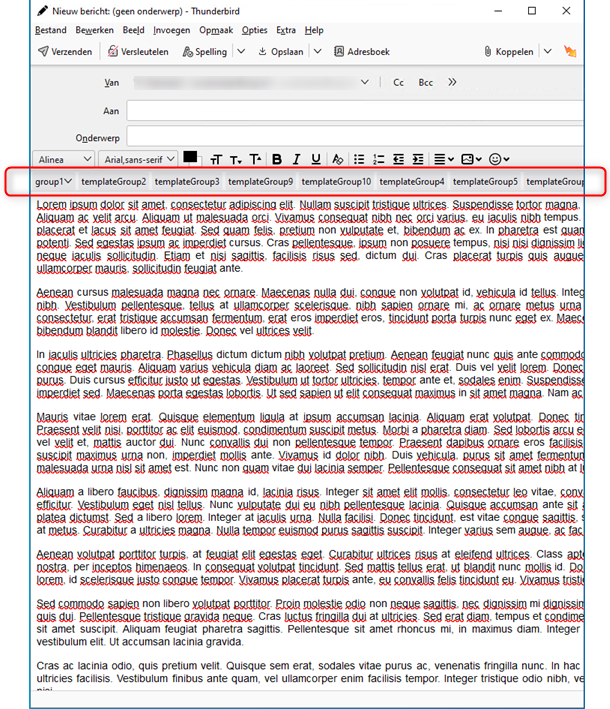
Img1: example with Quicktext You can see that the text disappears from the rightside of the screen
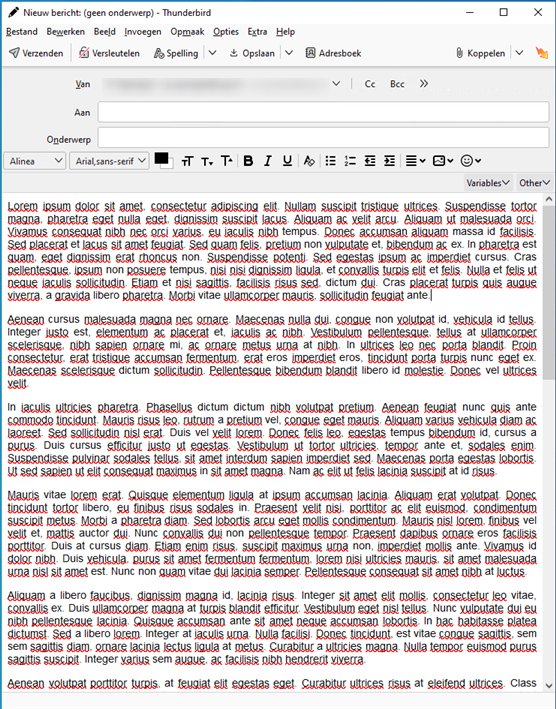
Img2: example without Quicktext The text gets wrapped as it should, the text jumps to the next line
Dear,
The wordwrapper that is used while writing a mail triggers on the Quicktext pluginbar.
In other words, When you have a lot of templates within the Quicktext plugin, the text will disappear from the screen when typing a long sentence.
This happens in version ''115.0.0'' or highter
no issues in previous version: ''102.9.1 ''
'''Img1: example with Quicktext'''
You can see that the text disappears from the rightside of the screen
'''Img2: example without Quicktext'''
The text gets wrapped as it should, the text jumps to the next line
p.nijmeijer کی جانب سے میں ترمیمکی گئ
تمام جوابات (2)
منتخب شدہ حل
I suggest you notify the Quicktext author of this.
The Quicktext author has fixed the problem