


Cannot open a secure site
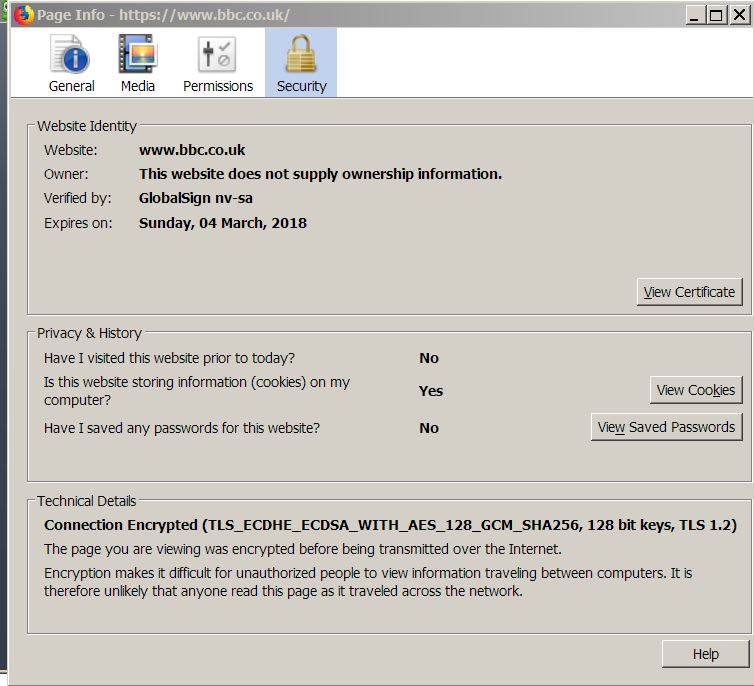
I use the BBC for news (https://www.bbc.co.uk/). Now after "upgrading?!" to V57 the site opens with only text, no images, no video. The lock is green, the Info icon shows the site as secure (see attached). How do I get this site to open normally?
منتخب شدہ حل
Hello,
The Refresh feature (called "Reset" in older Firefox versions) can fix many issues by restoring Firefox to its factory default state while saving your bookmarks, history, passwords, cookies, and other essential information.
Note: When you use this feature, you will lose any extensions, toolbar customizations, and some preferences. See the Refresh Firefox - reset add-ons and settings article for more information.
To Refresh Firefox:
- Open the Troubleshooting Information page using one of these methods:
- Click the menu button
 , click help
  and select Troubleshooting Information. A new tab containing your troubleshooting information should open.
- If you're unable to access the Help menu, type about:support in your address bar to bring up the Troubleshooting Information page.
- Click the menu button
- At the top right corner of the page, you should see a button that says "Refresh Firefox" ("Reset Firefox" in older Firefox versions). Click on it.
- Firefox will close. After the refresh process is completed, Firefox will show a window with the information that is imported.
- Click Finish and Firefox will reopen.
Did this fix the problem? Please report back to us!
Thank you.
اس جواب کو سیاق و سباق میں پڑھیں 👍 0تمام جوابات (1)
منتخب شدہ حل
Hello,
The Refresh feature (called "Reset" in older Firefox versions) can fix many issues by restoring Firefox to its factory default state while saving your bookmarks, history, passwords, cookies, and other essential information.
Note: When you use this feature, you will lose any extensions, toolbar customizations, and some preferences. See the Refresh Firefox - reset add-ons and settings article for more information.
To Refresh Firefox:
- Open the Troubleshooting Information page using one of these methods:
- Click the menu button , click help and select Troubleshooting Information. A new tab containing your troubleshooting information should open.
- If you're unable to access the Help menu, type about:support in your address bar to bring up the Troubleshooting Information page.
- Click the menu button
- At the top right corner of the page, you should see a button that says "Refresh Firefox" ("Reset Firefox" in older Firefox versions). Click on it.
- Firefox will close. After the refresh process is completed, Firefox will show a window with the information that is imported.
- Click Finish and Firefox will reopen.
Did this fix the problem? Please report back to us!
Thank you.