اس تھریڈ کو آرکائیوکیا گیا تھا۔
اگر آپ کو مدد کی ضرورت ہو تو براہ مہربانی نیا سوال پوچھیں۔

آرکائیو شدہ
Updated to Firefox 44.0 now web font rawengulksans will not display

I have rawengulksans font installed as a font on my website, since the automatic update to 44.0 this font is no longer displayed. I have rolled back to a earlier verison of firefox and the font works fine. I have also tested the webpage on IE, Chrome & Safari these browzers also display the font with no issue.
@font-face {
   font-family: 'rawengulksansregular';
   src: url('../fonts/rawengulksans-094-webfont.eot');
   src: url('../fonts/rawengulksans-094-webfont.eot?#iefix') format('embedded-opentype'),
        url('../fonts/rawengulksans-094-webfont.woff2') format('woff2'),
        url('../fonts/rawengulksans-094-webfont.woff') format('woff'),
        url('../fonts/rawengulksans-094-webfont.ttf') format('truetype'),
        url('../fonts/rawengulksans-094-webfont.svg#rawengulksansregular') format('svg');
   font-weight: normal;
   font-style: normal;
}
I have rawengulksans font installed as a font on my website, since the automatic update to 44.0 this font is no longer displayed. I have rolled back to a earlier verison of firefox and the font works fine. I have also tested the webpage on IE, Chrome & Safari these browzers also display the font with no issue.
@font-face {
font-family: 'rawengulksansregular';
src: url('../fonts/rawengulksans-094-webfont.eot');
src: url('../fonts/rawengulksans-094-webfont.eot?#iefix') format('embedded-opentype'),
url('../fonts/rawengulksans-094-webfont.woff2') format('woff2'),
url('../fonts/rawengulksans-094-webfont.woff') format('woff'),
url('../fonts/rawengulksans-094-webfont.ttf') format('truetype'),
url('../fonts/rawengulksans-094-webfont.svg#rawengulksansregular') format('svg');
font-weight: normal;
font-style: normal;
}
تمام جوابات (1)
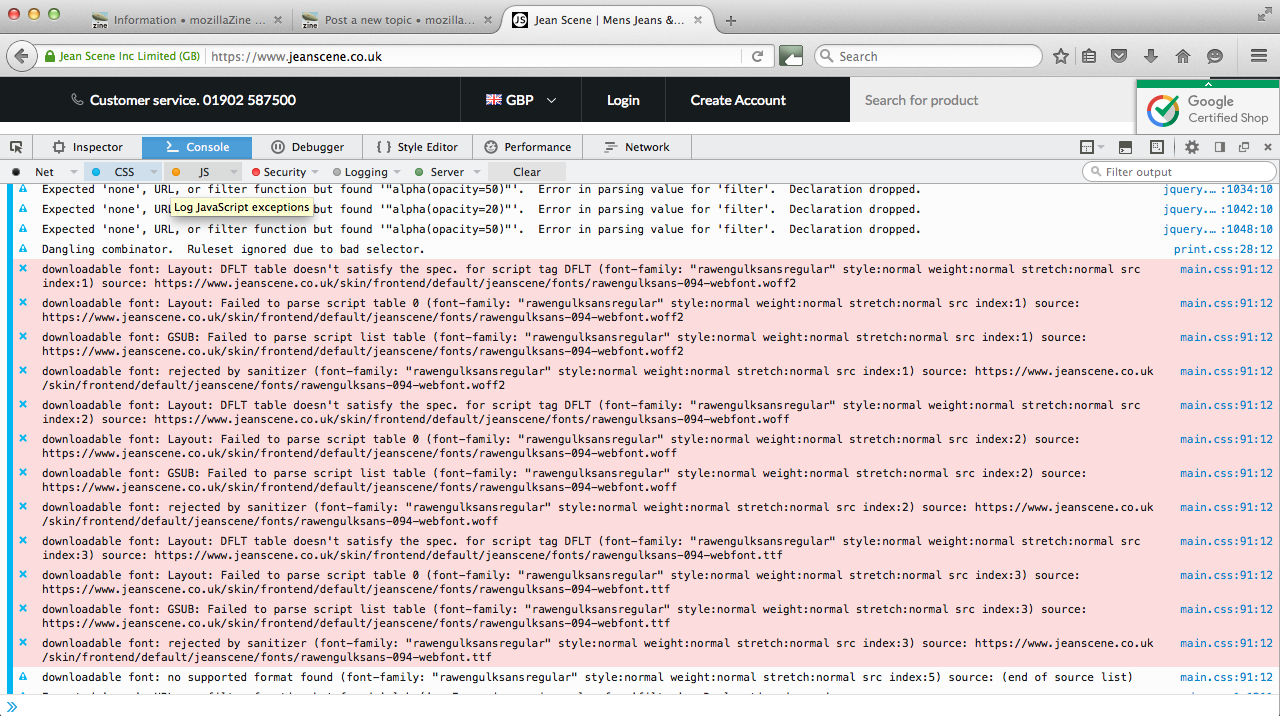
Please see attached image.