Windows 10 reached EOS (end of support) on October 14, 2025. If you are on Windows 10, see this article.

تلاش سپورٹ

Avoid support scams. We will never ask you to call or text a phone number or share personal information. Please report suspicious activity using the “Report Abuse” option.

مزید سیکھیں
Solved آرکائیو شدہ

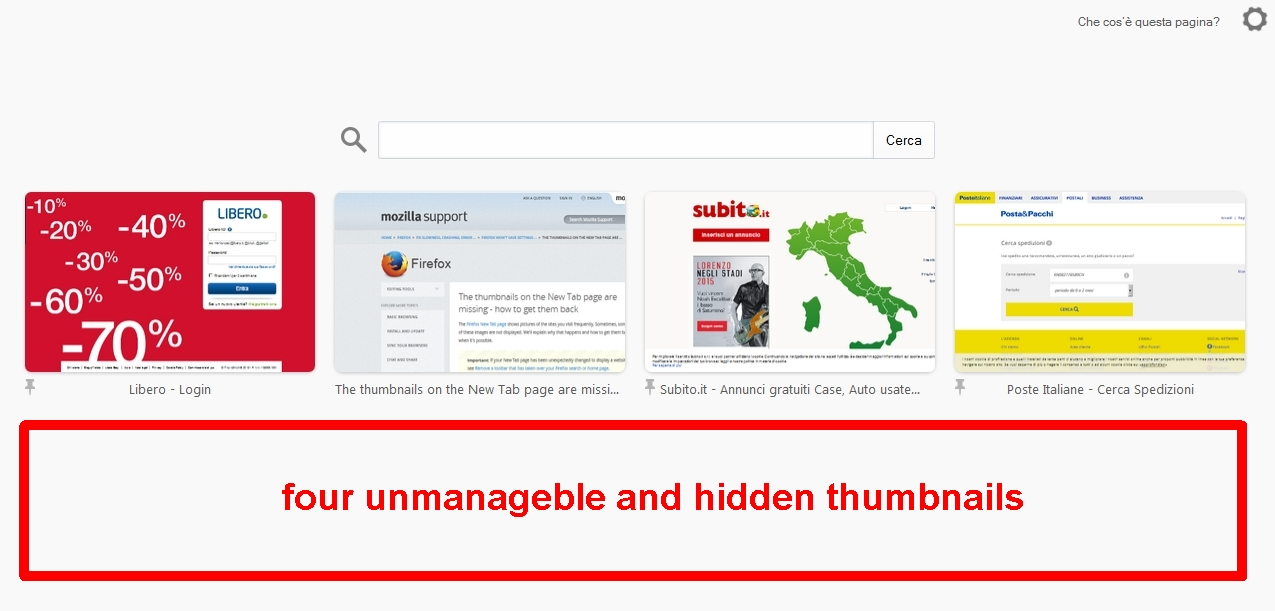
half new tab (thumbnails missing over different profiles)

nicolami replied
nicolami

about https://support.mozilla.org/en-US/kb/thumbnails-new-tab-page-missing-how-get-them-back

I follwed the procedure but, unfortunately, I didn't wait for the end reload page, and now I see the upper half page visible and the lower half page hidden, without frames/thumbnails visible. However, dragging the thumbnails I can see all of them 8 and I can also move them, but when released the dragging, the lower 4 frames/thumbnails again become hidden. the profile is new, I restored bookmarks and othere .json from last profile with the same issue. where am I wrong? how to resolve the problem? thanks.

about https://support.mozilla.org/en-US/kb/thumbnails-new-tab-page-missing-how-get-them-back I follwed the procedure but, unfortunately, I didn't wait for the end reload page, and now I see the upper half page visible and the lower half page hidden, without frames/thumbnails visible. However, dragging the thumbnails I can see all of them 8 and I can also move them, but when released the dragging, the lower 4 frames/thumbnails again become hidden. the profile is new, I restored bookmarks and othere .json from last profile with the same issue. where am I wrong? how to resolve the problem? thanks.

تمام جوابات (2)

منتخب شدہ حل

I resolved it. it was a simple issue of magnifier, zoom, CTRL+ CTRL-