


Thunderbird has lost all coonnections to sending mail. How to fix?

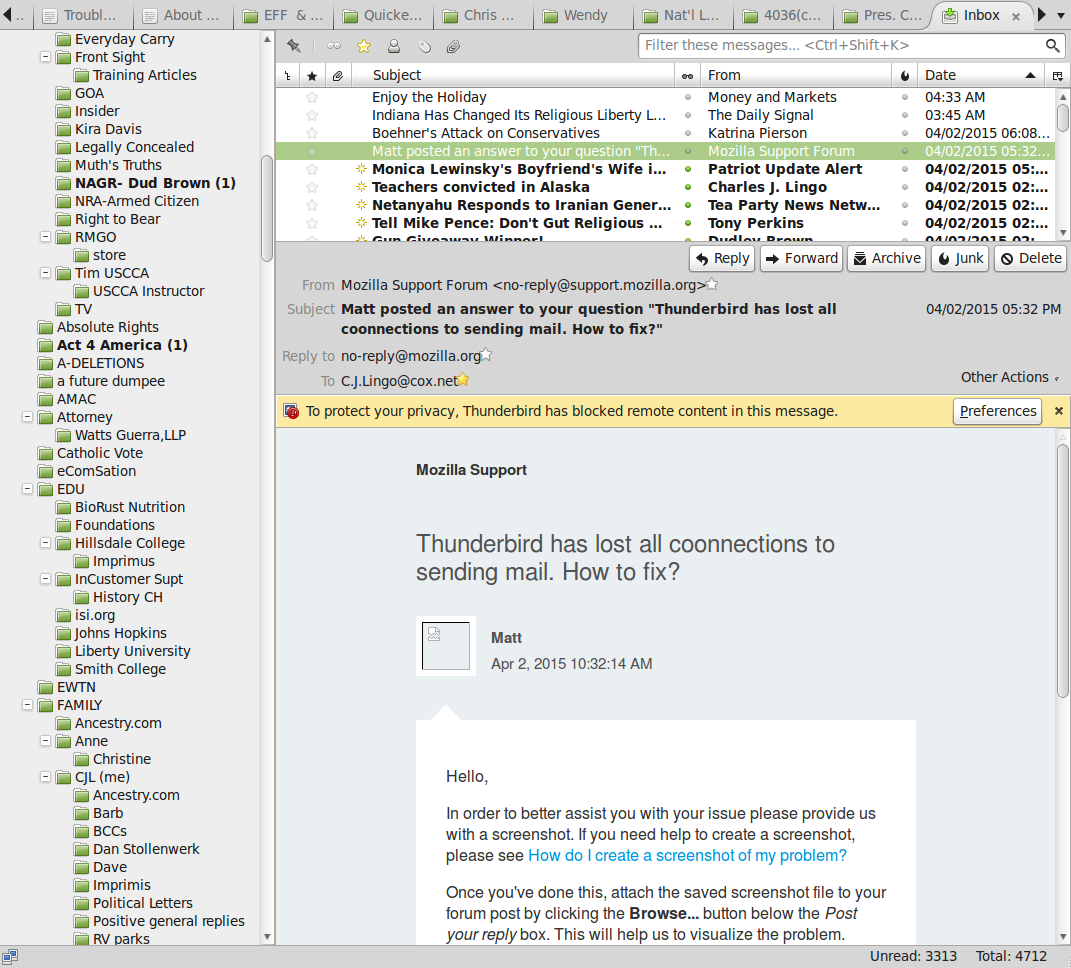
Thunderbird shows only the INBOX and messages, but it does not have the SEND Mail button displayed nor any of the other parts of the prviously displayed application.
Essentially I have no email sending capability.
Is there a fix? It appears that I can still receive email as my most recent email in the INBOX is dated at 11:32AM this morning.
منتخب شدہ حل
You don't have a toolbar.
<alt> + v + Toolbars and check the relevant toolbar options.
Or maybe [≡]|{hover over Preferences}, but I'm not too confident as the layout may vary between platforms, and I'm using Linux here.
اس جواب کو سیاق و سباق میں پڑھیں 👍 1تمام جوابات (3)
Hello,
In order to better assist you with your issue please provide us with a screenshot. If you need help to create a screenshot, please see How do I create a screenshot of my problem?
Once you've done this, attach the saved screenshot file to your forum post by clicking the Browse... button below the Post your reply box. This will help us to visualize the problem.
Thank you!
It appears that I do not ask enough questions. If I did, I might b able to follow matt's instructions on sending ascreenshot back to him . Here it is:
منتخب شدہ حل
You don't have a toolbar.
<alt> + v + Toolbars and check the relevant toolbar options.
Or maybe [≡]|{hover over Preferences}, but I'm not too confident as the layout may vary between platforms, and I'm using Linux here.