FROM line does not copy correctly when address in < > brackets is different: NAME@com <group@yahoo.groups>

FROM line does not copy correctly when the address within the < > brackets is different from the actual address.
This is what email from group users looks like:
NAME@com <groupName@yahoo.groups>
But when I COPY this, or copy it to the address book, all that TBird copies is the portion within the brackets < > -- which is incorrect.
تمام جوابات (3)
What Thunderbird does is correct, what yahoo and the others have done to email list is rubbish and this is some of the blow by that stupid decision has caused. Complain to the group owner be it yahoo goggle or live.
And email address has two parts, a display name and that address the part in < > is the address the part outside that is the display name. Thunderbird can not know that yahoo have decided they are going to fight spam by ignoring long standing practice and the RFCs, although mailing list really have no rules, only conventions.
Obviously what TB is doing is NOT correct - I want to copy the line as PLAIN EFFING TEXT and I should be able to copy every ASCII character on that line.
Never had this problem with Eudora. And I was using it up until a few weeks ago when Verizon broke it for me.
Also I cannot delete "tables" from FORWARDED emails. I can only delete the CONTENTS.
How can I tell TB to "copy" an email as TEXT -- whether that copy is to become a forward or a paste into a word processor?
Obviously what TB is doing is NOT correct - I want to copy the line as PLAIN EFFING TEXT and I should be able to copy every ASCII character on that line.Well as you have observed you can not copy every every ASCII character on that line.
Because you can not does not make what Thunderbird is doing wrong.
Never had this problem with Eudora. And I was using it up until a few weeks ago when Verizon broke it for me.
Not relevant, Eudora is a product which is no longer supported, or I assume you would still be using it. Thunderbird is not Eudora.
Also I cannot delete "tables" from FORWARDED emails. I can only delete the CONTENTS.
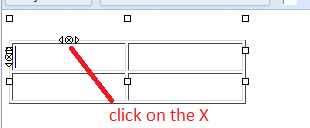
click on the X in the table see below repeated click will get rid of all of it, or use the menu Format > table > Delete > table
How can I tell TB to "copy" an email as TEXT -- whether that copy is to become a forward or a paste into a word processor?
It is copying the email, it is not copying the display name which because of the yahoos decision now contains the email address of the sender as well as their name. But that is and never has been an email address. It is a display name.
What you could do is add the userpreference using the config editor mailnews.headers.extraExpandedHeaders
I Have X-Sender list-post list-id list-help list-archive list-subscribe list-unsubscribe
But it is X-Sender that I just added and that adds the header field used by Yahoo for the senders email to the header information so you can select it and copy it to your hearts content. I can not get it to highlight like the others as yet. but you can highlight and copy.