Windows 10 reached EOS (end of support) on October 14, 2025. If you are on Windows 10, see this article.

Avatar for Username

Шукати в статтях підтримки

Остерігайтеся нападів зловмисників. Mozilla ніколи не просить вас зателефонувати, надіслати номер телефону у повідомленні або поділитися з кимось особистими даними. Будь ласка, повідомте про підозрілі дії за допомогою меню “Повідомити про зловживання”

Докладніше
Ця тема перенесена в архів. Якщо вам потрібна допомога, запитайте.
Архівовано

Problem: Bookmark sync only works in one direction

larienna

I have 2 computer, computer A has vista and computer B is a netbook with XP. The problem is that the bookmark sycn only works in one direction.

For example: both my computer has the same book marks (previously sync with X-mark which is now disabled). I decided to do some clean up on computer B. If Y sync computer A, nothing happens, but when I sync computer B, all the cleanup I made has been undone since computer A override all the changes I made to B.

In other words, the changes I made to B can never be applied to A.

I have 2 computer, computer A has vista and computer B is a netbook with XP. The problem is that the bookmark sycn only works in one direction. For example: both my computer has the same book marks (previously sync with X-mark which is now disabled). I decided to do some clean up on computer B. If Y sync computer A, nothing happens, but when I sync computer B, all the cleanup I made has been undone since computer A override all the changes I made to B. In other words, the changes I made to B can never be applied to A.

Усі відповіді (1)

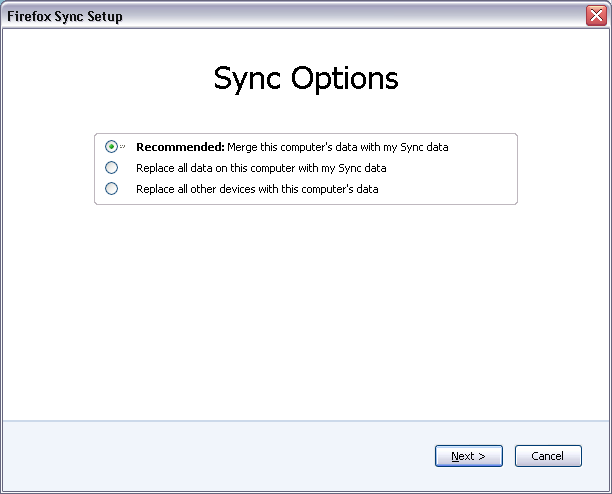
When you're doing a "clean-up" like that you need to use Reset Sync in Tools > Options > Sync - Current Account = Manage Account and use the Replace all other devices with this computer's data option. See the attached screenshot - use the third option.