how can I increase the font size of bookmarks toolbar?

how can I increase the font size of bookmark toolbars?
Усі відповіді (5)
It can not be done!
You can increase the String pref layout.css.devPixelsPerPx from 1.0 to 2.0 in 0.1 steps to see what works best.
In Firefox 3.6 and later this pref is a String value parsed to a float and allows to fine tune the dimensions of all elements more precisely.
To open the about:config page, type about:config in the location (address) bar and press the "Enter" key, just like you type the url of a website to open a website.
If you see a warning then you can confirm that you want to access that page.
Thanks for the quick response. That setting on my machine is -1. When I change that setting it increases the font size of the TABS. What I need to do is increase the font size of the Bookmarks Toolbar. Any thoughts on that? Thanks!!
Download and install this Firefox add-on. Works great. https://addons.mozilla.org/en-us/firefox/addon/theme-font-size-changer/
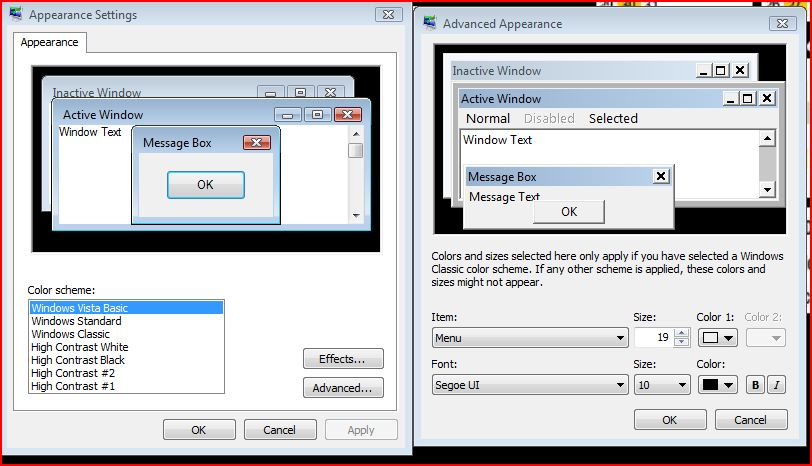
The font and size of text is linked to the windows appearance settings. See attached picture for Vista settings