


Mozilla VPN Release 2.40.0 - Bad Image Error

Hello Community and/or Support,
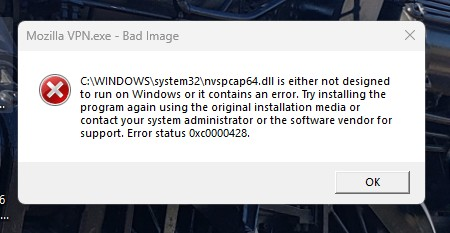
After installing the latest "Mozilla VPN Release 2.40.0" upon Windows 11 Version 26H2 OS Build 26300.9711, I received the follow error message 3 to 4 times in a row. after acknowledging the error (pressed "OK").
(See attached image) Mozilla VPN.exe - Bad Image is either not designed to run on Windows or It contains an error. Try installing the program again using the original installation media or contact your system administrator or the software vendor for support. Error status OxcOOON28.
Prior to installation, I just booted my computer and observed that my VPN App needed to be updated. I did not open any other app or perform any other work.
The VPN update informed me that it needed to close my current VPN connection to continue with the installation Update, which I allowed the update to manage.
In my troubleshooting efforts, reviewing other forums, and ask Google Gemini, I have performed the following. 1). Rebooted the computer after install. (Same Error Message) 2). Uninstall and reinstall Mozilla VPN. (Same Error Message) 3). Updated my NVIDIA GeForce GTX 1660 Ti driver to the latest release. (Same Error Message) 4). Ran "sfc /scannow" as administrator within the Command Prompt (Same Error Message). 5). Ran "dissm /online /cleanup-image /restorehealth" (Same Error Message).
Is there a method to correct the "Bad Image" error from popping up after restarting my computer? Also, would someone be so kind to inform the Mozilla VPN software team of this error?
Thank you all for your time!
Усі відповіді (2)
Hi, Mozilla VPN is one of Mozilla's premium products. In order to get premium support from a dedicated agent, please submit your question with your Mozilla VPN app by going to Settings > Help > Contact Support. Alternatively, you can sign in to the Mozilla account connected to your subscription here (if not already) and then use this link.
The Mozilla VPN form link can also be found at top at Ask a Question > Mozilla VPN. Just make sure the Mozilla Account you use has the Mozilla VPN subscription so you can post there.
Thank you, James. I was able to submit the issue via the Mozilla VPN App.
I appreciate your feedback.