


How do I pin an add-on/extension to the toolbar?

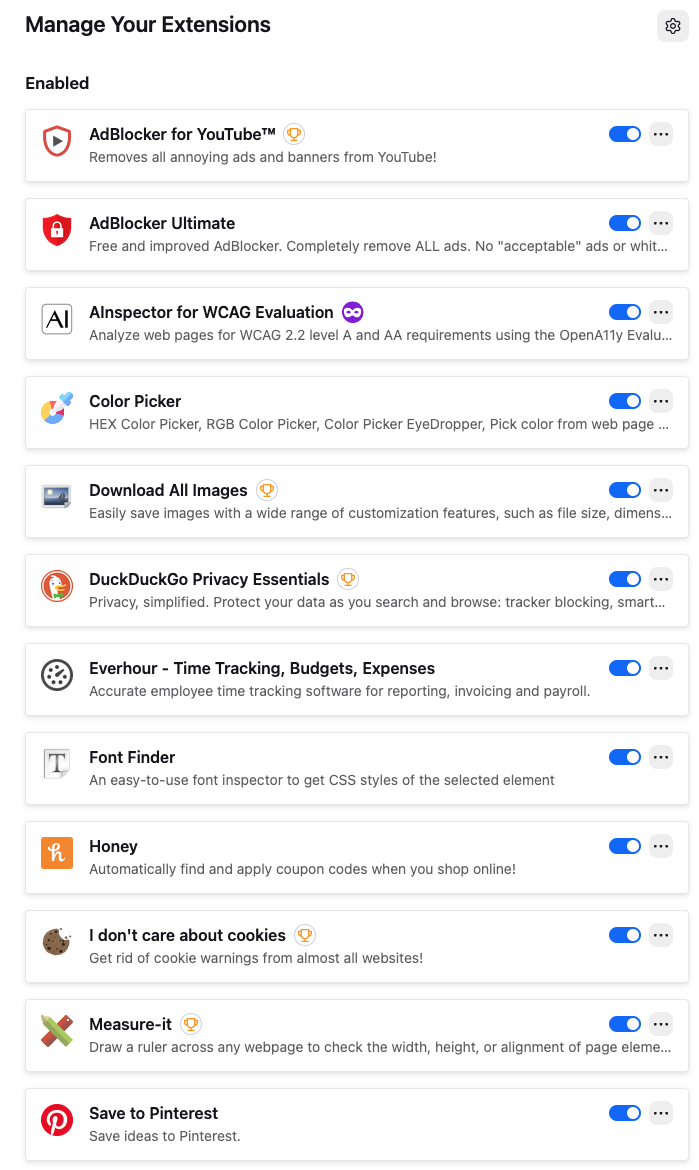
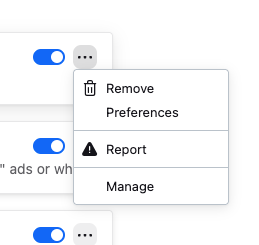
I can no longer pin extensions/add-ons to the toolbar. My interface does not look like the one in the help section. I don't see a gear, I see three dots. And when I click on the three dots I don't have the option to pin to toolbar.
I am using Firefox 147.0.4 on Mac OS 26.3 Tahoe.
I can no longer pin extensions/add-ons to the toolbar. My interface does not look like the one in the help section. I don't see a gear, I see three dots. And when I click on the three dots I don't have the option to pin to toolbar.
I am using Firefox 147.0.4 on Mac OS 26.3 Tahoe.
Усі відповіді (3)
Yes, that gives me the gear and the pin option! I must have clicked on the wrong puzzle piece and went to the Add-ons Manager page.

Hi! You’re not imagining it — Firefox changed how toolbar pinning works. The three-dot menu doesn’t show “Pin to toolbar” anymore. Open Customize Toolbar and drag your extensions manually onto the toolbar.