

Ця тема перенесена в архів.
Якщо вам потрібна допомога, запитайте.

Архівовано
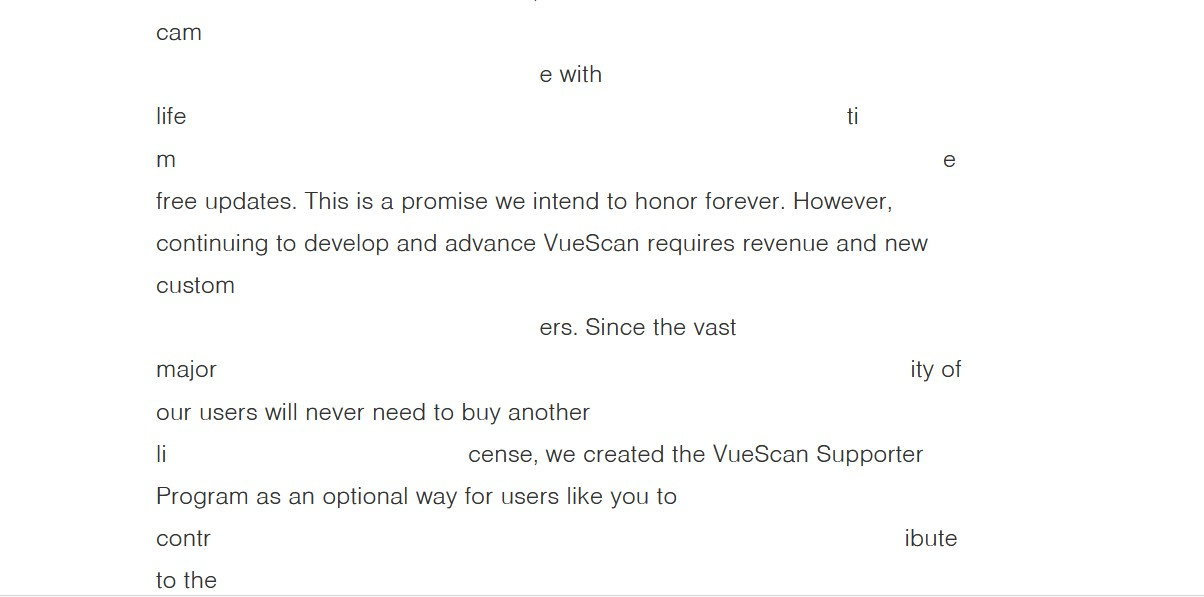
wonky text incoming messages

Some email messages have wonky text - how to fix this in Thunderbird?
Same question for how to fix in Firefox.
See attached screen shot.
Thanks
Some email messages have wonky text - how to fix this in Thunderbird?
Same question for how to fix in Firefox.
See attached screen shot.
Thanks
Усі відповіді (1)

Try turning off hardware acceleration.
For TB:
- go to TB Menu > Settings and enter 'hardware' (no quotes) in the search box
- uncheck 'Use hardware acceleration when available'
- close the tab and restart TB
For FF:
Try turning off hardware acceleration:
Go to FF Menu > Settings and enter 'hardware' (no quotes) in the search box
- uncheck 'Use recommended performance settings'
- uncheck 'Use hardware acceleration when available'
- close the tab and restart FF