


Windows 10 reached EOS (end of support) on October 14, 2025. If you are on Windows 10, see this article.

Шукати в статтях підтримки

Остерігайтеся нападів зловмисників. Mozilla ніколи не просить вас зателефонувати, надіслати номер телефону у повідомленні або поділитися з кимось особистими даними. Будь ласка, повідомте про підозрілі дії за допомогою меню “Повідомити про зловживання”

Докладніше
Ця тема перенесена в архів. Якщо вам потрібна допомога, запитайте.
Вирішено Архівовано

v144.0.1 - how to fix: calendar goes off screen to the right

sfhowes replied
major4579

How can I set the calendar to completely show on the screen - currently in Full Screen mode half of Sunday is off the screen, including the settings icon next to Day/Week/Multiweek/Month. My monitor is a 19" diagonal 4:3 - not a widescreen 16:9. For what it's worth the mail screen displays fine

Thanks, Marc
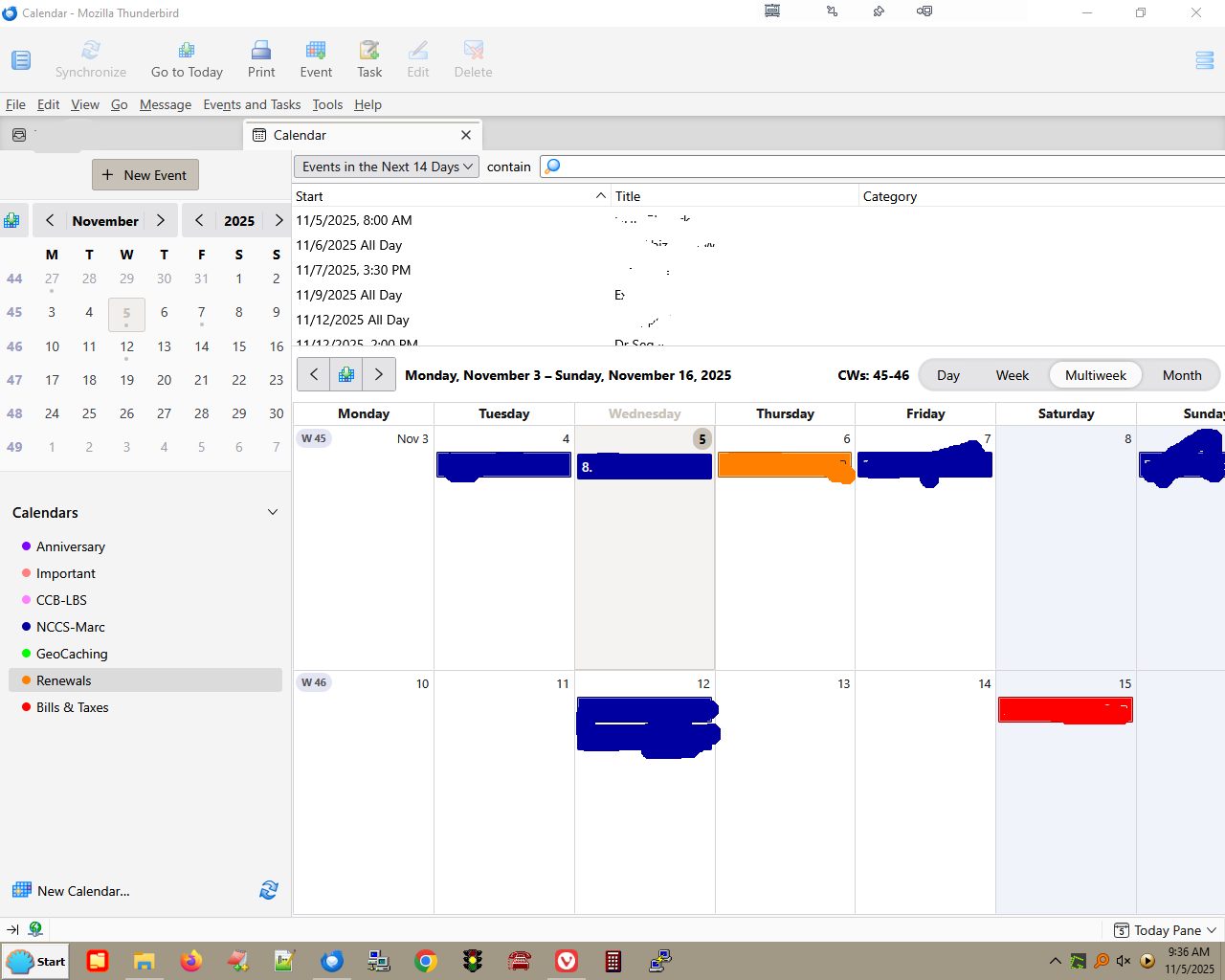
How can I set the calendar to completely show on the screen - currently in Full Screen mode half of Sunday is off the screen, including the settings icon next to Day/Week/Multiweek/Month. My monitor is a 19" diagonal 4:3 - not a widescreen 16:9. For what it's worth the mail screen displays fine Thanks, Marc
Вкладені знімки екрана

Змінено major4579

Читати цю відповідь у контексті

Вибране рішення

Possibly a broken layout. Launch again in safe mode, check 'reset toolbars...', and 'make changes and restart'.

https://kb.mozillazine.org/Safe_Mode#Safe_Mode_options

Усі відповіді (3)

Does it look correct in safe/troubleshoot mode (hold Shift when launching TB)?

When I started TB in troubleshooting mode, I did NOT check "Disable all add-ons" or "Reset toolbars and controls". Yes it looked correct in this mode - what does that mean? Thanks

Вибране рішення

Possibly a broken layout. Launch again in safe mode, check 'reset toolbars...', and 'make changes and restart'.

https://kb.mozillazine.org/Safe_Mode#Safe_Mode_options