

Ця тема перенесена в архів.
Якщо вам потрібна допомога, запитайте.

Архівовано
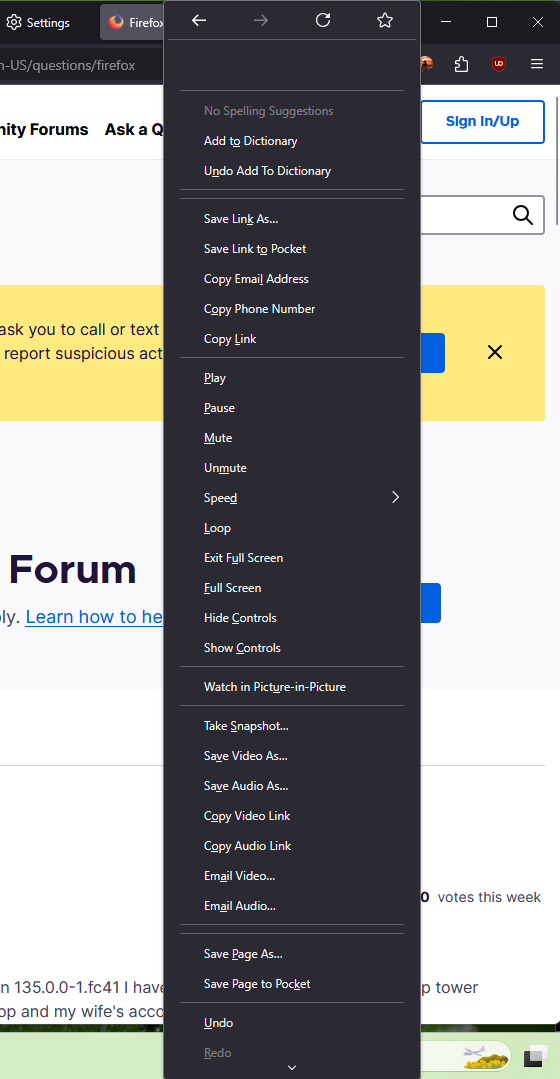
Messed up context menu?
Why does my context menu show everything in the world? How can I change this back? did this come with an update? most of these options don't work, even the simple "save image as" function
Why does my context menu show everything in the world? How can I change this back? did this come with an update? most of these options don't work, even the simple "save image as" function
Усі відповіді (3)
Try to delete search.json.mozlz4 file from your profile (with closed Firefox).

search.json.mozlz4
how do you edit the profile to delete that?
The suggestion I've seen that would be simpler to try first is:
- Open the Troubleshooting Information page
- Restart Firefox using the "Clear startup cache..." button on the right side
More information on that page: Use the Troubleshooting Information page to help fix Firefox issues